No operating system - no matter how good - comes with a complete set of every piece of software you're likely to want. There are always cases where an end-user needs to add additional software to meet specific needs. Corporate servers need business software; developers may want to live on the bleeding edge.
I used to maintain a lot of stuff myself. But this has become harder and harder over time, as build systems become more complex and less intelligent, and dependencies becore more entwined and harder to resolve.
One place I now use to keep stuff up to date - and to try software out easily without having to invest the effort in building the whole dependency tree from scratch myself - is Blastwave.
It's very use. Install pkg-get and go install. It grabs the software you want and installs it and any dependencies you need. All simple and painless.
Of course, what it also shows you is how bad this dependency tracking gets. I wanted to try out a couple of pieces of software this afternoon - dia and enlightenment as it happens - and off it went, installing package after package. It's a lot easier than doing it myself, but complexity is on the rise and I'm not sure how close we are to total meltdown.
Wednesday, April 12, 2006

Install investigations
There's been a reaonable amount of discussion recently regarding Solaris installation speed. Indeed, there's even some idea of what the problem is.
However, closer investigation reveals that rewriting the contents file isn't the limiting factor in a Solaris install. It's not even in the top 3, which are:
Currently, the contents file rewrite is having a race with the pkg tools overhead for 4th place.
Why this disconnect between the obvious problem - and it is a problem - of rewriting this large file many times and its relatively minor importance to Solaris install times? After all, for a slightly trimmed full install Solaris itself accounts for 3.5G of writes, and rewriting the contents file is twice that.
The point is, though, that rewriting the contents file involves a small number of large writes, which are quick. Solaris itself is many small files, so it generates something like 100 times the number of I/O operations.
Not only that, but it's possible to tweak the package installation order to minimize the amount of rewritten data. Simply install all the small packages early and leave the big packages that bloat the contents file until last. Doing so could - in principle - reduce the contents file rewrites by an order of magnitude.
This affects zone installs as well. For zone install, the uncompress cost doesn't exist at all. And for a sparse root zone, there's no Solaris to write to disk - it's loopback mounted from the global zone. So the contents file is much more important as a limiting factor for zone creation performance. However, I've managed to halve the contents file rewrites by tweaking the package installation order. I've not got that much control over the installation order, as it seems to depend on both dependency calculations and the order that opendir() goes through /var/sadm/pkg, but even then a gain of a factor 2 was fairly easy.
This isn't to say that the management of the contents file isn't an interesting and important subject that can lead to some benefits, but the relative importance of it in install performance can easily be substantially overstated. There's other low-hanging fruit to have a go at!
However, closer investigation reveals that rewriting the contents file isn't the limiting factor in a Solaris install. It's not even in the top 3, which are:
- The time taken to uncompress the data (they're bzip2 compressed)
- The time taken write Solaris to the disk
- The SMF manifest import on first boot
Currently, the contents file rewrite is having a race with the pkg tools overhead for 4th place.
Why this disconnect between the obvious problem - and it is a problem - of rewriting this large file many times and its relatively minor importance to Solaris install times? After all, for a slightly trimmed full install Solaris itself accounts for 3.5G of writes, and rewriting the contents file is twice that.
The point is, though, that rewriting the contents file involves a small number of large writes, which are quick. Solaris itself is many small files, so it generates something like 100 times the number of I/O operations.
Not only that, but it's possible to tweak the package installation order to minimize the amount of rewritten data. Simply install all the small packages early and leave the big packages that bloat the contents file until last. Doing so could - in principle - reduce the contents file rewrites by an order of magnitude.
This affects zone installs as well. For zone install, the uncompress cost doesn't exist at all. And for a sparse root zone, there's no Solaris to write to disk - it's loopback mounted from the global zone. So the contents file is much more important as a limiting factor for zone creation performance. However, I've managed to halve the contents file rewrites by tweaking the package installation order. I've not got that much control over the installation order, as it seems to depend on both dependency calculations and the order that opendir() goes through /var/sadm/pkg, but even then a gain of a factor 2 was fairly easy.
This isn't to say that the management of the contents file isn't an interesting and important subject that can lead to some benefits, but the relative importance of it in install performance can easily be substantially overstated. There's other low-hanging fruit to have a go at!
Monday, April 10, 2006
./configure is evil
For years I've used emacs as my editor.I don't want to get into religious wars here - if you want to use vi, then that's fine too. I happen to like emacs because I started out with EDT and TPU under VMS, and when I moved off the VAX I had to find an alternative - and I was able to make emacs play ball pretty easily.
I don't use an IDE, or indeed any custom authoring tools for that matter. I write web pages in emacs, as plain HTML.
Si I was glad to find out that I'm not entirely alone. Bill Rushmore just wrote about Emacs as a Java IDE. Spurred on by this, I thought about upgrading the version of emacs that I use.
I've been stuck on GNU emacs, version 19, for a very long time. The reason I haven't upgraded to later version is that they're too darn slow. (The same goes for XEmacs.) Which is one reason for not using an IDE - an editor has to start faster than I can start typing.
I now have a dual Opteron desktop, so it should be possible to get the latest version to start up fast enough, right?
I don't know, the darn thing won't build.
So I download emacs, unpack it on my Solaris box, see what configure options I have, and type:
Why without-gcc? I need this to go real fast, so I want to use the latest studio compiler and crank it up.
It fails. No xpm, png, in fact no nothing.
Well, there's a fundamental problem. The configure script is trying to be too clever by half, and is calling cpp directly. Don't do that. Run it the same way the compiler does, and things will work much better.
So I tell it to use "cc -E". This gets it past some of the cpp stuff, but there are two new problems that crop up:
There's a major thing wrong here. Why has it randomly decided to put spaces in? (And why does it think it needs libelf, libkvm, and libkstat just to see if it can find a png function? I'll let it off some of the other libraries, as although it doesn't need to specify them all there were times in the past when you had to.)
That's not all:
So it looks like it's trying to use the C preprocessor in different ways.
Foiled again.
Really, I can't see why anyone would think that getting a configure script to make a bunch of random guesses (and often get them wrong) is anything other than a stupid idea. There was a time when unix variants differed dramatically and you needed a way to tell them apart, but that time has long gone. As it is, we've now got to the point where the amount of software that compiles and works is heading towards zero, and the worst thing is that - unlike in the old days when it would have taken a couple of seconds to fix the Makefile to make it work - actually correcting the error when it goofs up like this is almost impossible.
I don't use an IDE, or indeed any custom authoring tools for that matter. I write web pages in emacs, as plain HTML.
Si I was glad to find out that I'm not entirely alone. Bill Rushmore just wrote about Emacs as a Java IDE. Spurred on by this, I thought about upgrading the version of emacs that I use.
I've been stuck on GNU emacs, version 19, for a very long time. The reason I haven't upgraded to later version is that they're too darn slow. (The same goes for XEmacs.) Which is one reason for not using an IDE - an editor has to start faster than I can start typing.
I now have a dual Opteron desktop, so it should be possible to get the latest version to start up fast enough, right?
I don't know, the darn thing won't build.
So I download emacs, unpack it on my Solaris box, see what configure options I have, and type:
./configure --prefix=/usr/local/versions/emacs-21.4 --without-gcc
   --with-xpm --with-jpeg --with-tiff --with-gif --with-png
Why without-gcc? I need this to go real fast, so I want to use the latest studio compiler and crank it up.
It fails. No xpm, png, in fact no nothing.
configure:2694: /usr/ccs/lib/cpp    conftest.c >/dev/null 2>conftest.out
"/usr/include/sys/isa_defs.h", line 500: undefined control
Well, there's a fundamental problem. The configure script is trying to be too clever by half, and is calling cpp directly. Don't do that. Run it the same way the compiler does, and things will work much better.
So I tell it to use "cc -E". This gets it past some of the cpp stuff, but there are two new problems that crop up:
configure:5430: cc -o conftest -I/usr/openwin/include  - g - O
    -I/usr/openwin/include     -L/usr/openwin/lib conftest.c -lpng -lz -lm
    - lX11   - lkvm - lelf - lsocket - lnsl - lkstat  1>&5
ld: fatal: file g: open failed: No such file or directory
ld: fatal: file O: open failed: No such file or directory
ld: fatal: file lX11: open failed: No such file or directory
ld: fatal: file lkvm: open failed: No such file or directory
ld: fatal: file lelf: open failed: No such file or directory
ld: fatal: file lsocket: open failed: No such file or directory
ld: fatal: file lnsl: open failed: No such file or directory
ld: fatal: file lkstat: open failed: No such file or directory
There's a major thing wrong here. Why has it randomly decided to put spaces in? (And why does it think it needs libelf, libkvm, and libkstat just to see if it can find a png function? I'll let it off some of the other libraries, as although it doesn't need to specify them all there were times in the past when you had to.)
That's not all:
"junk.c", line 586: invalid input token: 8.elc
...
So it looks like it's trying to use the C preprocessor in different ways.
Foiled again.
Really, I can't see why anyone would think that getting a configure script to make a bunch of random guesses (and often get them wrong) is anything other than a stupid idea. There was a time when unix variants differed dramatically and you needed a way to tell them apart, but that time has long gone. As it is, we've now got to the point where the amount of software that compiles and works is heading towards zero, and the worst thing is that - unlike in the old days when it would have taken a couple of seconds to fix the Makefile to make it work - actually correcting the error when it goofs up like this is almost impossible.
Wednesday, March 22, 2006
poking around with dtrace
Having released jfsstat, I've been using it on my test system just to see what would come up.
I left it running looking at file accesses - lookup, access, pathconf, readlink - and started to notice some odd patterns.
The first was that /proc was getting a very steady 25 lookups and 12.5 accesses per second. OK, that's easy - I had top running (refreshing every 5 seconds) and this system has 60 processes on it, so every refresh top is doing 1 access and 2 lookup per process.
The next was that / (and this machine just has the single filesystem) was seeing about 600 lookup and 10 access requests every 10 seconds.
The third part of the pattern was that roughly every minute there was a veritable storm of operations on the / filesystem.
Now, one of the longer term aims of my writing tools like jfsstat and jkstat is that you see some strange activity, and you can click on the activity there and then and drill down deeper - probably with dtrace. I'm not there yet, but I thought I would practice my dtrace skills and do it by hand.
OK, so what I'm after is ufs lookups. What can dtrace give me?
Right. Let's have a look at what's generating those lookup requests:
So, that 10 second repeating burst of 600 lookups is java. In fact, I know this to be tomcat.
Now I run the script again to catch the massive burst of activity that happens every minute:
I've hit the tomcat activity burst 3 times, but the once a minute is coming from something launched by cron - a system monitoring script that runs fping and rup and pokes the results back into a mysql database. But what on earth is mysql doing making 63666 lookup requests?
(The first question I asked was - is this one instance of mysql or many? If I aggregate on pid as well as execname then I see that I'm running a lot of copies of mysql, each of which generates 786 lookup requests on the filesystem.)
Next question: what are the pathnames that are being used in the lookup request? To get this, I need to understand the ufs_lookup call itself in a little more detail. So the source tells us that the 4th argument is a struct pathname, and the string I'm after is the pn_buf member. So let's see what pathnames are being looked up. First the little tomcat burst:
Pretty clear, really - every 10 seconds tomcat goes round checking to see if you've gone and modified anything.
Now for the mysql burst. What are the pathnames here? There's quite a lot of output, so I've trimmed it a bit:
What on earth?
So, most of these lookup operations are the mysql binary looking for shared libraries when it starts. And in some less than obvious places too! So why is this? I go and have a look at the binary:
The list of libraries matches what we see being looked for, so that makes sense. The problem is that the compiled in library search path contains places that it shouldn't (and some repeated), so it needlessly searches those locations (and multiple times at that) when mysql starts up.
So, problem solved. And, as I said earlier, the idea is that you be able to see this anomalous activity in one of the jkstat tools and click on it to drill down into the system to see what's going on, so that all the dtrace is done automatically on the fly for you.
It won't be that easy, of course. I'm relying on the fbt provider, so that I need to pretty well write the dtrace script by hand for each function I wish to investigate. (There isn't even a consistent naming or calling scheme - you can't just replace ufs by procfs and expect it to work.) But fortunately we have the OpenSolaris source to look at to see what's actually going on underneath the covers.
I left it running looking at file accesses - lookup, access, pathconf, readlink - and started to notice some odd patterns.
The first was that /proc was getting a very steady 25 lookups and 12.5 accesses per second. OK, that's easy - I had top running (refreshing every 5 seconds) and this system has 60 processes on it, so every refresh top is doing 1 access and 2 lookup per process.
The next was that / (and this machine just has the single filesystem) was seeing about 600 lookup and 10 access requests every 10 seconds.
The third part of the pattern was that roughly every minute there was a veritable storm of operations on the / filesystem.
Now, one of the longer term aims of my writing tools like jfsstat and jkstat is that you see some strange activity, and you can click on the activity there and then and drill down deeper - probably with dtrace. I'm not there yet, but I thought I would practice my dtrace skills and do it by hand.
OK, so what I'm after is ufs lookups. What can dtrace give me?
% dtrace -l | grep ufs| grep lookup
  536     vtrace               ufs                        ufs_lookup TR_UFS_LOOKUP_END
  537     vtrace               ufs                        ufs_lookup TR_UFS_LOOKUP_START
17836        fbt               ufs                        ufs_lookup entry
17837        fbt               ufs                        ufs_lookup return
Right. Let's have a look at what's generating those lookup requests:
% dtrace -n 'fbt:ufs:ufs_lookup:entry{@[execname]=count();}'
dtrace: description 'fbt:ufs:ufs_lookup:entry' matched 1 probe
^C

  java                                                            612
So, that 10 second repeating burst of 600 lookups is java. In fact, I know this to be tomcat.
Now I run the script again to catch the massive burst of activity that happens every minute:
% dtrace -n 'fbt:ufs:ufs_lookup:entry{@[execname]=count();}'
dtrace: description 'fbt:ufs:ufs_lookup:entry' matched 1 probe
^C

  sched                                                            24
  pwd                                                              28
  sh                                                               75
  fping                                                            91
  server.sh                                                       112
  uname                                                           150
  mysqld                                                          162
  ping.sh                                                         238
  nscd                                                            491
  cron                                                            498
  init                                                            988
  load.sh                                                        1014
  rup                                                            1539
  java                                                           1836
  perl                                                           2120
  awk                                                            2394
  mysql                                                         63666
I've hit the tomcat activity burst 3 times, but the once a minute is coming from something launched by cron - a system monitoring script that runs fping and rup and pokes the results back into a mysql database. But what on earth is mysql doing making 63666 lookup requests?
(The first question I asked was - is this one instance of mysql or many? If I aggregate on pid as well as execname then I see that I'm running a lot of copies of mysql, each of which generates 786 lookup requests on the filesystem.)
Next question: what are the pathnames that are being used in the lookup request? To get this, I need to understand the ufs_lookup call itself in a little more detail. So the source tells us that the 4th argument is a struct pathname, and the string I'm after is the pn_buf member. So let's see what pathnames are being looked up. First the little tomcat burst:
dtrace -n 'fbt:ufs:ufs_lookup:entry{@[stringof(args[3]->pn_buf)]=count();}'
dtrace: description 'fbt:ufs:ufs_lookup:entry' matched 1 probe
^C

  /opt/XSload/tomcat/conf/Catalina/localhost                        6
  /opt/XSload/tomcat/webapps/ROOT/META-INF/context.xml                6
  /opt/XSload/tomcat/webapps/jsp-examples/META-INF/context.xml                6
...
  /opt/XSload/tomcat/webapps/xsload/WEB-INF                        18
  /opt/XSload/tomcat/webapps/xsload.war                            20
  /opt/XSload/tomcat/conf/Catalina/localhost/host-manager.xml               35
  /opt/XSload/tomcat/conf/Catalina/localhost/manager.xml               35
  /opt/XSload/tomcat/webapps/balancer/META-INF/context.xml               35
  /opt/XSload/tomcat/conf/context.xml                              90
Pretty clear, really - every 10 seconds tomcat goes round checking to see if you've gone and modified anything.
Now for the mysql burst. What are the pathnames here? There's quite a lot of output, so I've trimmed it a bit:
...
  /usr/ccs/lib/libc.so.1                                          432
  /usr/ccs/lib/libcrypt_i.so.1                                    432
  /usr/ccs/lib/libcurses.so.1                                     432
  /usr/ccs/lib/libgen.so.1                                        432
  /usr/ccs/lib/libm.so.1                                          432
  /usr/ccs/lib/libnsl.so.1                                        432
  /usr/ccs/lib/librt.so.1                                         432
  /usr/ccs/lib/libsocket.so.1                                     432
  /usr/ccs/lib/libthread.so.1                                     432
  /usr/ccs/lib/libw.so.1                                          432
  /usr/ccs/lib/libz.so.1                                          432
  /lib/ld.so.1                                                    504
  /opt/SUNWspro/lib/rw7/libCrun.so.1                              540
  /opt/SUNWspro/lib/rw7/libCstd.so.1                              540
  /opt/SUNWspro/lib/rw7/libc.so.1                                 540
  /opt/SUNWspro/lib/rw7/libcrypt_i.so.1                           540
  /opt/SUNWspro/lib/rw7/libcurses.so.1                            540
  /opt/SUNWspro/lib/rw7/libgen.so.1                               540
  /opt/SUNWspro/lib/rw7/libm.so.1                                 540
  /opt/SUNWspro/lib/rw7/libnsl.so.1                               540
  /opt/SUNWspro/lib/rw7/librt.so.1                                540
  /opt/SUNWspro/lib/rw7/libsocket.so.1                            540
  /opt/SUNWspro/lib/rw7/libthread.so.1                            540
  /opt/SUNWspro/lib/rw7/libw.so.1                                 540
  /opt/SUNWspro/lib/rw7/libz.so.1                                 540
  /opt/SUNWspro/lib/v8/libCrun.so.1                               540
  /opt/SUNWspro/lib/v8/libCstd.so.1                               540
  /usr/local/mysql/data/my.cnf                                    540
...
  /opt/SUNWspro/prod/usr/lib/cpu/sparcv8plus+vis/libCstd_isa.so.1              756
  /opt/SUNWspro/prod/usr/lib/cpu/sparcv8plus+vis2/libCstd_isa.so.1              756
  /opt/SUNWspro/prod/usr/lib/cpu/sparcv9+vis/libCstd_isa.so.1              756
  /opt/SUNWspro/prod/usr/lib/cpu/sparcv9+vis2/libCstd_isa.so.1              756
  /opt/SUNWspro/prod/usr/lib/cpu/sparcv9/libCstd_isa.so.1              756
...
  /opt/SUNWspro/lib/libthread.so.1                                864
  /opt/SUNWspro/lib/libw.so.1                                     864
  /opt/SUNWspro/lib/libz.so.1                                     864
  /lib/libm.so.2                                                  888
  /usr/lib/libc.so.1                                              972
  /usr/lib/libcrypt_i.so.1                                        972
...
  /opt/SUNWspro/lib/v8/libgen.so.1                               1080
  /opt/SUNWspro/lib/v8/libm.so.1                                 1080
  /opt/SUNWspro/lib/v8/libnsl.so.1                               1080
  /opt/SUNWspro/lib/v8/librt.so.1                                1080
  /opt/SUNWspro/lib/v8/libsocket.so.1                            1080
  /opt/SUNWspro/lib/v8/libthread.so.1                            1080
...
  /opt/SUNWspro/prod/usr/lib/cpu/sparcv8plus/../../libCrun.so.1             2160
  /opt/SUNWspro/prod/usr/lib/cpu/sparcv8plus/libCstd_isa.so.1             2592
  /platform/SUNW,Sun-Blade-1000/lib/../../sun4u-us3/lib/libc_psr.so.1             3360
  /platform/SUNW,Sun-Blade-1000/lib/libc_psr.so.1                4480
What on earth?
So, most of these lookup operations are the mysql binary looking for shared libraries when it starts. And in some less than obvious places too! So why is this? I go and have a look at the binary:
% dump -Lv mysql
[INDEX] Tag         Value
[1]     NEEDED          libcurses.so.1
[2]     NEEDED          libz.so.1
[3]     NEEDED          librt.so.1
[4]     NEEDED          libcrypt_i.so.1
[5]     NEEDED          libgen.so.1
[6]     NEEDED          libsocket.so.1
[7]     NEEDED          libnsl.so.1
[8]     NEEDED          libm.so.1
[9]     NEEDED          libCstd.so.1
[10]    NEEDED          libCrun.so.1
[11]    NEEDED          libw.so.1
[12]    NEEDED          libthread.so.1
[13]    NEEDED          libc.so.1
[16]    RUNPATH         /opt/SUNWspro/lib/rw7:/opt/SUNWspro/lib/v8:/opt/SUNWspro/lib:/opt/SUNWspro/lib/v8:/opt/SUNWspro/lib:/usr/ccs/lib:/usr/lib
[17]    RPATH           /opt/SUNWspro/lib/rw7:/opt/SUNWspro/lib/v8:/opt/SUNWspro/lib:/opt/SUNWspro/lib/v8:/opt/SUNWspro/lib:/usr/ccs/lib:/usr/lib
The list of libraries matches what we see being looked for, so that makes sense. The problem is that the compiled in library search path contains places that it shouldn't (and some repeated), so it needlessly searches those locations (and multiple times at that) when mysql starts up.
So, problem solved. And, as I said earlier, the idea is that you be able to see this anomalous activity in one of the jkstat tools and click on it to drill down into the system to see what's going on, so that all the dtrace is done automatically on the fly for you.
It won't be that easy, of course. I'm relying on the fbt provider, so that I need to pretty well write the dtrace script by hand for each function I wish to investigate. (There isn't even a consistent naming or calling scheme - you can't just replace ufs by procfs and expect it to work.) But fortunately we have the OpenSolaris source to look at to see what's actually going on underneath the covers.
Tuesday, March 21, 2006
jfsstat
I've just updated jkstat.
The notable new feature in this version is the jfsstat utility:
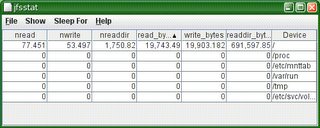
This uses the new kstats introduced in Nevada recently - the kstats used by fsstat. So you need to be running Nevada build 35 or newer to see these. (ON downloads - you want SXCR build 35 or later.)
The other change that's part of this is that I've started to use JTable to display things. I don't know why I've avoided this in the past - I guess that JTable seemed rather complex, but once I had got the hang of it it turns out to be very easy. I'm also using TableSorter from the Java Swing tutorial, which gives me the ability to sort the columns for free.
Enjoy!
The notable new feature in this version is the jfsstat utility:
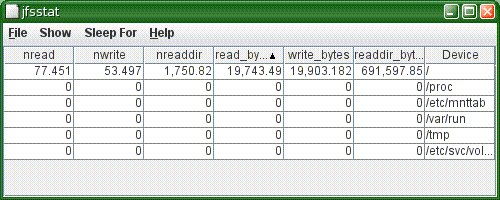
This uses the new kstats introduced in Nevada recently - the kstats used by fsstat. So you need to be running Nevada build 35 or newer to see these. (ON downloads - you want SXCR build 35 or later.)
The other change that's part of this is that I've started to use JTable to display things. I don't know why I've avoided this in the past - I guess that JTable seemed rather complex, but once I had got the hang of it it turns out to be very easy. I'm also using TableSorter from the Java Swing tutorial, which gives me the ability to sort the columns for free.
Enjoy!
Friday, March 17, 2006
Home Networked
I'm writing this blog entry using my W2100z workstation upstairs in the spare room.
We've spent the last couple of weekends decorating Amanda's room, and I took the opportunity to run some cat-5 cable in the upstairs rooms. The next step was to run cable down the stairs to connect my little ethernet switch to the broadband router, and enable dhcp. Hey presto! It all works.
The girls each have a SunBlade 150. Well, I've got them, and it means I don't have to worry about them getting virus infestations. So a surfing we can go! (And it means that the main computer is free instead of being taken up by someone trying to do their homework half the evening.)
I used an all-in-one kit I got from Maplins. 50m of cable, connectors, boxes, faceplates, tools, and 4 patch leads. A great buy and a real bargain.
We've spent the last couple of weekends decorating Amanda's room, and I took the opportunity to run some cat-5 cable in the upstairs rooms. The next step was to run cable down the stairs to connect my little ethernet switch to the broadband router, and enable dhcp. Hey presto! It all works.
The girls each have a SunBlade 150. Well, I've got them, and it means I don't have to worry about them getting virus infestations. So a surfing we can go! (And it means that the main computer is free instead of being taken up by someone trying to do their homework half the evening.)
I used an all-in-one kit I got from Maplins. 50m of cable, connectors, boxes, faceplates, tools, and 4 patch leads. A great buy and a real bargain.
Wednesday, March 08, 2006
T2000 problem
I just tried to buy a pair of Sun's T2000 machines, and then discovered (very late) that the system specification doesn't match my requirements.
It's not the system itself that's the problem, but the peripheral connectivity - or rather lack of such.
In particular, the plan was to hook up a couple of 3120 SCSI arrays. Not everything wants a fancy raid array, and FC arrays (and associated HBAs) are pretty pricy anyway. In this case, I'm looking at raw spindles for database access, but also if you look at ZFS it wants plain drives - raid hardware just gets in the way. So the plan was to have 2 SCSI channels and mirror them.
This won't work in a T2000. There's only 1 free PCI-X slot (the internal SAS controller takes the other one), and the only supported SCSI HBA is single channel anyway. So at the present time you simply can't have more than a single SCSI chain on a T2000.
To say that this is annoying is an understatement. It also limits the usefulness of the T2000 for several other projects I have in the pipeline.
Now, I could use FC storage, because the T2000 does have PCI-E slots, and there are PCI-E fibre HBAs, so it would work, but you're looking at a 50% or so increase in cost, which I regard as unacceptable. (The cost differential is particularly bad in small configurations - as you push up it becomes much less pronounced.)
Ho hum. Time to construct a plan B.
It's not the system itself that's the problem, but the peripheral connectivity - or rather lack of such.
In particular, the plan was to hook up a couple of 3120 SCSI arrays. Not everything wants a fancy raid array, and FC arrays (and associated HBAs) are pretty pricy anyway. In this case, I'm looking at raw spindles for database access, but also if you look at ZFS it wants plain drives - raid hardware just gets in the way. So the plan was to have 2 SCSI channels and mirror them.
This won't work in a T2000. There's only 1 free PCI-X slot (the internal SAS controller takes the other one), and the only supported SCSI HBA is single channel anyway. So at the present time you simply can't have more than a single SCSI chain on a T2000.
To say that this is annoying is an understatement. It also limits the usefulness of the T2000 for several other projects I have in the pipeline.
Now, I could use FC storage, because the T2000 does have PCI-E slots, and there are PCI-E fibre HBAs, so it would work, but you're looking at a 50% or so increase in cost, which I regard as unacceptable. (The cost differential is particularly bad in small configurations - as you push up it becomes much less pronounced.)
Ho hum. Time to construct a plan B.
Friday, March 03, 2006
OpenSolaris Installation and Packaging
It's here! Dave Miner made the announcement that the opensolaris Installation and Packaging community, and the SVR4 packaging project are now up and running.
This is important stuff. Being able to install and manage software is a critical component of an operating system, and is something I do a lot of.
And the process - particularly the performance (or lack thereof) of the tools - could stand some improvement. Yes, they work, and they're solid, but with a bit of extra work they could be made better.
This is important stuff. Being able to install and manage software is a critical component of an operating system, and is something I do a lot of.
And the process - particularly the performance (or lack thereof) of the tools - could stand some improvement. Yes, they work, and they're solid, but with a bit of extra work they could be made better.
Wednesday, March 01, 2006
fsstat in latest OpenSolaris
I've updated my test machine to the latest OpenSolaris build.
I used the bfu archives this time. Normally I wait for it to make it into Solaris Express (SXCR) and jumpstart, but this release has two feature I wanted to investigate, and I want to try them out as soon as I can.
The two features in question are the Java binding to DTrace, and the new fsstat utility and associated kstat support. More on DTrace once I get jkstat updated to integrate with it, but I wanted to mention a little more about fsstat.
Now, I'm just a user, but I've played with fsstat a little and looked at the code, so I've got a little bit of understanding of what it's doing.
On its own, fsstat will give filesystem activity for the various filesystem types:
If you give it a filesystem as an argument, it will show that:
and it takes the normal interval and count arguments.
These numbers are all backed by kstats. For example:
Now, that's a lot of data about what's going on.
The kstat names aren't spectacularly obvious. They all start with
(I've trimmed this for brevity). So the kstat you need to query for statistics on the root filesystem in this case is called
And that's pretty much it. Now to get some more tools to make sense of all this new information!
I used the bfu archives this time. Normally I wait for it to make it into Solaris Express (SXCR) and jumpstart, but this release has two feature I wanted to investigate, and I want to try them out as soon as I can.
The two features in question are the Java binding to DTrace, and the new fsstat utility and associated kstat support. More on DTrace once I get jkstat updated to integrate with it, but I wanted to mention a little more about fsstat.
Now, I'm just a user, but I've played with fsstat a little and looked at the code, so I've got a little bit of understanding of what it's doing.
On its own, fsstat will give filesystem activity for the various filesystem types:
 new  name   name  attr  attr lookup rddir  read read  write write
 file remov  chng   get   set    ops   ops   ops bytes   ops bytes
1.22K   606    63 1.99M   569  10.2M 37.8K  993K  502M  216K  152M ufs
    0     0     0 7.73K     0  14.8K   722 8.65K 3.18M   290 6.91K proc
    0     0     0     1     0     10     0     0     0     0     0 nfs
    0     0     0     0     0      0     0     0     0     0     0 zfs
    0     0     0 87.1K     0      0     0     0     0     0     0 lofs
14.6K 2.95K 11.5K 30.8K    37  43.5K    26 32.9K 32.9M 45.9K 34.5M tmpfs
    0     0     0 3.05K     0      0     0    32 5.25K     0     0 mntfs
    0     0     0     0     0      0     0     0     0     0     0 nfs3
    0     0     0     0     0      0     0     0     0     0     0 nfs4
    0     0     0     6     0      0     0     0     0     0     0 autofs
If you give it a filesystem as an argument, it will show that:
# fsstat /tmp /var/run /etc/svc/volatile
 new  name   name  attr  attr lookup rddir  read read  write write
 file remov  chng   get   set    ops   ops   ops bytes   ops bytes
  251   233     2 1.10K    21    719    26    29 34.9K    60 36.7K /tmp
   20     0     0    44     8  16.8K     0     0     0     6    67 /var/run
14.5K 2.72K 11.6K 29.8K     8  26.4K     0 32.9K 32.9M 46.0K 34.5M /etc/svc/volatile
and it takes the normal interval and count arguments.
These numbers are all backed by kstats. For example:
# kstat unix:0:vopstats_ufs
module: unix                            instance: 0
name:   vopstats_ufs                    class:    misc
        crtime                          76.4978722
        naccess                         559104
        naddmap                         1280864
        nclose                          514400
        ncmp                            5179654
        ncreate                         1222
        ndelmap                         1276280
        ndispose                        1788458
        ndump                           0
        ndumpctl                        0
        nfid                            0
        nfrlock                         6953
        nfsync                          1641
        ngetattr                        1550291
        ngetpage                        5904478
        ngetsecattr                     2882
        ninactive                       30404
        nioctl                          114402
        nlink                           18
        nlookup                         10861279
        nmap                            1024824
        nmkdir                          17
        nopen                           479509
        npageio                         14
        npathconf                       70555
        npoll                           477742
        nputpage                        39301
        nread                           1031796
        nreaddir                        38829
        nreadlink                       785043
        nrealvp                         65352
        nremove                         602
        nrename                         29
        nrmdir                          4
        nrwlock                         1292387
        nrwunlock                       1293855
        nseek                           213405
        nsetattr                        531
        nsetfl                          179084
        nsetsecattr                     26
        nshrlock                        0
        nspace                          12
        nsymlink                        16
        nvnevent                        0
        nwrite                          223174
        read_bytes                      530866166
        readdir_bytes                   18340192
        snaptime                        9588.8833902
        write_bytes                     159609739
Now, that's a lot of data about what's going on.
The kstat names aren't spectacularly obvious. They all start with
unix:0:vopstats_ with the unique identifier tagged onto the end. This can either be a filesystem type (ufs, lofs, nfs, zfs are some examples) or the id of a filesystem mountpoint. So in /etc/mnttab you might see
/dev/dsk/c0t1d0s0 / ufs rw,intr,...,dev=1d80008
(I've trimmed this for brevity). So the kstat you need to query for statistics on the root filesystem in this case is called
unix:0:vopstats_1d80008.And that's pretty much it. Now to get some more tools to make sense of all this new information!
Sunday, February 26, 2006
Vanished...
After a nice weekend away I'm wondering where my machine at work has got to.
It was fine when I left it on Thursday, but sometime Friday afternoon it vanished without trace. Can't log in. Can't ping it. No nothing.
I can get into my other machine (that I use for OpenSolaris testing) just fine. That's connected into the same switch, powered off the same extension lead. So it's not a network or power problem.
Oh well, I guess I'll find out what hapened to it when I get in to the office tomorrow.
It was fine when I left it on Thursday, but sometime Friday afternoon it vanished without trace. Can't log in. Can't ping it. No nothing.
I can get into my other machine (that I use for OpenSolaris testing) just fine. That's connected into the same switch, powered off the same extension lead. So it's not a network or power problem.
Oh well, I guess I'll find out what hapened to it when I get in to the office tomorrow.
Thursday, February 23, 2006
Affordable Sun Gear
Over on OpenSolaris.org, I jumped into a discussion regarding the availability - or more accurately lack of - a cheap sparc desktop machine.
At the present time, Sun sell a number of desktop sparc machines: SunBlade 150, SunBlade 1500, SunBlade 2500, and the new Ultra 45.
Frankly, why they're still selling the 150 is beyond me - it wasn't exactly quick when it was introduced in 2002 and it's a painful experience trying to use one with modern bloated software. It's horrifically expensive, and the available configurations aren't up to much. £2000 for a crippled antique? No thankyou...
The SunBlade 1500 isn't really that bad a machine. It's still over £2000, but it's not that much more than the 150 and is 2-3 times better. Still, £2000 just to get off the ground? Heavens...
I'll skip the 2500, as I think the Ultra 45 is similarly specified, but with a little more expansion and future-proofing. The starting price isn't that much more than a 1500 either, but rapdily rises.
All these boxes are out of my price range as an individual, and I couldn't really justify an employer buying them either.
The more powerful boxes are better value, but you have to pay for the privilege.
As far as I'm concerned, a reasonable entry-level box would be something like the SB1500, at about £1000 or so. Doesn't have to be fancy, but XVR-100 graphics and 512M memory minimum.
There's a similar story when it comes to sparc servers. Sun still sell the V100 and V120. OK, so there's a good market, and these machines have their uses. And they don't have much competition - there aren't many other machines of that low a spec out there.
At least with servers you definitely get into value-for-money territory as you move up the range. Certainly any of the T1 (Niagara) boxes are awesome. But there isn't much value in the sub £5000 space. Again, something like a V100 but with a modern US-IIIi processor at just over the £1000 mark would be handy.
The whole sparc low-end lineup looks incredibly stale. Even the Ultra 45 isn't much more than a SB2500 rehash (a good rehash, but still a rehash).
As might be expected, there's more in the Opteron world down at the low end. You can't really quarrel with the X2100 and Ultra 20.
But even here, Sun make it hard to get something decent. The problem (and this afflicts the whole of the range) is the lack of configuration choice. They seem to make the basic assumption that there's a cheap and nasty option that has the minimum of everything, then have another option in which most things are upgraded, and maybe another option in which everything is maxed out. That's not what I want. I don't want to have to pay for a fancy graphics card just to get a faster cpu, or the other way round. And sometimes I might actually want the base system with a 250G drive. Most PC vendors I look at allow you to select the various components of the system independently, so that I can put together a system that's balanced to meet my needs, but Sun won't let me do that.
At the present time, Sun sell a number of desktop sparc machines: SunBlade 150, SunBlade 1500, SunBlade 2500, and the new Ultra 45.
Frankly, why they're still selling the 150 is beyond me - it wasn't exactly quick when it was introduced in 2002 and it's a painful experience trying to use one with modern bloated software. It's horrifically expensive, and the available configurations aren't up to much. £2000 for a crippled antique? No thankyou...
The SunBlade 1500 isn't really that bad a machine. It's still over £2000, but it's not that much more than the 150 and is 2-3 times better. Still, £2000 just to get off the ground? Heavens...
I'll skip the 2500, as I think the Ultra 45 is similarly specified, but with a little more expansion and future-proofing. The starting price isn't that much more than a 1500 either, but rapdily rises.
All these boxes are out of my price range as an individual, and I couldn't really justify an employer buying them either.
The more powerful boxes are better value, but you have to pay for the privilege.
As far as I'm concerned, a reasonable entry-level box would be something like the SB1500, at about £1000 or so. Doesn't have to be fancy, but XVR-100 graphics and 512M memory minimum.
There's a similar story when it comes to sparc servers. Sun still sell the V100 and V120. OK, so there's a good market, and these machines have their uses. And they don't have much competition - there aren't many other machines of that low a spec out there.
At least with servers you definitely get into value-for-money territory as you move up the range. Certainly any of the T1 (Niagara) boxes are awesome. But there isn't much value in the sub £5000 space. Again, something like a V100 but with a modern US-IIIi processor at just over the £1000 mark would be handy.
The whole sparc low-end lineup looks incredibly stale. Even the Ultra 45 isn't much more than a SB2500 rehash (a good rehash, but still a rehash).
As might be expected, there's more in the Opteron world down at the low end. You can't really quarrel with the X2100 and Ultra 20.
But even here, Sun make it hard to get something decent. The problem (and this afflicts the whole of the range) is the lack of configuration choice. They seem to make the basic assumption that there's a cheap and nasty option that has the minimum of everything, then have another option in which most things are upgraded, and maybe another option in which everything is maxed out. That's not what I want. I don't want to have to pay for a fancy graphics card just to get a faster cpu, or the other way round. And sometimes I might actually want the base system with a 250G drive. Most PC vendors I look at allow you to select the various components of the system independently, so that I can put together a system that's balanced to meet my needs, but Sun won't let me do that.
Java DTrace
Stephen Lau announced the latest nightly OpenSolaris delivery. Looking through the changelog, I noticed:
Yay! Getting to DTrace from Java!
Issues Resolved:
        PSARC case 2006/054 : DTrace JNI Binding
        BUG/RFE:6384263PSARC 2006/054 DTrace JNI Binding
Yay! Getting to DTrace from Java!
Monday, February 13, 2006
Evil JES Installer
I'm a glutton for punishment. Must be. I can't think of any other reason why I put myself through this.
I'm testing out the Java Enterprise System. Version 2005Q4 comes in the DVD kit with Solaris 10 Update 1, so I thought I would try that out, following these sample instructions.
The installer starts off OK, but then it complains that J2SE is obsolete. Say what? This is a brand new S10U1 install, and has a newer JDK than is supplied on the JES media. I selected manual upgrade (promising that I would upgrade it myself) in the hope that it wouldn't do anything stupid.
For what it's worth, Solaris 10 Update 1 ships with J2SE 5.0_06, while the JES media contains the older (and insecure) 5.0_04. There are two major issues here already:
So I plug through the screens. (There's another one where it complains about the versions of JATO, JAXP, and JAF being out of date. Why? This is the latest all-singing all-dancing version of Solaris, hot off the press. Why aren't those components up to date?)
So I get to the end and tell it to go install. And what does it do? It downgrades the system Java to the old insecure version!
Aaaaarrrrrrgggggghhhhhh!!!!!!
This is plain bad behaviour, compounding its previous errors with a heinous crime.
I'm testing out the Java Enterprise System. Version 2005Q4 comes in the DVD kit with Solaris 10 Update 1, so I thought I would try that out, following these sample instructions.
The installer starts off OK, but then it complains that J2SE is obsolete. Say what? This is a brand new S10U1 install, and has a newer JDK than is supplied on the JES media. I selected manual upgrade (promising that I would upgrade it myself) in the hope that it wouldn't do anything stupid.
For what it's worth, Solaris 10 Update 1 ships with J2SE 5.0_06, while the JES media contains the older (and insecure) 5.0_04. There are two major issues here already:
- JES ought to have its java version in sync with the version of the OS it's shipped with
- It ought to detect a newer version and accept it as good
So I plug through the screens. (There's another one where it complains about the versions of JATO, JAXP, and JAF being out of date. Why? This is the latest all-singing all-dancing version of Solaris, hot off the press. Why aren't those components up to date?)
So I get to the end and tell it to go install. And what does it do? It downgrades the system Java to the old insecure version!
Aaaaarrrrrrgggggghhhhhh!!!!!!
This is plain bad behaviour, compounding its previous errors with a heinous crime.
Friday, February 10, 2006
JKstat updated
I've updated JKstat - my Java JNI interface to Solaris kstats.
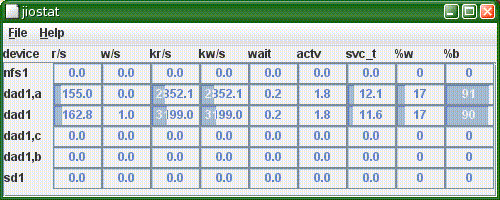
This version adds jiostat, a graphical version of iostat. This is just a basic hack at the problem - I want to be able to select and hide statistics, sort by output, and connect associated statistics (such as a disk with its partitions, or a metadevice with its components). However, the first implementation had pretty awful performance, which is why version 0.09 got skipped.

This version adds jiostat, a graphical version of iostat. This is just a basic hack at the problem - I want to be able to select and hide statistics, sort by output, and connect associated statistics (such as a disk with its partitions, or a metadevice with its components). However, the first implementation had pretty awful performance, which is why version 0.09 got skipped.
Thursday, February 09, 2006
Why do arrays have even numbers of disks?
Like it says: Why do arrays have even numbers of disks?
Most hardware disk arrays - certainly the ones that Sun sell - currently have an even number of drives in them. The StorEdge 3x00 series have 12, while the 6130 has 14.
The problem I have is that if you take away one drive to act as a hot spare, you're then left with 11 or 13. Not only is this an odd number, it's also prime.
So, what sort of sensible grouping of the drives can you come up with? I often punt and simply create a huge raid-5 volume spanning all the drives I've got left, which is simple. But there are cases when I really want to configure 2 identical sets of disks - either to mirror or to give to 2 hosts. To make this work, I have one drive left over (so I use it as a second hot spare).
Wouldn't it be neat to add an extra drive?
Most hardware disk arrays - certainly the ones that Sun sell - currently have an even number of drives in them. The StorEdge 3x00 series have 12, while the 6130 has 14.
The problem I have is that if you take away one drive to act as a hot spare, you're then left with 11 or 13. Not only is this an odd number, it's also prime.
So, what sort of sensible grouping of the drives can you come up with? I often punt and simply create a huge raid-5 volume spanning all the drives I've got left, which is simple. But there are cases when I really want to configure 2 identical sets of disks - either to mirror or to give to 2 hosts. To make this work, I have one drive left over (so I use it as a second hot spare).
Wouldn't it be neat to add an extra drive?
Roundup
Rounding up a few loose ends:
The OpenSolaris Visual Panels project has now started. This really interesting stuff, especially from my viewpoint of developing SolView and JKstat. I agree with JC Van Nieuwenhoven's comment - that managing Solaris with a GUI is a pain - and it's good to see efforts underway to fix this.
(One thing I would say, though, is that good GUIs aren't just for novices. While I might know the 16 arcane commands to configure something, would I rather have a good gui and press 1 button? If it was a good gui, yes!)
Following on from my application profiling to see if a T2000 would be a good thing, I found this article that explains a little bit more about what sorts of behaviour might throw off the statistics. Based on this, I think my machine is spending a lot of time in memcpy.
I also notice that the Ultra 45 workstation lists a 146G SAS drive as an option. I can't see this on the published price lists for the X4x00 or the T2000, but I hope it's on its way as it would help address one of the problem areas I've been having for a while.
The OpenSolaris Visual Panels project has now started. This really interesting stuff, especially from my viewpoint of developing SolView and JKstat. I agree with JC Van Nieuwenhoven's comment - that managing Solaris with a GUI is a pain - and it's good to see efforts underway to fix this.
(One thing I would say, though, is that good GUIs aren't just for novices. While I might know the 16 arcane commands to configure something, would I rather have a good gui and press 1 button? If it was a good gui, yes!)
Following on from my application profiling to see if a T2000 would be a good thing, I found this article that explains a little bit more about what sorts of behaviour might throw off the statistics. Based on this, I think my machine is spending a lot of time in memcpy.
I also notice that the Ultra 45 workstation lists a 146G SAS drive as an option. I can't see this on the published price lists for the X4x00 or the T2000, but I hope it's on its way as it would help address one of the problem areas I've been having for a while.
Tuesday, February 07, 2006
Should I get a T2000?
So I'm looking at the new Sun T2000 boxes, and I tried the test program to see if my workload is suitable.
Now, this is a web server. That's all it does. And it's running coldfusion (ie JRun, as in Java), and Oracle, so first thoughts are that it should match pretty well. So I give pfp a whirl.
That's not good!
OK, so that was an isolated incident. But this machine tends to stick at about the 1.5% grey area. This is typical:
Now, what I don't know is whether there's something odd about this machine, or Oracle, or Coldfusion, or the CMS sitting atop it, or the versions (oldish), or something about the fact that this is an old V880 running an old version of Solaris that pfp can't handle properly. But in any case, the T2000 doesn't look like a given.
I also tried looking at one of the machines I built myself recently, with an Apache/Tomcat/Postgres combo:
That's what I expected. (And I get the same sort of thing on one of my Domino boxes.)
So I'm still unclear as to whether a T2000 would be a good bet for the old webserver.
Now, this is a web server. That's all it does. And it's running coldfusion (ie JRun, as in Java), and Oracle, so first thoughts are that it should match pretty well. So I give pfp a whirl.
# /var/tmp/pfp -p 10
We observed 407247665 instructions separated
in 11.17% floating point and 88.83% others.

This workload is not recommended for UltraSPARC T1 systems.
That's not good!
OK, so that was an isolated incident. But this machine tends to stick at about the 1.5% grey area. This is typical:
# /var/tmp/pfp -p 10
We observed 1960035483 instructions separated
in 1.61% floating point and 98.39% others.

This workload is a potential fit for UltraSPARC T1 systems
 and need to be tested.
Now, what I don't know is whether there's something odd about this machine, or Oracle, or Coldfusion, or the CMS sitting atop it, or the versions (oldish), or something about the fact that this is an old V880 running an old version of Solaris that pfp can't handle properly. But in any case, the T2000 doesn't look like a given.
I also tried looking at one of the machines I built myself recently, with an Apache/Tomcat/Postgres combo:
# /var/tmp/pfp 60
We observed 2132762256 instructions separated
in 0.05% floating point and 99.95% others.

This workload is recommended for UltraSPARC T1 systems.
That's what I expected. (And I get the same sort of thing on one of my Domino boxes.)
So I'm still unclear as to whether a T2000 would be a good bet for the old webserver.
Sunday, February 05, 2006
Solaris Info Viewer
Following a discussion on the sysadmin-discuss list, I've put up SolView, a utility I put together a year or so back and then forgot about.
The idea is to have a single window that gets you to the important information about a Solaris system quickly and easily. It hasn't been extensively tested, and relies on Solaris 10 at the present time. Comments etc, especially suggestions for new capabilities or information it could display, are welcome.
The idea is to have a single window that gets you to the important information about a Solaris system quickly and easily. It hasn't been extensively tested, and relies on Solaris 10 at the present time. Comments etc, especially suggestions for new capabilities or information it could display, are welcome.
Friday, February 03, 2006
Suspend/Resume
After my recent confession, and looking at start up time, I tried suspend/resume to see if that could get the system going any quicker.
Now, I had earlier problems with suspend/resume taking forever, so I tried again after updating to S10U1.
And, OK, so the resume is quicker than it was. But it's still about 3 minutes - just the same as a cold boot. There has to be something wrong here - resume should be quicker, as it just has to bring things back into memory and set them running again without having to go through the thinking step of how they got there.
Now, I had earlier problems with suspend/resume taking forever, so I tried again after updating to S10U1.
And, OK, so the resume is quicker than it was. But it's still about 3 minutes - just the same as a cold boot. There has to be something wrong here - resume should be quicker, as it just has to bring things back into memory and set them running again without having to go through the thinking step of how they got there.
Thursday, February 02, 2006
System start up time
To follow on from why I use windows, I just did some (unscientific) start-up timings on my SunBlade 1500 running Solaris 10 Update 1.
Time in seconds from pressing the on button:
There's a 30 second hole in the middle where I'm typing in my username and password (and writing down the numbers) where 10 seconds would be more reasonable, so the full length of time to actual login is almost exactly 3 minutes. (And then another 20 seconds to open Mozilla.)
(I've broken the graphical startup into 2 phases, dtlogin start and JDS start, with the human typing in the middle. The whole graphical login process takes about a minute of the 3, with the general boot taking the other 2 minutes. OK, so it's possible to make the gui startup much quicker, but there's still the whole hardware phase and kernel boot to get past.)
What's the machine been doing all this time? A quick look at iostat immediately afterwards:
Or in raw terms from kstat:
So during boot I read 125M of data off the disk, in 11,000 reads. And this actually only covers about 2/3 of the boot - it isn't until about a minute into the boot that the kstats are created. If you allow for the login delay while I'm typing username and password and the few seconds it takes to actually run the above commands, and you can see that the disk is actually well over 50% busy during the boot. Based on the disk activity, boot times can't improve by better than a factor of 2 unless the disk access pattern changes (larger reads than the average 11k seen here would help).
The cpu statistics can also be obtained:
Remember that these numbers don't cover the first 1/3 of the boot. (And they don't add up, either, as I make that 170s which is more than the 140s between crtime and snaptime.) But looking at it, the processor is less than 50% busy.
I'm not sure how to look at these numbers and convert them into the sort of boot-time improvements that might be made, but taking the 50% resource utilization at face value indicates that the portion of the boot covered by the kstat collection could be sped up by a factor 2, which takes the overall cold start from 3 minutes to 2. That wouldn't be bad, would it?
Time in seconds from pressing the on button:
- Solaris license terms: 41s
- Console Login prompt: 104s
- Desktop Login prompt: 133s
- JDS start: 165s
- JDS ready: 190s
- Terminal ready to type: 199s
There's a 30 second hole in the middle where I'm typing in my username and password (and writing down the numbers) where 10 seconds would be more reasonable, so the full length of time to actual login is almost exactly 3 minutes. (And then another 20 seconds to open Mozilla.)
(I've broken the graphical startup into 2 phases, dtlogin start and JDS start, with the human typing in the middle. The whole graphical login process takes about a minute of the 3, with the general boot taking the other 2 minutes. OK, so it's possible to make the gui startup much quicker, but there's still the whole hardware phase and kernel boot to get past.)
What's the machine been doing all this time? A quick look at iostat immediately afterwards:
                    extended device statistics
    r/s    w/s   kr/s   kw/s wait actv wsvc_t asvc_t  %w  %b device
   74.5    3.5  824.7   37.0  0.3  0.8    4.3    9.7  13  46 c0t0d0
Or in raw terms from kstat:
 reads                           10986
 writes                          482
 nread                           124590592
 nwritten                        5022208
So during boot I read 125M of data off the disk, in 11,000 reads. And this actually only covers about 2/3 of the boot - it isn't until about a minute into the boot that the kstats are created. If you allow for the login delay while I'm typing username and password and the few seconds it takes to actually run the above commands, and you can see that the disk is actually well over 50% busy during the boot. Based on the disk activity, boot times can't improve by better than a factor of 2 unless the disk access pattern changes (larger reads than the average 11k seen here would help).
The cpu statistics can also be obtained:
 cpu_nsec_idle                   102634677402
 cpu_nsec_kernel                 44861276123
 cpu_nsec_user                   25778566225
Remember that these numbers don't cover the first 1/3 of the boot. (And they don't add up, either, as I make that 170s which is more than the 140s between crtime and snaptime.) But looking at it, the processor is less than 50% busy.
I'm not sure how to look at these numbers and convert them into the sort of boot-time improvements that might be made, but taking the 50% resource utilization at face value indicates that the portion of the boot covered by the kstat collection could be sped up by a factor 2, which takes the overall cold start from 3 minutes to 2. That wouldn't be bad, would it?
Subscribe to:
Posts (Atom)