I'm getting somewhat unsatisfied with the various desktop environments available. The desktop is currently in the doldrums, presenting a dull and dreary landscape.
So, I thought I would give XFCE another look. OK, so it turns out that it is a little bit of work to get it running on Solaris 10. There's a bunch of prerequisites that you need to build first, and a couple of tweaks. So it was a bit tedious, but I got it to work fairly easily. My install notes are available to help others down the same path.
What I've got is essentially functional. I've not worked out why some of the menu and application icons don't appear, and a few of the window manager themes don't quite work (you get strange visual artifacts) but it's functional, meets my requirements (which may be different from other people) of being easy to use, has a reasonable choice of themes, isn't quite as heavyweight as some of the other desktops, and shows promise for the future.
Wednesday, July 22, 2009

Friday, July 10, 2009
Testing ZFS compression
One of my servers (it's a continuous build server) generates a significant amount of logfiles. About 150G so far, growing at over a gigabyte each day.
Now, logfiles tend to be compressible, so in preparation for migrating it to a new host (it's a zone, so moving from one physical host to another is trivial) I tested ZFS compression to see how well that would work.
Now, logfiles tend to be compressible, so in preparation for migrating it to a new host (it's a zone, so moving from one physical host to another is trivial) I tested ZFS compression to see how well that would work.
| Type | Ratio |
|---|---|
| lzjb | 5.08x |
| gzip | 22.19x |
| gzip-1 | 16.37x |
Now, the default lzjb gives you fair compression. That saves 80% of my storage, so that's pretty good.
Going to gzip compression the space saving is spectacular. Unfortunately the machine runs like it's stuck in treacle, so that's not exactly practical.
Which is why I tried gzip-1. You save much more space than lzjb, although not as much as the default gzip (which is gzip-6). Unfortunately, while the machine doesn't quite go as comatose as it does with the regular gzip compression, the performance impact is still noticeable.
Overall, while I wouldn't mind the extra compression, the performance impact makes it hard, so I'm going to stick with the regular lzjb.
Sunday, June 14, 2009
JKstat, meet JavaFX
One of the announcements out of CommunityOne was the availability of JavaFX for Solaris and OpenSolaris - if you're lucky enough to be running on x86, anyway.
So the first thing that occurred to me was - could I use JavaFX to make a graphical front-end to JKstat?
(And the same thought occurred to Ben Rockwood as well, who asked me how easy it would be and pushed the thought from idle fancy to a must try, especially after I glibly said - "sure, dead easy".)

So the above image is jcpustate using the JKstat core api rendered with JavaFX. Of itself, it's nothing fancy, but it's served its purpose: I've got a rudimentary understanding of JavaFX out of it; I've worked out how to integrate JKstat amd JavaFX; and this validates that the JKstat core api does its job.
You can now download JKstat 0.29. Look in the jkstatfx directory, the source code for the above example is JCpuStateFX.fx.
I had a couple of issues getting this to work. I found I had to put the jni shared library (
I have to say that this wasn't the feature I had originally planned for this version of JKstat. I've been working on an interactive chart builder so you're not limited to the fixed and limited set of charts that JKstat creates on its own, but that will have to wait a while for the next release.
So the first thing that occurred to me was - could I use JavaFX to make a graphical front-end to JKstat?
(And the same thought occurred to Ben Rockwood as well, who asked me how easy it would be and pushed the thought from idle fancy to a must try, especially after I glibly said - "sure, dead easy".)

So the above image is jcpustate using the JKstat core api rendered with JavaFX. Of itself, it's nothing fancy, but it's served its purpose: I've got a rudimentary understanding of JavaFX out of it; I've worked out how to integrate JKstat amd JavaFX; and this validates that the JKstat core api does its job.
You can now download JKstat 0.29. Look in the jkstatfx directory, the source code for the above example is JCpuStateFX.fx.
I had a couple of issues getting this to work. I found I had to put the jni shared library (
libkstat_jni.so) directly into the right javafx lib directory - setting LD_LIBRARY_PATH didn't seem to work. The other was that JavaFX doesn't natively support either java Collections or Generics. It clearly understands them - because it tracks the types of the objects in my Collections correctly (and it doesn't understand how to cast objects back toi the right type either). I ended up having to use the toarray(T[] a) method to create a Sequence of the right type.I have to say that this wasn't the feature I had originally planned for this version of JKstat. I've been working on an interactive chart builder so you're not limited to the fixed and limited set of charts that JKstat creates on its own, but that will have to wait a while for the next release.
Friday, May 29, 2009
Heading off to CommunityOne
Need to start packing as I'm off to CommunityOne.
It's going to be a busy week. Starting off, Sunday I'll be at the Open HA Cluster Summit, on Monday is CommunityOne, and the OGB will be out in force. If you're around, there's an OGB Town Hall at 6pm, before the OpenSolaris party.
Tuesday there's more CommunityOne, including the Deep Dives and the Crossbow BOF, then on Wednesday I'm hoping to meet up with the OSUG Bootcamp.
And, perhaps the most important thing about getting to events like this, I hope to meet as many people as possible in the few days I'm there.
It's going to be a busy week. Starting off, Sunday I'll be at the Open HA Cluster Summit, on Monday is CommunityOne, and the OGB will be out in force. If you're around, there's an OGB Town Hall at 6pm, before the OpenSolaris party.
Tuesday there's more CommunityOne, including the Deep Dives and the Crossbow BOF, then on Wednesday I'm hoping to meet up with the OSUG Bootcamp.
And, perhaps the most important thing about getting to events like this, I hope to meet as many people as possible in the few days I'm there.
Friday, May 15, 2009
Reports from the community for CommunityOne
The OGB will be at CommunityOne in a few weeks. If you would like to get involved, there's still time (just) to register - OpenSolaris will have a big presence!
On the Monday, June 1st, we're holding a Town Hall at 6pm, and we invite any and all members of the OpenSolaris community to come along, meet us, talk to us, give us feedback about OpenSolaris and how we the OGB can help in making the OpenSolaris community better.
(It's somewhat unfortunate that there's something else going on at 6pm that involves free alcohol or something like that. Hard choice, huh?)
As part of the OGB presence at CommunityOne, we're looking to display reports from communities, projects, and user groups that make up our community. What I'm thinking of here is lots of individual highlight slides we can put on display boards (so they ought to be self-contained on a single page). Bullet points, and pictures make it look better. I'll also put them all together into a single presentation (we might have that running in a permanent loop on a screen, for example) that anyone can take and use.
Longer term, I see this as a first run of a regular reporting process. The OpenSolaris community is doing great work, and we ought to all be aware of the great work that's going on and highlighting our achievements so they're more widely known.
On the Monday, June 1st, we're holding a Town Hall at 6pm, and we invite any and all members of the OpenSolaris community to come along, meet us, talk to us, give us feedback about OpenSolaris and how we the OGB can help in making the OpenSolaris community better.
(It's somewhat unfortunate that there's something else going on at 6pm that involves free alcohol or something like that. Hard choice, huh?)
As part of the OGB presence at CommunityOne, we're looking to display reports from communities, projects, and user groups that make up our community. What I'm thinking of here is lots of individual highlight slides we can put on display boards (so they ought to be self-contained on a single page). Bullet points, and pictures make it look better. I'll also put them all together into a single presentation (we might have that running in a permanent loop on a screen, for example) that anyone can take and use.
Longer term, I see this as a first run of a regular reporting process. The OpenSolaris community is doing great work, and we ought to all be aware of the great work that's going on and highlighting our achievements so they're more widely known.
Saturday, April 18, 2009
What can the OGB do for you?
It's a great honour to be elected to the OGB, and I want to thank everyone who took the trouble to vote.
So, what is the OGB going to do this year?
Let's start by looking at the Charter. This defines what the OGB has to do. And if you look at that, then the job of the OGB - above all else - is to construct and maintain the OpenSolaris Constitution. Much of the Charter is about the Constitution, and there's also quite a bit about the structure of the OGB itself (and a lot of that is the initial bootstrapping of the OGB when the OpenSolaris community was created and we started with the CAB).
Past that, the OGB then manages the community according to the Constitution. There are clear problems with the current Constitution, which is why a revised version was proposed. Having failed to pass, we're going to have to do something, because the current Constitution is a obstacle that's getting in the way of developing the community, but how we deal with that is another matter.
Note that the OGB is quite constrained in its operations. Both the Charter and the Constitution are reasonably specific about what we are supposed to do. In particular, it's pretty explicitly clear that the OpenSolaris we govern is not OpenSolaris the Sun distribution, nor is it OpenSolaris the codebase, it's just the OpenSolaris community.
However, I'm going to interpret the Charter slightly more broadly. At the beginning, it says to manage and direct an OpenSolaris community in its efforts to improve upon and advocate in favor of OpenSolaris. There are two phrases there that are key.
The first is manage and direct - and clearly we the OGB cannot in fact direct any member of the community to do anything. What we can do is put into place management processes that will allow the community to do its work more easily; it's up to the community to use them. One of the things we have talked about (it's come up before, but I think we want to push it again) is some level of reporting. We should expect every structural part of the community to produce regular status reports, so that we know what's going on. At the very least, that a project or community is still alive. Beyond that, these reports would promote wider awareness of what each group is doing, and would also give groups an opportunity to make bottlenecks known so that they can be acted upon. There are problems that are well known already, and we need to make sure that progress in those areas is maintained - and is more visible so that people don't think the problems are being ignored.
The second key phrase is advocate, and I would like to see the OGB more prominent as advocates and champions of OpenSolaris. On a personal note, this is difficult for a quiet reserved Englishman such as myself, but it needs doing. And at least some of the other OGB members (I'm not going to say all, because I certainly can't presume I can speak for them) feel that the OGB should be taking a more active role. If we don't, then call us to account.
Going back to the title - and given the limitations on the real power that the OGB has - what can the OGB do for you?
So, what is the OGB going to do this year?
Let's start by looking at the Charter. This defines what the OGB has to do. And if you look at that, then the job of the OGB - above all else - is to construct and maintain the OpenSolaris Constitution. Much of the Charter is about the Constitution, and there's also quite a bit about the structure of the OGB itself (and a lot of that is the initial bootstrapping of the OGB when the OpenSolaris community was created and we started with the CAB).
Past that, the OGB then manages the community according to the Constitution. There are clear problems with the current Constitution, which is why a revised version was proposed. Having failed to pass, we're going to have to do something, because the current Constitution is a obstacle that's getting in the way of developing the community, but how we deal with that is another matter.
Note that the OGB is quite constrained in its operations. Both the Charter and the Constitution are reasonably specific about what we are supposed to do. In particular, it's pretty explicitly clear that the OpenSolaris we govern is not OpenSolaris the Sun distribution, nor is it OpenSolaris the codebase, it's just the OpenSolaris community.
However, I'm going to interpret the Charter slightly more broadly. At the beginning, it says to manage and direct an OpenSolaris community in its efforts to improve upon and advocate in favor of OpenSolaris. There are two phrases there that are key.
The first is manage and direct - and clearly we the OGB cannot in fact direct any member of the community to do anything. What we can do is put into place management processes that will allow the community to do its work more easily; it's up to the community to use them. One of the things we have talked about (it's come up before, but I think we want to push it again) is some level of reporting. We should expect every structural part of the community to produce regular status reports, so that we know what's going on. At the very least, that a project or community is still alive. Beyond that, these reports would promote wider awareness of what each group is doing, and would also give groups an opportunity to make bottlenecks known so that they can be acted upon. There are problems that are well known already, and we need to make sure that progress in those areas is maintained - and is more visible so that people don't think the problems are being ignored.
The second key phrase is advocate, and I would like to see the OGB more prominent as advocates and champions of OpenSolaris. On a personal note, this is difficult for a quiet reserved Englishman such as myself, but it needs doing. And at least some of the other OGB members (I'm not going to say all, because I certainly can't presume I can speak for them) feel that the OGB should be taking a more active role. If we don't, then call us to account.
Going back to the title - and given the limitations on the real power that the OGB has - what can the OGB do for you?
Friday, April 17, 2009
Backups done right?
I'm fed up with NetBackup. It vaguely works most of the time, but not all (which makes it difficult to justify it as a backup solution). And it's sucking up a lot of time - management and configuration takes a lot of work.
My experience with Legato has been great. It's incredibly easy to manage, just works, and sits there in the background without needing me to constantly mother it. It's not perfect - the latest java-based GUI is pretty horrid, and my experience of it in non-unix (ie. Windows) environments is that it's a duck out of water.
So, I'm looking around. I'll probably give Amanda a whirl. So if anyone has experience of both Amanda (or Zmanda) *and* one or both the above options, then feel free to comment - I'm particularly interested in comparisons.
My experience with Legato has been great. It's incredibly easy to manage, just works, and sits there in the background without needing me to constantly mother it. It's not perfect - the latest java-based GUI is pretty horrid, and my experience of it in non-unix (ie. Windows) environments is that it's a duck out of water.
So, I'm looking around. I'll probably give Amanda a whirl. So if anyone has experience of both Amanda (or Zmanda) *and* one or both the above options, then feel free to comment - I'm particularly interested in comparisons.
Sunday, March 22, 2009
Newer != Better
We all know that just because something is new doesn't mean that it's better than what's gone before. A couple of examples I've had the misfortune to experience first-hand recently emphasize this:
Firefox 3 is dramatically inferior to Firefox 2. Not only does it feel much more sluggish, but the URL bar (in particular the drop-down menu) is terrible. Yes, the oldbar extension removes some of the maddening irritations of the look and feel, but the list of URLs presented is completely broken, to the point where it's worse than useless. I've not upgraded every machine I have, and the overall experience on the machines I have upgraded is pretty poor - so much so that I'm tempted to revert.
I've used emacs for decades. (And EDT/EVE/TPU before that.) For many years I've stayed with emacs 19.34, because it worked. Recently I've switched to emacs 22, because it's newer, maintained, and is what tends to be found on other systems. Again, the experience is staggeringly poor. Not only is it much slower but some of its features are just plain stupid. One of the more idiotic features I came across recently was that it assumes that a file named with a "zone" extension must be a DNS zone. (As a Solaris sysadmin, a zone is likely to be something else.) And if the file doesn't parse as it thinks a DNS zone file should then you are completely unable to even save the file - it's so smugly superior.
The world is full of other examples. Why do we put up with it?
Firefox 3 is dramatically inferior to Firefox 2. Not only does it feel much more sluggish, but the URL bar (in particular the drop-down menu) is terrible. Yes, the oldbar extension removes some of the maddening irritations of the look and feel, but the list of URLs presented is completely broken, to the point where it's worse than useless. I've not upgraded every machine I have, and the overall experience on the machines I have upgraded is pretty poor - so much so that I'm tempted to revert.
I've used emacs for decades. (And EDT/EVE/TPU before that.) For many years I've stayed with emacs 19.34, because it worked. Recently I've switched to emacs 22, because it's newer, maintained, and is what tends to be found on other systems. Again, the experience is staggeringly poor. Not only is it much slower but some of its features are just plain stupid. One of the more idiotic features I came across recently was that it assumes that a file named with a "zone" extension must be a DNS zone. (As a Solaris sysadmin, a zone is likely to be something else.) And if the file doesn't parse as it thinks a DNS zone file should then you are completely unable to even save the file - it's so smugly superior.
The world is full of other examples. Why do we put up with it?
Saturday, March 21, 2009
Agile SysAdmin
A while back we had a talk at LOSUG about Agile System Administration. While presenting a particular view, I think Gordon was also trying to get us systems administrators to think more about the theory underlying the work that we do.
Development has formal techniques - Agile, XP, Scrum, pair programming, test-first. And note that these are at a different layer from the actual programming skills required to write the software.
Does Systems Administration have the same sorts of practices? Does it need them? Do the concepts of Agile Development translate into Systems Administration?
Gordon has a blog discussing some of his thoughts on the subject. I encourage those of you interested in the subject to read and contribute. (The home page of the blog is just the welcome; you'll need to look at the Archives and Categories to find the actual blog entries.)
For what it's worth, I think somewhat differently, preferring flexible and lightweight (preferably zero-touch) minimalist administration over mandated standardization and heavyweight processes.
Development has formal techniques - Agile, XP, Scrum, pair programming, test-first. And note that these are at a different layer from the actual programming skills required to write the software.
Does Systems Administration have the same sorts of practices? Does it need them? Do the concepts of Agile Development translate into Systems Administration?
Gordon has a blog discussing some of his thoughts on the subject. I encourage those of you interested in the subject to read and contribute. (The home page of the blog is just the welcome; you'll need to look at the Archives and Categories to find the actual blog entries.)
For what it's worth, I think somewhat differently, preferring flexible and lightweight (preferably zero-touch) minimalist administration over mandated standardization and heavyweight processes.
Sunday, March 08, 2009
SNMP GUI - Jangle 0.03
A little bit more work (thanks to all for comments and encouragement!) and a new version of Jangle is available.
Some highlights:
Enjoy!
Some highlights:
- Prototype tree view
- User-defined MIB location (from the File menu)
- Some error handling
- Work done in the background for faster startup and better responsiveness
- The graph has the human-readable name if we can rather than the numeric OID
Enjoy!
Monday, March 02, 2009
Jangle
One of the comments I got yesterday was that my new Java SNMP browser didn't work on Ubuntu. That wasn't entirely a surprise - with such a rough first cut I was astonished that it worked at all, even for me.
But anyway, that was easy enough to fix and I've released a new version that does run on Ubuntu (verified under 8.10) and that ought to me more sane and portable generally. One thing I need to work out is where the MIB files tend to be found on different systems.
I've renamed it to Jangle. It's possible to think of this as
Java Assistant for Networked Graphs that's, Like, Easy
but I wouldn't want you to read too much into it. Really.
Download, and run
(The new name has more zip, is less generic, and less likely to conflict with other tools.)
But anyway, that was easy enough to fix and I've released a new version that does run on Ubuntu (verified under 8.10) and that ought to me more sane and portable generally. One thing I need to work out is where the MIB files tend to be found on different systems.
I've renamed it to Jangle. It's possible to think of this as
Java Assistant for Networked Graphs that's, Like, Easy
but I wouldn't want you to read too much into it. Really.
Download, and run
./jangle browser(The new name has more zip, is less generic, and less likely to conflict with other tools.)
Sunday, March 01, 2009
A Java SNMP client
I've been looking at SNMP a bit more closely recently. One thing that has struck me is that while there are a number of java based SNMP clients, none of them seemed to be complete, and I couldn't obviously find one that could produce charts easily.
This is easy, right. So a little while later snmpgui was written.

OK, so this is version 0.01. I've been able to retrieve a list of things to monitor (that's the long list of OIDs above). Clearly that needs prettifying a bit - a tree view would be a nice next step. And I can retrieve values and produce pretty charts. That's incoming bytes on my main network interface.
It's a simple proof of concept - but it proves that something can be done pretty easily, and that it works.
This is easy, right. So a little while later snmpgui was written.
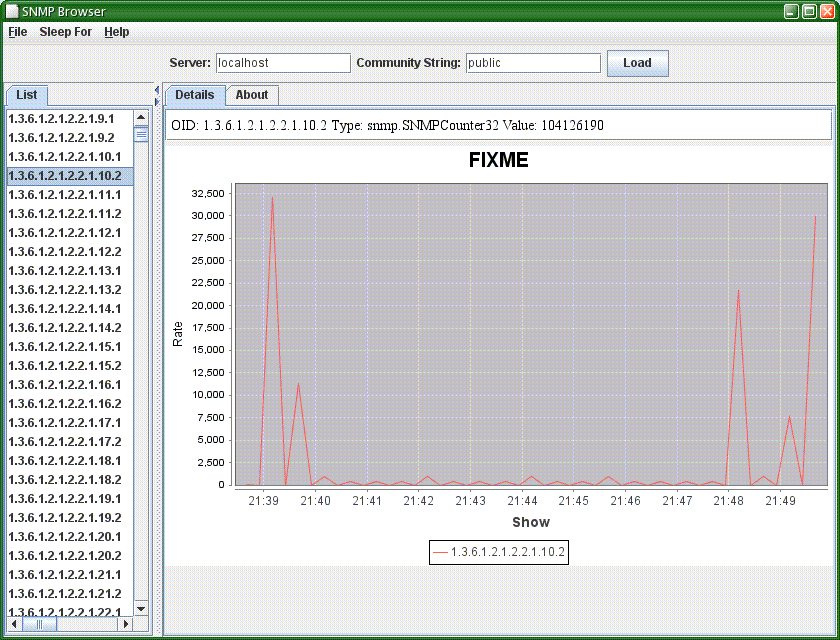
OK, so this is version 0.01. I've been able to retrieve a list of things to monitor (that's the long list of OIDs above). Clearly that needs prettifying a bit - a tree view would be a nice next step. And I can retrieve values and produce pretty charts. That's incoming bytes on my main network interface.
It's a simple proof of concept - but it proves that something can be done pretty easily, and that it works.
SolView 0.46
I've uploaded a new version of SolView. This broadly corresponds to the version I talked about at LOSUG, with one new feature.
I've improved the Jumpstart Profile Builder by adding the ability to import an existing jumpstart profile. The idea is to use this as an initial customization of the set of installed packages that you can then modify further.
In practice, this didn't work out anything like as well as I wanted it to. One of the constraints I place upon the construction of a profile is that the package selection be self consistent: package dependencies must be satisfied. (Indeed, it was the desire to be able to construct such profiles that led to writing the profile builder in the first place.) However, most existing profiles have customizations that lead to unsatisfied package dependencies. Often, fixing up such profiles as they are imported ends up simply undoing all your customizations.
The current implementation is just a first pass, so I could improve it. For example, if it encounters a dependency error on import, it could ask you whether you want to keep the customization (and add or remove other packages as necessary) or ignore the customization. The problem is that this gets you into a horrible rats nest very quickly.
In practice, I find it easier to build a new profile based on an existing one by eye - looking at what I'm trying to add or remove and replicating that in the jumpstart profile builder.
So I'm tempted not to invest too much time on this feature. However, one thing I should be able to do relatively easily is to take the import code and use it to build a profile based on a straight list of packages. For example, this could be used to generate a jumpstart profile that would reproduce an existing installed system.
I've improved the Jumpstart Profile Builder by adding the ability to import an existing jumpstart profile. The idea is to use this as an initial customization of the set of installed packages that you can then modify further.
In practice, this didn't work out anything like as well as I wanted it to. One of the constraints I place upon the construction of a profile is that the package selection be self consistent: package dependencies must be satisfied. (Indeed, it was the desire to be able to construct such profiles that led to writing the profile builder in the first place.) However, most existing profiles have customizations that lead to unsatisfied package dependencies. Often, fixing up such profiles as they are imported ends up simply undoing all your customizations.
The current implementation is just a first pass, so I could improve it. For example, if it encounters a dependency error on import, it could ask you whether you want to keep the customization (and add or remove other packages as necessary) or ignore the customization. The problem is that this gets you into a horrible rats nest very quickly.
In practice, I find it easier to build a new profile based on an existing one by eye - looking at what I'm trying to add or remove and replicating that in the jumpstart profile builder.
So I'm tempted not to invest too much time on this feature. However, one thing I should be able to do relatively easily is to take the import code and use it to build a profile based on a straight list of packages. For example, this could be used to generate a jumpstart profile that would reproduce an existing installed system.
Friday, February 27, 2009
JKstat 0.27
I pushed out JKstat 0.27 a few days ago. This is just a minor update to 0.26.
I've been playing with the client-server mode a little, and while the basic code hasn't changed it's now a bit cleaner. I added a
I also fixed a regression spotted when I updated SolView. I had changed the name of the shared library in 0.25, but 0.26 had the old name again. The reason is simple forgetfulness. I develop on an x86 machine, which normally isn't a problem, but if I do any work on the native code then I need to copy across to a sparc machine to do a recompile. I did that just before uploading, and must have forgotten to copy the final version back to my development system. Doh!
I've been playing with the client-server mode a little, and while the basic code hasn't changed it's now a bit cleaner. I added a
jkstat.bat and have been running the client on a Vista laptop quite successfully. I also enabled the ability to embed the client inside tomcat in addition to running the basic XML-RPC webserver.I also fixed a regression spotted when I updated SolView. I had changed the name of the shared library in 0.25, but 0.26 had the old name again. The reason is simple forgetfulness. I develop on an x86 machine, which normally isn't a problem, but if I do any work on the native code then I need to copy across to a sparc machine to do a recompile. I did that just before uploading, and must have forgotten to copy the final version back to my development system. Doh!
Sunday, February 15, 2009
Simple Web Services
One of the things I like about XML-RPC is that is really is astonishingly easy to implement. I like to be able to understand the code I write - and that includes the things I reuse from elsewhere. And with XML-RPC, it's even better - it's normally possible to parse the XML that comes back by eye.
Contrast that with the monstrosity that SOAP has evolved into - a huge morass of complexity, massive code size, bloat everywhere, and it's really turned into a right mess. There's been nothing simple about SOAP for a long time now.
The snag with XML-RPC is that there are a couple of rather crippling limitations. In particular, you're stuck with 32-bit integers. I've had to enable vendor extensions in order to use 64-bit longs, and while that's fine for my client code, it makes the JKstat server far less useful for clients using other frameworks and languages.
So I'm stuck in a hole. I'm going to stick with XML-RPC for now, as it will be good enough to test with and is really easy to develop against. (And the way I've implemented the remote access makes it trivial to put in new or replacement access services.)
What's the way forward? I'm not at all keen on building a full web-services stack - that defeats the whole object of the exercise. There has been some discussion recently of exposing the kstat hierarchy via SNMP, but that's clunky and depends on SNMP (great if you use SNMP already, less great if you don't). I've been looking at things like JSON-RPC and RESTful web services as alternatives. The simplest approach may just be to encode everything as Strings and convert back.
Contrast that with the monstrosity that SOAP has evolved into - a huge morass of complexity, massive code size, bloat everywhere, and it's really turned into a right mess. There's been nothing simple about SOAP for a long time now.
The snag with XML-RPC is that there are a couple of rather crippling limitations. In particular, you're stuck with 32-bit integers. I've had to enable vendor extensions in order to use 64-bit longs, and while that's fine for my client code, it makes the JKstat server far less useful for clients using other frameworks and languages.
So I'm stuck in a hole. I'm going to stick with XML-RPC for now, as it will be good enough to test with and is really easy to develop against. (And the way I've implemented the remote access makes it trivial to put in new or replacement access services.)
What's the way forward? I'm not at all keen on building a full web-services stack - that defeats the whole object of the exercise. There has been some discussion recently of exposing the kstat hierarchy via SNMP, but that's clunky and depends on SNMP (great if you use SNMP already, less great if you don't). I've been looking at things like JSON-RPC and RESTful web services as alternatives. The simplest approach may just be to encode everything as Strings and convert back.
Thursday, February 12, 2009
Client-server JKstat
One of the things I've wanted to add to JKstat for a while is some sort of client-server capability: the ability to run a server process on a machine and connect to it from a remote client which runs the GUI.
This separation of responsibility can offload the graphical processing associated with displaying the output off the server onto your desktop device. And that desktop device need not be running Solaris. Although I haven't tested it myself, there's no reason why you can't now run the client on - say - Windows.
So, how do you make this work? Having downloaded the latest (0.26) version of JKstat, unpack it, and on the server machine you wish to monitor:
where you can choose a port number, and on the client machine where you want the kstat browser to run
so it knows where to look for the server.
The current implementation is very much an experimental proof of concept. There's no access control implemented at present, for example. And the way it operates is bound to change.
At the moment, it's using Apache XML-RPC. I like XML-RPC because it's very simple to use, pretty fast, and lightweight. There are also - in principle - implementations for other languages so you don't have to use Java.
And the Apache XML-RPC implementation can either be standalone (that's the way I'm using it right now) or embedded in a servlet container. The latter would allow you to put pretty well any access control mechanism you like in place.
I'm not particularly fixated about either XML-RPC or this specific implementation, though. This was chosen first because I've used it before and know it's so easy to implement - allowing me to concentrate on the JKstat specific part and seeing how well (or badly) client-server works at all before investing a lot of effort.
In practice, XML-RPC is a pretty good match. It implements Lists (or arrays) and Maps (or hashes) as native constructs. I don't need any more complex data structures. The weakness is that while all I need to pass in those structures are Strings and Long values, the latter requires Vendor extensions, which I've had to turn on, breaking the portability aspect.
This separation of responsibility can offload the graphical processing associated with displaying the output off the server onto your desktop device. And that desktop device need not be running Solaris. Although I haven't tested it myself, there's no reason why you can't now run the client on - say - Windows.
So, how do you make this work? Having downloaded the latest (0.26) version of JKstat, unpack it, and on the server machine you wish to monitor:
./jkstat server -p 7367
where you can choose a port number, and on the client machine where you want the kstat browser to run
./jkstat remotebrowser -s http://server_name:7367/
so it knows where to look for the server.
The current implementation is very much an experimental proof of concept. There's no access control implemented at present, for example. And the way it operates is bound to change.
At the moment, it's using Apache XML-RPC. I like XML-RPC because it's very simple to use, pretty fast, and lightweight. There are also - in principle - implementations for other languages so you don't have to use Java.
And the Apache XML-RPC implementation can either be standalone (that's the way I'm using it right now) or embedded in a servlet container. The latter would allow you to put pretty well any access control mechanism you like in place.
I'm not particularly fixated about either XML-RPC or this specific implementation, though. This was chosen first because I've used it before and know it's so easy to implement - allowing me to concentrate on the JKstat specific part and seeing how well (or badly) client-server works at all before investing a lot of effort.
In practice, XML-RPC is a pretty good match. It implements Lists (or arrays) and Maps (or hashes) as native constructs. I don't need any more complex data structures. The weakness is that while all I need to pass in those structures are Strings and Long values, the latter requires Vendor extensions, which I've had to turn on, breaking the portability aspect.
Tuesday, January 27, 2009
Compression going really fast
The Sun coolthreads boxes are great for throughput, but not all that hot at single-threaded performance. One thing that seems to go particularly badly is compression.
Enter pbzip2
It can fill up all 128 threads and something that would otherwise take over half a day can be done in just over 6 minutes.
Enter pbzip2
# pbzip2 foo.tar
50187.77u 156.31s 6:39.39 12605.2%
It can fill up all 128 threads and something that would otherwise take over half a day can be done in just over 6 minutes.
Friday, January 02, 2009
Zones, multiple interfaces, and routing
Some things are reasonably obvious in hindsight. This was one of them.
I've been consolidating some old applications into zones on a Solaris server.
Some of them were on physical servers, some were already in zones on other hardware. It turned out that the applications I was consolidating lived on two different subnets, and I didn't really want to go to the trouble of changing IP addresses.
No problem. The T5140 I was using has multiple interfaces, so I connected one of the unused interfaces to the second subnet and gave it an address (the server's primary interface was already in the first subnet I was using).
Then configure up the zones, remembering that you need to choose the correct network device depending on which subnet the zone is in.
And the zones didn't work. Bother. What did I forget? This:
At least one of the network interfaces used by a zone needs to have a default route associated with it.
Specifically, that second network interface needs to have a default route added to it. For the main host, it didn't matter - it will route packets over whichever interface it needs to. But if a zone is only associated with the second network interface, it can't use the default route associated with the first interface.
I add routes explicitly, so just a quick manual
to add a default route for the second interface did the trick - you can have multiple default routes and Solaris will always use the right one.
To make this permanent, just add multiple lines to the
I've been consolidating some old applications into zones on a Solaris server.
Some of them were on physical servers, some were already in zones on other hardware. It turned out that the applications I was consolidating lived on two different subnets, and I didn't really want to go to the trouble of changing IP addresses.
No problem. The T5140 I was using has multiple interfaces, so I connected one of the unused interfaces to the second subnet and gave it an address (the server's primary interface was already in the first subnet I was using).
Then configure up the zones, remembering that you need to choose the correct network device depending on which subnet the zone is in.
And the zones didn't work. Bother. What did I forget? This:
At least one of the network interfaces used by a zone needs to have a default route associated with it.
Specifically, that second network interface needs to have a default route added to it. For the main host, it didn't matter - it will route packets over whichever interface it needs to. But if a zone is only associated with the second network interface, it can't use the default route associated with the first interface.
I add routes explicitly, so just a quick manual
route add net default 10.2.3.254
to add a default route for the second interface did the trick - you can have multiple default routes and Solaris will always use the right one.
To make this permanent, just add multiple lines to the
/etc/defaultrouter file.
Tuesday, December 16, 2008
End of an era
A year ago, the dominant computing platform in the Tribble household was the Sun workstation.
OK, so only one - my W2100z - was anything like modern, with an old Sun Blade 1500 and a couple of antiquated Sun Blade 150s used by the children.
Over the summer, the Sun Blade 150s got retired - one replaced by the Blade 1500, the other by a new laptop.
Then I was fortunate enough to get a decent enough PC free, which has replaced the Sun Blade 1500.
(And don't worry, it's set up to dual boot Windows and OpenSolaris).
So I finally sold the Sun Blade 1500 today, and the house no longer has any Sparc workstations.
OK, so only one - my W2100z - was anything like modern, with an old Sun Blade 1500 and a couple of antiquated Sun Blade 150s used by the children.
Over the summer, the Sun Blade 150s got retired - one replaced by the Blade 1500, the other by a new laptop.
Then I was fortunate enough to get a decent enough PC free, which has replaced the Sun Blade 1500.
(And don't worry, it's set up to dual boot Windows and OpenSolaris).
So I finally sold the Sun Blade 1500 today, and the house no longer has any Sparc workstations.
Monday, December 08, 2008
Solaris Link Aggregation
Setting up link aggregation in Solaris is pretty simple. First make sure you have a recent version (I'm using update 5 aka 5/08 and update 6 aka 10/08).
Then make sure your switch is configured. For example, on one of my Summit switches where I'm going to aggregate ports 7 and 8:
You can see the state of the network interfaces on the host using
Then on the host (connected to the console - trying to do this over the network is obviously going to be difficult), take down the existing interface:
Create an aggregate out of nxge0 and nxge1, with index 1 (why normal interfaces start out with index 0 and aggregations start out at 1 is one of those oddities):
And then bring the interface up:
Here I've enabled LACP (the '
I had a little play with the policy. In the command above it's set to 'L2'. This didn't work well for me - all the traffic went down one of the links. Same with 'L3'. Setting to to use both L2 and L3 seemed to work better
Monitoring the aggregate can again be done using dladm. For example, you can watch the traffic and how much goes down each link with 'dladm show-aggr -s -i 1'.
Then make sure your switch is configured. For example, on one of my Summit switches where I'm going to aggregate ports 7 and 8:
enable sharing 7 grouping 7 8 lacp
You can see the state of the network interfaces on the host using
dladm, for example:
# dladm show-dev
nxge0           link: up        speed: 1000  Mbps       duplex: full
nxge1           link: up        speed: 1000  Mbps       duplex: full
nxge2           link: unknown   speed: 0     Mbps       duplex: unknown
nxge3           link: unknown   speed: 0     Mbps       duplex: unknown
Then on the host (connected to the console - trying to do this over the network is obviously going to be difficult), take down the existing interface:
ifconfig nxge0 down unplumb
Create an aggregate out of nxge0 and nxge1, with index 1 (why normal interfaces start out with index 0 and aggregations start out at 1 is one of those oddities):
dladm create-aggr -P L2 -l passive -d nxge0 -d nxge1 1
And then bring the interface up:
and then rename /etc/hostname.nxge0 to /etc/hostname.aggr1 so the right thing happens next boot.
ifconfig aggr1 plumb
ifconfig aggr1 inet 172.18.1.1 netmask 255.255.255.0 broadcast 172.18.1.255 up
Here I've enabled LACP (the '
-l passive' flag). I'm not absolutely sure how vital this is, but I think the switch and the host need to be set compatibly.I had a little play with the policy. In the command above it's set to 'L2'. This didn't work well for me - all the traffic went down one of the links. Same with 'L3'. Setting to to use both L2 and L3 seemed to work better
and I got traffic using both links, and an aggregate throughput obviously in excess of a single gigabit.
dladm modify-aggr -P L2,L3 1
Monitoring the aggregate can again be done using dladm. For example, you can watch the traffic and how much goes down each link with 'dladm show-aggr -s -i 1'.
T5140 trouble
Had a bit of fun and games with a T5140 last week.
This was a new machine (although when I say new, we purchased it a little while ago).
Powered on, and the preinstalled Solaris just panics. Not necessarily a problem, as I reinstall anyway. But I have seen this a few times - the preinstalled system should at least boot.
So I boot using Solaris 10 10/08, and it dies on me:
Not good.
What I has to do was install Solaris 10 5/08, update the system firmware, and then install the version of Solaris I wanted.
(Which explains why my other machines are fine - they were first installed a little while ago, so has S10 5/08 on them initially. But it looks as though updating to reasonably current firmware is a really good idea.)
This was a new machine (although when I say new, we purchased it a little while ago).
Powered on, and the preinstalled Solaris just panics. Not necessarily a problem, as I reinstall anyway. But I have seen this a few times - the preinstalled system should at least boot.
So I boot using Solaris 10 10/08, and it dies on me:
Fast Data Access MMU Miss
Not good.
What I has to do was install Solaris 10 5/08, update the system firmware, and then install the version of Solaris I wanted.
(Which explains why my other machines are fine - they were first installed a little while ago, so has S10 5/08 on them initially. But it looks as though updating to reasonably current firmware is a really good idea.)
Tuesday, October 28, 2008
Scaling administration
Commenting on my last SolView post, somebody asked a question I had asked myself:
does it gracefully handle the situation where you have thousands of zfs files systems?
And I don't actually know - because I haven't actually tried it.
The original code got the list of zfs filesystems by calling
However, one of the things I've given some thought to - and one of the reasons for writing SolView in the first place - is how to get a handle on systems as they scale up. I'm not talking about managing large numbers of systems (that's an entirely separate problem), I'm talking about looking at a single system where the number of instances of an object may be measured in the tens, hundreds, or thousands.
For example, my T5140s have 128 processor threads. I have systems with 100 virtual network interfaces. Many people have systems with thousands of zfs filesystems. Zones encourage consolidation of multiple application onto a single system (so do other virtualization technologies, but in those other cases you tend to manage the instances independently), so you maybe looking at a system with dozens of zones and thousands of processes running. A thumper has 48 disks, and that's small. Using SMF, a machine typically has a couple of hundred services.
The common thread here is that the number of objects under consideration is larger than you can fit on screen (or in a terminal window, at any rate) in one go. And is thus larger than you can actually see at once. How does your brain cope with reading the output from running
As we move into this brave new world, we're going to need better tools in the areas of sorting, aggregation, and filtering.
A couple of examples from SolView and (originally) JKstat:
I wrote a lookalike of xcpustate for JKstat. That works great on my desktop. But my desktop isn't big enough to show a copy of it running on a T5140, so I wrote an enhanced version (now shipping with SolView) that shows the aggregate statistics for cores and chips, and allows you to hide the threads or cores, which makes the amount of information thrown at your eyeballs at any given time rather more manageable.
Another example is that the original view of SMF services in SolView was just a linear list. I then wrote a tree view, based on the (apparently) hierarchical names of the services. I found that the imposition of structure - even a structure that's mostly artificial - helps the brain focus on the information rather than be overwhelmed by a flat unstructured list. And that structure breaks the services down into chunks that are small enough for the user to handle easily.
So back to the example of huge numbers of ZFS filesystems. So the plan is to show them in the display grouped in the same hierarchy as the filesystems themselves, rather than as a plain list. And to show snapshots as children of their parent filesystem. So everything possible to break things down into more manageable chunks.
This relies on the underlying data being structured. I'm assuming that when someone has 100,000 filesystems that they are structured somehow - whether by department or hashed by name or whatever - rather than being a great unstructured mess. I can't create order out of chaos, but the tools we use should do everything they can to use what order they can find to create a structure that's easy to comprehend.
does it gracefully handle the situation where you have thousands of zfs files systems?
And I don't actually know - because I haven't actually tried it.
The original code got the list of zfs filesystems by calling
zfs list (which is now all it does) and then retrieved all the properties for each one - whether you viewed them or not. I soon scrapped that loop, as it was obvious that it doesn't scale. So I think my code is about as efficient as it can be - it's going to scale as well as the underlying tools do.However, one of the things I've given some thought to - and one of the reasons for writing SolView in the first place - is how to get a handle on systems as they scale up. I'm not talking about managing large numbers of systems (that's an entirely separate problem), I'm talking about looking at a single system where the number of instances of an object may be measured in the tens, hundreds, or thousands.
For example, my T5140s have 128 processor threads. I have systems with 100 virtual network interfaces. Many people have systems with thousands of zfs filesystems. Zones encourage consolidation of multiple application onto a single system (so do other virtualization technologies, but in those other cases you tend to manage the instances independently), so you maybe looking at a system with dozens of zones and thousands of processes running. A thumper has 48 disks, and that's small. Using SMF, a machine typically has a couple of hundred services.
The common thread here is that the number of objects under consideration is larger than you can fit on screen (or in a terminal window, at any rate) in one go. And is thus larger than you can actually see at once. How does your brain cope with reading the output from running
df on 10,000 filesystems?As we move into this brave new world, we're going to need better tools in the areas of sorting, aggregation, and filtering.
A couple of examples from SolView and (originally) JKstat:
I wrote a lookalike of xcpustate for JKstat. That works great on my desktop. But my desktop isn't big enough to show a copy of it running on a T5140, so I wrote an enhanced version (now shipping with SolView) that shows the aggregate statistics for cores and chips, and allows you to hide the threads or cores, which makes the amount of information thrown at your eyeballs at any given time rather more manageable.
Another example is that the original view of SMF services in SolView was just a linear list. I then wrote a tree view, based on the (apparently) hierarchical names of the services. I found that the imposition of structure - even a structure that's mostly artificial - helps the brain focus on the information rather than be overwhelmed by a flat unstructured list. And that structure breaks the services down into chunks that are small enough for the user to handle easily.
So back to the example of huge numbers of ZFS filesystems. So the plan is to show them in the display grouped in the same hierarchy as the filesystems themselves, rather than as a plain list. And to show snapshots as children of their parent filesystem. So everything possible to break things down into more manageable chunks.
This relies on the underlying data being structured. I'm assuming that when someone has 100,000 filesystems that they are structured somehow - whether by department or hashed by name or whatever - rather than being a great unstructured mess. I can't create order out of chaos, but the tools we use should do everything they can to use what order they can find to create a structure that's easy to comprehend.
Monday, October 27, 2008
SolView moves ahead
I've been working on a few new features in SolView, and it's about time for a new release. So that's version 0.45 out of the door.
The major feature this time is a sneak peek of a prototype I've put together for the System Explorer. See the image here for a sample:

You can see the left hand panel containing a tree view of the various bits of the system that SolView has found. Selecting any of them show whatever information I can find - either by running external commands, or by using JKstat to grab statistics.
This is both skeletal and a prototype. But it does try to answer the question: what's in my system, and how do the bits relate to each other? It's the relationships that I'm trying to capture: so I have a disk, but what's it used for, and where's the load on it coming from? And there's clearly a lot more to do in this regard.
The major feature this time is a sneak peek of a prototype I've put together for the System Explorer. See the image here for a sample:
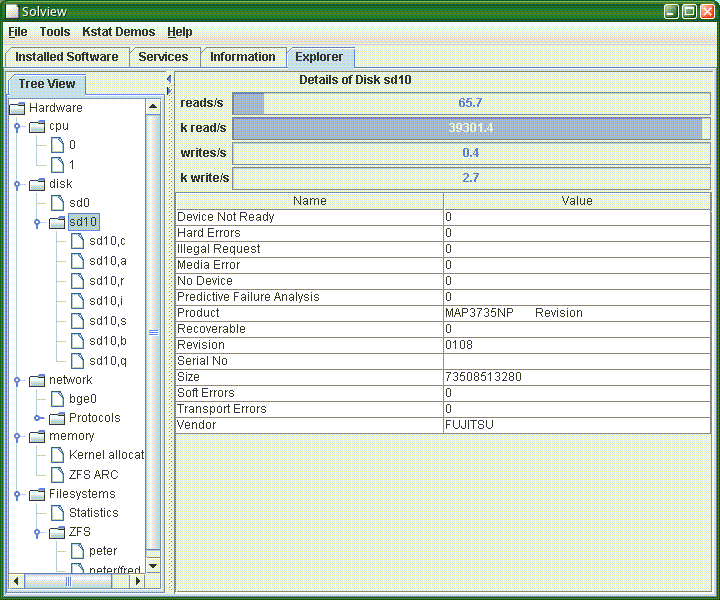
You can see the left hand panel containing a tree view of the various bits of the system that SolView has found. Selecting any of them show whatever information I can find - either by running external commands, or by using JKstat to grab statistics.
This is both skeletal and a prototype. But it does try to answer the question: what's in my system, and how do the bits relate to each other? It's the relationships that I'm trying to capture: so I have a disk, but what's it used for, and where's the load on it coming from? And there's clearly a lot more to do in this regard.
Sunday, October 26, 2008
MilaX - Wow!
I've been playing around on my laptop today. It's a fairly basic model - with a pretty large screen - that I normally just use for simple connectivity. So the fact that it's running Vista doesn't bother me, as it can launch firefox, VNC, and putty just fine.
I wanted to play around with OpenSolaris on it, which is a bit tricky - it doesn't work right on the metal (I can manually get the wired network to function, but never got the wireless going). So I'm back to running stuff under VirtualBox. Which would be easy if I had a decent amount of memory to play with, but the laptop has 768M and Sun's OpenSolaris distro needs pretty much all of that, so it's not going to work.
Enter Milax. Not only is the download tiny, but it claims to boot graphically in 256M, and CLI in 128M. So I gave it 384M in VirtualBox, and it works just fine!
It's a fabulous little distro. There's no room in that footprint for all the bloat we're used to - no desktop environment, no office suite, no java - but it works, and is really very slick.
In many ways I feel right at home: a standalone window manager and individual applications, all very lightweight, and reminds me of the energy of the 90s before the big desktop environments turned computing into a desolate wasteland.
I wanted to play around with OpenSolaris on it, which is a bit tricky - it doesn't work right on the metal (I can manually get the wired network to function, but never got the wireless going). So I'm back to running stuff under VirtualBox. Which would be easy if I had a decent amount of memory to play with, but the laptop has 768M and Sun's OpenSolaris distro needs pretty much all of that, so it's not going to work.
Enter Milax. Not only is the download tiny, but it claims to boot graphically in 256M, and CLI in 128M. So I gave it 384M in VirtualBox, and it works just fine!
It's a fabulous little distro. There's no room in that footprint for all the bloat we're used to - no desktop environment, no office suite, no java - but it works, and is really very slick.
In many ways I feel right at home: a standalone window manager and individual applications, all very lightweight, and reminds me of the energy of the 90s before the big desktop environments turned computing into a desolate wasteland.
Monday, October 20, 2008
Refactored JKstat
As I mentioned about a month ago, both JKstat and SolView were in line for some major refactoring.
I've done a bit of a spring clean on JKstat, so there's a new version - 0.25 - which has a lot of the cleanups and shuffling about that I had in mind. The class hierarchy has been restructured, code cleanup continues, and the more complex demos have been moved to SolView. The restructuring also allows the easy construction of a jar file containing just the API, so you don't need to drag in all the bloat associated with the browser, gui components, and demos.
The associated SolView release will follow shortly.
And thanks to Mike Duigou for a bunch of helpful fixes and suggestions!
I've done a bit of a spring clean on JKstat, so there's a new version - 0.25 - which has a lot of the cleanups and shuffling about that I had in mind. The class hierarchy has been restructured, code cleanup continues, and the more complex demos have been moved to SolView. The restructuring also allows the easy construction of a jar file containing just the API, so you don't need to drag in all the bloat associated with the browser, gui components, and demos.
The associated SolView release will follow shortly.
And thanks to Mike Duigou for a bunch of helpful fixes and suggestions!
Wednesday, September 24, 2008
Would you pass?
Sun have made some free pre-assessment tests available.
Just for fun, I went through the UNIX Essentials one. Would I pass? (Given that I have never had any formal training and have a rather eclectic skills mix it's not a foregone conclusion.)
According to the test, yes. I got a whopping 37/42 which is clearly enough to pass.
I suspect, though, that this says more about the accuracy (and grammatical validity, in one case) of the questions. One of the questions was incapable of being parsed into english, and I had to guess at random. Another one had two possible correct answers depending on factors you weren't told about. Another one had no correct answer on a vanilla Solaris system. There were a couple of questions that I looked at and thought to myself 'you wouldn't ever do it like that'.
(Plus a couple of questions on stuff that I would never use under any circumstances. I had a similar test when I applied for my current job, and my answer to every question mentioning vi was ':q' and use a proper editor.)
I tried the SCSA sample tests - scoring a little better on the part I test, and slightly lower on the part II. But again, there were questions that were simply wrong; some where the correct answer would always be 'look it up in the man page'; some artificially contrived questions; and I'm more than a little concerned about the coverage and subject matter. And on the SCSA tests there are a couple of areas where I haven't done much for a few years now (my OBP and LDAP skills are obviously getting a little rusty).
Just for fun, I went through the UNIX Essentials one. Would I pass? (Given that I have never had any formal training and have a rather eclectic skills mix it's not a foregone conclusion.)
According to the test, yes. I got a whopping 37/42 which is clearly enough to pass.
I suspect, though, that this says more about the accuracy (and grammatical validity, in one case) of the questions. One of the questions was incapable of being parsed into english, and I had to guess at random. Another one had two possible correct answers depending on factors you weren't told about. Another one had no correct answer on a vanilla Solaris system. There were a couple of questions that I looked at and thought to myself 'you wouldn't ever do it like that'.
(Plus a couple of questions on stuff that I would never use under any circumstances. I had a similar test when I applied for my current job, and my answer to every question mentioning vi was ':q' and use a proper editor.)
I tried the SCSA sample tests - scoring a little better on the part I test, and slightly lower on the part II. But again, there were questions that were simply wrong; some where the correct answer would always be 'look it up in the man page'; some artificially contrived questions; and I'm more than a little concerned about the coverage and subject matter. And on the SCSA tests there are a couple of areas where I haven't done much for a few years now (my OBP and LDAP skills are obviously getting a little rusty).
Tuesday, September 23, 2008
On OpenSolaris Change
When I noted that Sun's plans for OpenSolaris threatened the Solaris ecosystem, I got a mixed bag of comments.
Some of the comments missed the point, which is that compatibility (across the board) is a key strength, and that producing something that forces what is essentially a new platform on the world will drive away old customers without necessarily attracting new ones.
The key point is compatibility. And while modernization is essential (I'll come back to that later), it is possible to do it compatibly, in an evolutionary manner, rather than doing a rip and replace job.
Evolutionary change allows you to keep existing customers who thus have an easier migration path; makes it easier for new adopters who can tap into the existing skills pool; and allows the improvements to be fed back to older (ie. current, such as Solaris 10) releases which still have a long service life ahead of them.
Replacing the packaging system and installer from scratch is just something you should never do. It's probably cost the Solaris/OpenSolaris ecosystem about 2 years, and we can only hope that we can eventually recover in the way that Firefox did after Netscape's mistake.
Some of the comments missed the point, which is that compatibility (across the board) is a key strength, and that producing something that forces what is essentially a new platform on the world will drive away old customers without necessarily attracting new ones.
The key point is compatibility. And while modernization is essential (I'll come back to that later), it is possible to do it compatibly, in an evolutionary manner, rather than doing a rip and replace job.
Evolutionary change allows you to keep existing customers who thus have an easier migration path; makes it easier for new adopters who can tap into the existing skills pool; and allows the improvements to be fed back to older (ie. current, such as Solaris 10) releases which still have a long service life ahead of them.
Replacing the packaging system and installer from scratch is just something you should never do. It's probably cost the Solaris/OpenSolaris ecosystem about 2 years, and we can only hope that we can eventually recover in the way that Firefox did after Netscape's mistake.
Saturday, September 20, 2008
Too radical a change?
Attempting to predict the future is difficult, but what I do know about Sun's plans for Solaris and OpenSolaris fills me with concern.
What we seem to be looking at is an OpenSolaris derived replacement for Solaris. Which means a completely replaced packaging system and installer. Being essentially incompatible with what we currently have, this means a fork-lift upgrade: you can't simply go forward as you are before.
Forcing change upon customers is bad. It makes the upgrade a decision point, and customers are then forced to make a choice. So what might customers do? Let's consider some classes of customer:
Solaris-only shops: they have to go from what they have to something different. So given that they have to change, some might take the replacement; I suspect many will choose something different.
Heterogeneous shops: many large shops are heterogeneous, and already support multiple platforms. I see significant resistance to adopting any new platforms, and many shops will simply migrate to one of their existing platforms rather than adopt a new one.
Alien shops: there's going to be problems getting a new platform into a shop that doesn't already use Solaris. Solaris is mature, well tested, has a reasonable number of practitioners available in the job market. An OpenSolaris based platform may be unattractive to such shops: not only would they be unable to bring in expertise for something new, but Sun are advertising it as just the same as Linux, so why would they change to something that isn't different?
So, as I see it, scrapping Solaris and replacing it with a fundamentally different OpenSolaris distribution is going to drive a fraction (possibly quite a large fraction) of the existing Solaris base to other platforms, and I simply can't see any corresponding takeup of new deployments.
Contrast this with the story if you take the existing Solaris and produce a new version (Solaris 11 would be the obvious numbering) that uses the same packaging, installation, deployment, and administration tools as the existing Solaris. In other words, that could be deployed painlessly and seamlessly without any need for additional training or rebuilding new administrative infrastructure, but contains all the advancements that have been made to OpenSolaris in the last 4 years - things such as CIFS client and server, Crossbow, NFS enhancements, and an updated desktop just to name a few. Existing users would simply adopt it as a logical progression; new users would be more attracted because they could concentrate on the technical features and would be able to take advantage of the pool of experience available to deploy it.
The problem is simply one of change. The technical merits of the old and new systems are essentially irrelevant to the discussion. Given how dangerous change is, why is OpenSolaris so insistent on rip and replace rather than improving and enhancing what we already have?
What we seem to be looking at is an OpenSolaris derived replacement for Solaris. Which means a completely replaced packaging system and installer. Being essentially incompatible with what we currently have, this means a fork-lift upgrade: you can't simply go forward as you are before.
Forcing change upon customers is bad. It makes the upgrade a decision point, and customers are then forced to make a choice. So what might customers do? Let's consider some classes of customer:
Solaris-only shops: they have to go from what they have to something different. So given that they have to change, some might take the replacement; I suspect many will choose something different.
Heterogeneous shops: many large shops are heterogeneous, and already support multiple platforms. I see significant resistance to adopting any new platforms, and many shops will simply migrate to one of their existing platforms rather than adopt a new one.
Alien shops: there's going to be problems getting a new platform into a shop that doesn't already use Solaris. Solaris is mature, well tested, has a reasonable number of practitioners available in the job market. An OpenSolaris based platform may be unattractive to such shops: not only would they be unable to bring in expertise for something new, but Sun are advertising it as just the same as Linux, so why would they change to something that isn't different?
So, as I see it, scrapping Solaris and replacing it with a fundamentally different OpenSolaris distribution is going to drive a fraction (possibly quite a large fraction) of the existing Solaris base to other platforms, and I simply can't see any corresponding takeup of new deployments.
Contrast this with the story if you take the existing Solaris and produce a new version (Solaris 11 would be the obvious numbering) that uses the same packaging, installation, deployment, and administration tools as the existing Solaris. In other words, that could be deployed painlessly and seamlessly without any need for additional training or rebuilding new administrative infrastructure, but contains all the advancements that have been made to OpenSolaris in the last 4 years - things such as CIFS client and server, Crossbow, NFS enhancements, and an updated desktop just to name a few. Existing users would simply adopt it as a logical progression; new users would be more attracted because they could concentrate on the technical features and would be able to take advantage of the pool of experience available to deploy it.
The problem is simply one of change. The technical merits of the old and new systems are essentially irrelevant to the discussion. Given how dangerous change is, why is OpenSolaris so insistent on rip and replace rather than improving and enhancing what we already have?
Tuesday, September 16, 2008
Better documentation style
I don't write as much documentation as I should, and frankly what I do write often isn't done that well. But the OpenSolaris Editorial Cheat Sheet contains a lot of useful advice and hints condensed into a small space. Now, if I could just relearn my writing style my documentation wouldn't look like it was written in such an amateurish fashion!
Monday, September 15, 2008
Solaris Advantages
I make extensive use of Solaris, so thought it would be worth summarizing some of the key advantages that it brings for me. Other people might consider other aspects important, and you could construct similar lists for other platforms.
Compatibility - software that works on one release or for a given patch revision of Solaris is pretty well guaranteed to run subsequently. This is huge, and isn't generally true for other platforms. I've got 20-year old applications running happily day in, day out. By and large, everything just works, and continues to work.
Installation Automation - jumpstart is a huge competitive advantage. You can trivially deploy systems, being able to completely reproduce a configuration, and roll out systems and updates effortlessly.
Lightweight virtualization - Zones, especially sparse root zones, allow you to consolidate large numbers of small systems onto a server, with minimal overhead and without adding to the management overhead normally associated with adding another system to your network. (Note that the real advantage here comes from the use of sparse root zones, which not only guarantee that the zone looks like its parent, but mean that you don't manage the software on the zones at all but just manage the parent host. Whole root zones aren't as lightweight and don't have anything like the same advantages, and branded zones - while a neat trick - don't have any compelling advantages over other virtualization solutions.)
ZFS - for storage on a massive scale, combined with ease of management, and the ability to verify that your data is what you though it was, this is key. To that you can add snapshots (which we use automatically now any time we change something, which makes our backout plans for a change request way simpler than they used to be), and compression (storing text - or xml - files just got a whole lot cheaper), and it's free.
Ease of management - while Sun have generally failed completely to provide advanced management tools, the fact is that you don't need them - the underlying facilities in Solaris are pretty solid and it's trivial to write your own layer of tools on top, and integrate Solaris into a range of other tools. Not only that, but the tools are consistent - while things do evolve, you don't have to completely relearn how to manage the system on a regular and frequent basis.
Cheap - it's free, and not only that but you don't have to pay for a 3rd-party virtualization solution, I/O multipathing, volume manager, or filesystem, as they're all included.
Compatibility - software that works on one release or for a given patch revision of Solaris is pretty well guaranteed to run subsequently. This is huge, and isn't generally true for other platforms. I've got 20-year old applications running happily day in, day out. By and large, everything just works, and continues to work.
Installation Automation - jumpstart is a huge competitive advantage. You can trivially deploy systems, being able to completely reproduce a configuration, and roll out systems and updates effortlessly.
Lightweight virtualization - Zones, especially sparse root zones, allow you to consolidate large numbers of small systems onto a server, with minimal overhead and without adding to the management overhead normally associated with adding another system to your network. (Note that the real advantage here comes from the use of sparse root zones, which not only guarantee that the zone looks like its parent, but mean that you don't manage the software on the zones at all but just manage the parent host. Whole root zones aren't as lightweight and don't have anything like the same advantages, and branded zones - while a neat trick - don't have any compelling advantages over other virtualization solutions.)
ZFS - for storage on a massive scale, combined with ease of management, and the ability to verify that your data is what you though it was, this is key. To that you can add snapshots (which we use automatically now any time we change something, which makes our backout plans for a change request way simpler than they used to be), and compression (storing text - or xml - files just got a whole lot cheaper), and it's free.
Ease of management - while Sun have generally failed completely to provide advanced management tools, the fact is that you don't need them - the underlying facilities in Solaris are pretty solid and it's trivial to write your own layer of tools on top, and integrate Solaris into a range of other tools. Not only that, but the tools are consistent - while things do evolve, you don't have to completely relearn how to manage the system on a regular and frequent basis.
Cheap - it's free, and not only that but you don't have to pay for a 3rd-party virtualization solution, I/O multipathing, volume manager, or filesystem, as they're all included.
Sunday, September 14, 2008
Refactoring solview and jkstat
Originally, JKstat and SolView were completely separate.
The latest released version of SolView comes with JKstat, so you can launch some of the JKstat demos.
I'm looking at much closer ties between the two. I've had a much more in-depth use for JKstat in mind all along, and the way I'm doing it is by adding what I'm calling a "System Explorer" to SolView.
So SolView will have a view of all the interesting components of a system: processors (chips, cores, and threads), memory, disks, filesystems, networks. Anything else if I can think of how to do it. And then will display pretty much everything you can about the selected object. A lot of that information is gleaned from kstats using JKstat.
From that point of view, something like the ZFS ARC demo makes more sense as a sophisticated component inside SolView rather than a standalone JKstat demo application.
So what I'm planning on doing (and this may take a while) is to have a spring clean of the demos in JKstat, removing the bad ones entirely and moving the more complex and involved ones to SolView. And then splitting JKstat into two logically separate parts: the core API (which has no graphical components), and the graphical browser with some basic demos. The two parts of JKstat will still be developed together, although I wouldn't expect that much development once the process is complete, as JKstat will be stable and the higher-level fancy tools will be developed independently under the SolView banner.
The latest released version of SolView comes with JKstat, so you can launch some of the JKstat demos.
I'm looking at much closer ties between the two. I've had a much more in-depth use for JKstat in mind all along, and the way I'm doing it is by adding what I'm calling a "System Explorer" to SolView.
So SolView will have a view of all the interesting components of a system: processors (chips, cores, and threads), memory, disks, filesystems, networks. Anything else if I can think of how to do it. And then will display pretty much everything you can about the selected object. A lot of that information is gleaned from kstats using JKstat.
From that point of view, something like the ZFS ARC demo makes more sense as a sophisticated component inside SolView rather than a standalone JKstat demo application.
So what I'm planning on doing (and this may take a while) is to have a spring clean of the demos in JKstat, removing the bad ones entirely and moving the more complex and involved ones to SolView. And then splitting JKstat into two logically separate parts: the core API (which has no graphical components), and the graphical browser with some basic demos. The two parts of JKstat will still be developed together, although I wouldn't expect that much development once the process is complete, as JKstat will be stable and the higher-level fancy tools will be developed independently under the SolView banner.
Friday, September 05, 2008
How to confuse ImageMagick
I mentioned some huge files generated by ImageMagick.
I worked out what was going wrong. What we do is take a 600dpi original and generate a bunch of images at different resolutions and formats. Looking at the headers:
That's odd. Someone has fiddled with the image.
Hm. Not so bad.
Yikes! If my calculations are correct that's 1 dpi.
So when I resize it to 300 dpi I end up trying to create a 882900x1237800 image. 10^12 pixels. No wonder it can't cope.
Moral of the story: never trust your input data.
I worked out what was going wrong. What we do is take a 600dpi original and generate a bunch of images at different resolutions and formats. Looking at the headers:
Software: Adobe Photoshop CS2 Windows
That's odd. Someone has fiddled with the image.
Image Width: 2943 Image Length: 4126
Hm. Not so bad.
Resolution: 0.393, 0.393 pixels/cm
Yikes! If my calculations are correct that's 1 dpi.
So when I resize it to 300 dpi I end up trying to create a 882900x1237800 image. 10^12 pixels. No wonder it can't cope.
Moral of the story: never trust your input data.
Thursday, September 04, 2008
When to bury the pager
If anyone's been following me on twitter recently you may have noticed a few fraught messages about SANs and pagers.
We have an on-call rota. Being a relatively small department, this actually means that we cover the entire department - so it's possible that I might get a call to sort out a Windows problem, or that one of the Windows guys might get to sort out one of my Sun servers. But it's not usually too stressful.
This last week has been a bit of a nightmare and the problem has been so bad and so apparently intractable that I've simply buried the pager, turned off notification of email and texts on the phone, and relied on someone phoning me if anything new came up. Otherwise I would get woken up several hundred times a night for no good purpose.
Of course, today being the final day of my stint (yay!) I finally work out what's causing it.
What we've been having is the SAN storage on one of our boxes going offline. Erratically, unpredictably, and pretty often. Started last Friday, continuing on and off since.
This isn't the first time. We've seen some isolated panics, and updated drivers. They fix the panic, for sure, but now it just stays broken when it sees a problem. The system vendor, the storage vendor, and the HBA vendor got involved.
We've tried a number of fixes. Replaced the HBA. Made no difference. Put another HBA in a different slot. Made no difference. Tried running one port on each HBA rather than 2 on one. Made no difference. We're seeing problems down all paths to the storage (pretty much equally).
Last night (OK, early this morning) I noticed that the block addresses that were reporting errors weren't entirely random. There were a set of blocks that were being reported again and again. And the errors come in groups, but each group contained one of the common blocks (presumably the other were just random addresses that happened to be being accessed during the error state).
I've had conversations with some users who've been having trouble getting one of their applications to run to completion with all the problems we've had. And they're getting fraught because they have deadlines to meet.
And then I start putting two and two together. Can I find out exactly when they were running their application? OK, so they started last Friday (just about when the problem started). And we know that the system was fine for a while after a reboot, and going back it turns out that either a plain reboot, or a reboot for hardware replacement, kills whatever they're doing, and it may be later in the evening or the next morning before they start work again.
So, it's an absolutely massive coincidence - an almost perfect correlation - that we have problems that kill the entire system for hours an hour after they start their applications up, and the problems finish within seconds of their application completing a task.
So, it looks very much like there's something in their data that's killing either the SAN, the HBA, or the driver. Some random pattern of bits that causes something involved to just freak out. (I don't really thing it's a storage hardware error. It could be, but there are so many layers of abstraction and virtualisation in the way that a regular bad block would get mangled long before it gets to my server.) And it's only the one dataset that's causing grief - we have lots of other applications, and lots of servers, and none of them are seeing significant problems.
So, we can fix the problem - just don't run that thing!
And then I realize that I've seen this before. Now that's on a completely different model of server running a different version of solaris running a different filesystem on different storage. But it's files (different files) but from the same project. Creepy.
We have an on-call rota. Being a relatively small department, this actually means that we cover the entire department - so it's possible that I might get a call to sort out a Windows problem, or that one of the Windows guys might get to sort out one of my Sun servers. But it's not usually too stressful.
This last week has been a bit of a nightmare and the problem has been so bad and so apparently intractable that I've simply buried the pager, turned off notification of email and texts on the phone, and relied on someone phoning me if anything new came up. Otherwise I would get woken up several hundred times a night for no good purpose.
Of course, today being the final day of my stint (yay!) I finally work out what's causing it.
What we've been having is the SAN storage on one of our boxes going offline. Erratically, unpredictably, and pretty often. Started last Friday, continuing on and off since.
This isn't the first time. We've seen some isolated panics, and updated drivers. They fix the panic, for sure, but now it just stays broken when it sees a problem. The system vendor, the storage vendor, and the HBA vendor got involved.
We've tried a number of fixes. Replaced the HBA. Made no difference. Put another HBA in a different slot. Made no difference. Tried running one port on each HBA rather than 2 on one. Made no difference. We're seeing problems down all paths to the storage (pretty much equally).
Last night (OK, early this morning) I noticed that the block addresses that were reporting errors weren't entirely random. There were a set of blocks that were being reported again and again. And the errors come in groups, but each group contained one of the common blocks (presumably the other were just random addresses that happened to be being accessed during the error state).
I've had conversations with some users who've been having trouble getting one of their applications to run to completion with all the problems we've had. And they're getting fraught because they have deadlines to meet.
And then I start putting two and two together. Can I find out exactly when they were running their application? OK, so they started last Friday (just about when the problem started). And we know that the system was fine for a while after a reboot, and going back it turns out that either a plain reboot, or a reboot for hardware replacement, kills whatever they're doing, and it may be later in the evening or the next morning before they start work again.
So, it's an absolutely massive coincidence - an almost perfect correlation - that we have problems that kill the entire system for hours an hour after they start their applications up, and the problems finish within seconds of their application completing a task.
So, it looks very much like there's something in their data that's killing either the SAN, the HBA, or the driver. Some random pattern of bits that causes something involved to just freak out. (I don't really thing it's a storage hardware error. It could be, but there are so many layers of abstraction and virtualisation in the way that a regular bad block would get mangled long before it gets to my server.) And it's only the one dataset that's causing grief - we have lots of other applications, and lots of servers, and none of them are seeing significant problems.
So, we can fix the problem - just don't run that thing!
And then I realize that I've seen this before. Now that's on a completely different model of server running a different version of solaris running a different filesystem on different storage. But it's files (different files) but from the same project. Creepy.
Thank heaven for sparse files!
We use ImageMagick to do a lot of image processing. I'm not sure what it's up to, but some processing needs to create temporary working files that can be quite large (in /var/tmp by default, I've moved them with TMPDIR because that filled up).
However, I now see this:
or, in more readable units a few seconds later:
Ouch. That's on an internal 146G drive.
What on earth is it doing with a 154 terabyte file?
However, I now see this:
/bin/ls -l /storage/tmp
total 203037932
-rw-------   1 user grp       169845176062560 Sep  4 11:18 magick-XXT0aaXE
-rw-------   1 user grp       222497224416 Sep  4 13:24 magick-XXU0aaXE
-rw-------   1 user grp       11499827272024 Sep  4 13:11 magick-XXbFaiKF
-rw-------   1 user grp       15064771904 Sep  4 13:24 magick-XXcFaiKF
-rw-------   1 user grp       18904557170048 Sep  4 10:51 magick-XXtlaGCE
-rw-------   1 user grp       24764978480 Sep  4 13:24 magick-XXulaGCE
or, in more readable units a few seconds later:
/bin/ls -lhs /storage/tmp
total 203038194
33272257 -rw-------   1 user grp          154T Sep  4 11:18 magick-XXT0aaXE
34295031 -rw-------   1 user grp          207G Sep  4 13:24 magick-XXU0aaXE
29432967 -rw-------   1 user grp           10T Sep  4 13:11 magick-XXbFaiKF
9271301 -rw-------   1 user grp           14G Sep  4 13:24 magick-XXcFaiKF
48382483 -rw-------   1 user grp           17T Sep  4 10:51 magick-XXtlaGCE
48384155 -rw-------   1 user grp           23G Sep  4 13:24 magick-XXulaGCE
Ouch. That's on an internal 146G drive.
What on earth is it doing with a 154 terabyte file?
Thursday, August 28, 2008
JKstat meets the ZFS ARC
Recently, Ben Rockwood posted a useful script to display ZFS cache statistics.
Now, all it's doing is grabbing kstats, so it wasn't much of a stretch to put together a new version of JKstat that has a new demo to display the ZFS cache statistics. Try
(Requires OpenSolaris, Solaris Nevada, or Solaris 10 8/07 or later to actually have the kstats to display.)
This release of JKstat is a bit rough, as there are a few other things I was working on that aren't neatly finished off yet, but I thought it worth putting out just for the arcstat demo - any comments and suggestions for improvement would be gratefully appreciated!
So, download JKstat now - and here's a little snapshot of the new demo:

Now, all it's doing is grabbing kstats, so it wasn't much of a stretch to put together a new version of JKstat that has a new demo to display the ZFS cache statistics. Try
.
jkstat arcstat
(Requires OpenSolaris, Solaris Nevada, or Solaris 10 8/07 or later to actually have the kstats to display.)
This release of JKstat is a bit rough, as there are a few other things I was working on that aren't neatly finished off yet, but I thought it worth putting out just for the arcstat demo - any comments and suggestions for improvement would be gratefully appreciated!
So, download JKstat now - and here's a little snapshot of the new demo:
Wednesday, August 27, 2008
Computers - unpredictable creatures
Computers are unpredictable beasts. You would think they would be more deterministic, but reality is otherwise.
I have a server with a tape drive. We've used it for about a year, most days. Then suddenly we start getting errors. At first we thought it was a bad tape, but then multiple tapes started giving us grief. Easy enough, just use a different drive. I finally got around to debugging it last week. Swapped the drives over - still errors. Turned out to be a bad cable. That's a new one - I've not seen a SCSI cable fail like that before. (Usually they fail straight away or when you change something, not after working stably and untouched for the best part of a year.)
Yesterday I set up SNMP on some machines for monitoring purposes. Pointed the monitoring system at them, and a couple of minutes later a couple stop responding. That wasn't part of the plan. So I go to the LOM interface, and they're powered off. Call the datacenter, they haven't done anything. I have seen strange things, but snmp (running unprivileged, I might add) powering a machine off when queried? So I tell them to power themselves back on. One comes up fine, the other boots but no ZFS filesystems or zones. I try format. No SAN disks. And then:
I still don't know what happened, but some electrical gremlins had gotten into the works. So the machines had obviously shut themselves off due to lack of power. And I'm guessing that the PSUs were capable of supplying just enough power to boot the machine, but not enough to get the HBAs powered up properly. Another new failure mode to go in the book.
I have a server with a tape drive. We've used it for about a year, most days. Then suddenly we start getting errors. At first we thought it was a bad tape, but then multiple tapes started giving us grief. Easy enough, just use a different drive. I finally got around to debugging it last week. Swapped the drives over - still errors. Turned out to be a bad cable. That's a new one - I've not seen a SCSI cable fail like that before. (Usually they fail straight away or when you change something, not after working stably and untouched for the best part of a year.)
Yesterday I set up SNMP on some machines for monitoring purposes. Pointed the monitoring system at them, and a couple of minutes later a couple stop responding. That wasn't part of the plan. So I go to the LOM interface, and they're powered off. Call the datacenter, they haven't done anything. I have seen strange things, but snmp (running unprivileged, I might add) powering a machine off when queried? So I tell them to power themselves back on. One comes up fine, the other boots but no ZFS filesystems or zones. I try format. No SAN disks. And then:
# fcinfo hba-portYikes! It had a couple of fiber-channel HBAs in it a few minutes ago.
No Adapters Found.
I still don't know what happened, but some electrical gremlins had gotten into the works. So the machines had obviously shut themselves off due to lack of power. And I'm guessing that the PSUs were capable of supplying just enough power to boot the machine, but not enough to get the HBAs powered up properly. Another new failure mode to go in the book.
Saturday, July 05, 2008
The gardening release
I've been developing SolView and JKstat for a while. Over time, code goes stale so I thought it was time for a good cleanup.
Rather than trying to spot all the bad code by eye, I sought a tool that would find unused code, unused imports, and generally find problems automatically. (And I already run javac with the -Xlint:unchecked flag, and use the OpenSolaris jstyle utility.)
After a little looking around, I found PMD and find it very useful. It's done an excellent job of finding poor code. Fortunately, it hasn't found any killer bugs, but has pointed out plenty of cases where I've been sloppy. One bad habit I've got into is unnecessarily declaring class fields rather than local variables, for example. So I recommend it. (I don't regard this as the end of the exercise - I plan to keep looking to see what other static analysis tools can tell me about my code.)
As a result, I've released new versions of SolView and JKstat that have been cleaned up. I haven't done much else to JKstat, although I have enabled the ability for SolView to just show the panel you're primarily interested in (such as just the services, or the general information) which makes it rather lighter weight.
Rather than trying to spot all the bad code by eye, I sought a tool that would find unused code, unused imports, and generally find problems automatically. (And I already run javac with the -Xlint:unchecked flag, and use the OpenSolaris jstyle utility.)
After a little looking around, I found PMD and find it very useful. It's done an excellent job of finding poor code. Fortunately, it hasn't found any killer bugs, but has pointed out plenty of cases where I've been sloppy. One bad habit I've got into is unnecessarily declaring class fields rather than local variables, for example. So I recommend it. (I don't regard this as the end of the exercise - I plan to keep looking to see what other static analysis tools can tell me about my code.)
As a result, I've released new versions of SolView and JKstat that have been cleaned up. I haven't done much else to JKstat, although I have enabled the ability for SolView to just show the panel you're primarily interested in (such as just the services, or the general information) which makes it rather lighter weight.
Sunday, June 15, 2008
JKstat, SolView, Awards
I've released new versions of JKstat and SolView.
In JKstat, I've added Kstat aggregations. These are used in an enhanced cpustate demo to show the aggregate cpu statistics of a multithreaded core, or a multicore processor. This also needed me to work out how the various cpu kstats were related, so I knew which cpu corresponded to which thread and core of a complex multithreaded/multicore system. (A version of psrinfo naturally fell out of this as something I needed for testing.) There are a couple of new charts - for cpustate and the netload demo.
For SolView, I've added access to the logfiles for SMF services, and also a tree view of the SMF services. The tree is based on the service naming hierarchy, not the dependency tree, and is an experiment to see if that's a useful description of the services (as opposed to a straight list that's a couple of hundred lines long).
These are the entries I've submitted to the OpenSolaris Community Innovation Awards Program, and I'm hoping for some success there.
In JKstat, I've added Kstat aggregations. These are used in an enhanced cpustate demo to show the aggregate cpu statistics of a multithreaded core, or a multicore processor. This also needed me to work out how the various cpu kstats were related, so I knew which cpu corresponded to which thread and core of a complex multithreaded/multicore system. (A version of psrinfo naturally fell out of this as something I needed for testing.) There are a couple of new charts - for cpustate and the netload demo.
For SolView, I've added access to the logfiles for SMF services, and also a tree view of the SMF services. The tree is based on the service naming hierarchy, not the dependency tree, and is an experiment to see if that's a useful description of the services (as opposed to a straight list that's a couple of hundred lines long).
These are the entries I've submitted to the OpenSolaris Community Innovation Awards Program, and I'm hoping for some success there.
Thursday, June 12, 2008
You don't exist, go away!
Oh dear. I try to run ssh and I get:
You don't exist, go away!
Which is sort of correct. I'm changing all the userids (including my own) while logged into the system, so that the shell I was running this from was under the old (now invalid) userid. Still, I was a little surprised at the bluntness of the response.
You don't exist, go away!
Which is sort of correct. I'm changing all the userids (including my own) while logged into the system, so that the shell I was running this from was under the old (now invalid) userid. Still, I was a little surprised at the bluntness of the response.
Tuesday, June 10, 2008
Making scp go a little quicker
Transferring files with scp isn't the quickest option, but if it's the only one there's a simple way to make it go a little quicker.
Using blowfish rather than the default 3des gave me about an extra 50% or so of throughput.
This was really noticeable on my new T5120s, where I went from under 10M/s to over 13M/s for a single copy. (OK, so it can probably run lots in parallel, but I was just moving large images.)
scp -c blowfish source.file remote.host:/destination/file.name
Using blowfish rather than the default 3des gave me about an extra 50% or so of throughput.
This was really noticeable on my new T5120s, where I went from under 10M/s to over 13M/s for a single copy. (OK, so it can probably run lots in parallel, but I was just moving large images.)
Sunday, June 08, 2008
jingle and jumble
One of the problems with developing in Java is that some relatively common tasks that ought to be simple require writing a lot of boilerplate code, or are otherwise inconvenient.
So, like many others before me, I have a bunch of classes that I use regularly. These are not clever, innovative, or terribly interesting. But they have saved me a lot of typing and repetition over the years.
I named them jingle and jumble. (There were jangle and jungle, which I think had something to do with networking and web services; I've lost those completely.)
The jingle classes help write swing applications. One of the most useful ones is a Frame registry that keeps track of how many windows you have open and allows you to close one or all of them.
In jumble, it's a case of allowing you to get a file into a string (or vice-versa) in one line.
They're used to simplify jkstat and solview.
(I don't really expect others to use them, though. I'm blogging just to note their existence.)
So, like many others before me, I have a bunch of classes that I use regularly. These are not clever, innovative, or terribly interesting. But they have saved me a lot of typing and repetition over the years.
I named them jingle and jumble. (There were jangle and jungle, which I think had something to do with networking and web services; I've lost those completely.)
The jingle classes help write swing applications. One of the most useful ones is a Frame registry that keeps track of how many windows you have open and allows you to close one or all of them.
In jumble, it's a case of allowing you to get a file into a string (or vice-versa) in one line.
They're used to simplify jkstat and solview.
(I don't really expect others to use them, though. I'm blogging just to note their existence.)
Wednesday, June 04, 2008
Subtle change on sun.com
Don't know when this was changed, but I've noticed a subtle change on Sun's website recently.
I'm sure that in the main navigation, it had Products first and Downloads second. They seem to have swapped over.
I'm not sure whether this marks a change in direction, with less emphasis on selling stuff and more on giving stuff away, or whether they're tracking visitors and ordering the navigation links by popularity.
I'm sure that in the main navigation, it had Products first and Downloads second. They seem to have swapped over.
I'm not sure whether this marks a change in direction, with less emphasis on selling stuff and more on giving stuff away, or whether they're tracking visitors and ordering the navigation links by popularity.
Friday, May 23, 2008
Networking vanished
I've had a faulty X2100M2 - it's been claiming for months that it's got a failed fan.
Originally it thought all the fans had failed (although I was somewhat suspicious because the temperatures looked fine). So I replaced them once and that made it happier, but not entirely happy.
So today we tried to replace the faulty fan again. No joy, so we ended up replacing the motherboard. And after fiddling with the cables, we finally persuaded the fault light to go out.
Unfortunately, we were only halfway home. Couldn't get a peep out of the system. Nothing on the serial port, nothing on the SP, couldn't even ping it.
One of the problems was that the replacement motherboard had old firmware, so things like serial port settings were up the creek. I had to play the upgrade game. At least that got me back to sanity, and I could see the system output as it boots.
Whoa there. Couldn't bring the network up. Originally, I had bge0 and bge1; on the new motherboard it decided to call the network interfaces bge2 and bge3. Ok, rename hostname.bge0 and we're back in business, but why on earth was it that hard just to get one of the system fans to work?
Originally it thought all the fans had failed (although I was somewhat suspicious because the temperatures looked fine). So I replaced them once and that made it happier, but not entirely happy.
So today we tried to replace the faulty fan again. No joy, so we ended up replacing the motherboard. And after fiddling with the cables, we finally persuaded the fault light to go out.
Unfortunately, we were only halfway home. Couldn't get a peep out of the system. Nothing on the serial port, nothing on the SP, couldn't even ping it.
One of the problems was that the replacement motherboard had old firmware, so things like serial port settings were up the creek. I had to play the upgrade game. At least that got me back to sanity, and I could see the system output as it boots.
Whoa there. Couldn't bring the network up. Originally, I had bge0 and bge1; on the new motherboard it decided to call the network interfaces bge2 and bge3. Ok, rename hostname.bge0 and we're back in business, but why on earth was it that hard just to get one of the system fans to work?
Friday, May 16, 2008
SAS vs. SATA
I use Solaris zones a lot.
We've got a number of X2200s, in two variants. Some just run web front ends, and are fitted with SATA drives (once running, the only disk activity is the web server logs); the database back-ends have SAS drives.
OK, so the SAS drives are expected to be a bit quicker - we did get them for that purpose. Based solely on the rotational speed, there's about a factor of 2 difference in performance.
However, if you take zone creation time as a metric, the performance difference is rather larger than a factor of 4. Something else makes the SAS drives fly and the SATA drives crawl.
We've got a number of X2200s, in two variants. Some just run web front ends, and are fitted with SATA drives (once running, the only disk activity is the web server logs); the database back-ends have SAS drives.
OK, so the SAS drives are expected to be a bit quicker - we did get them for that purpose. Based solely on the rotational speed, there's about a factor of 2 difference in performance.
However, if you take zone creation time as a metric, the performance difference is rather larger than a factor of 4. Something else makes the SAS drives fly and the SATA drives crawl.
An upgrade too far
I've been using Live Upgrade on my Solaris servers recently. Normally I would prefer a fresh install, as that gives you more of an opportunity to fix up any mistakes you made, but sometimes you need to preserve the application data or can't afford the downtime.
One word of warning, though: if you're starting with Solaris 8, you can go to Solaris 10 8/07 (update 4), but not to Solaris 10 5/08 (update 5). Even when upgrading from Solaris 9 or 10 you'll need the 7zip patches, but those don't exist (yet, anyway) for Solaris 8.
One word of warning, though: if you're starting with Solaris 8, you can go to Solaris 10 8/07 (update 4), but not to Solaris 10 5/08 (update 5). Even when upgrading from Solaris 9 or 10 you'll need the 7zip patches, but those don't exist (yet, anyway) for Solaris 8.
Tuesday, May 13, 2008
Sun does quad core Opterons
So Sun are now - finally - pushing quad core Opterons in the X4140, X4240, and X4440.
The X4240 is a new one. I like it. Yes, whereas I complained before, this one does have 16 internal drives.
The X4240 is a new one. I like it. Yes, whereas I complained before, this one does have 16 internal drives.
Friday, May 09, 2008
Living in the Ghetto
Where I work is very much a pure Microsoft shop in terms of user environment - ie. desktops.
(The company makes its money using real Unix servers.)
I'm one of the very few who actually run Solaris on a Sun workstation. And, yes, sometimes I feel like I'm being pushed into a ghetto.
A world where you have to talk to Microsoft Exchange to read your mail, which means Outlook Web Access (which, frankly, is a shockingly poor attempt at being a mail client); where you're sent documents in Office 2007 format that you can't read; where half the company intranet simply doesn't function. Catering to those of living outside the walls simply isn't in Microsoft's world view, it would seem.
So, given the list of features, I'll have to grab the OpenOffice 3 beta and give it a try.
(The company makes its money using real Unix servers.)
I'm one of the very few who actually run Solaris on a Sun workstation. And, yes, sometimes I feel like I'm being pushed into a ghetto.
A world where you have to talk to Microsoft Exchange to read your mail, which means Outlook Web Access (which, frankly, is a shockingly poor attempt at being a mail client); where you're sent documents in Office 2007 format that you can't read; where half the company intranet simply doesn't function. Catering to those of living outside the walls simply isn't in Microsoft's world view, it would seem.
So, given the list of features, I'll have to grab the OpenOffice 3 beta and give it a try.
OpenSolaris in VirtualBox
I've been playing around today with VirtualBox, after finding that the latest version claims to run on Solaris 10.
Which is true, but you need to jump through a few hoops first.
First, you need to make sure that libGL.so can be found. I guess this varies a bit depending on whether you're using mesa or have the nividia drivers, but I ended up setting LD_LIBRARY_PATH_64 to /usr/X11/lib/amd64.
Then you need libXinerama; if you're running an older version of Solaris (my test machine was running S10U3 == 11/06) then applying patch 125726-02 will do the trick.
Then if you're running 64-bit you'll need a copy of libdlpi. I just snarfed a copy off one of my test opensolaris boxes (actually indiana preview 2 - I have seen comments that the one from the official OpenSolaris release won't work as it's too new).
(Yes, I realize there might be a bit of a chicken and egg situation there!)
Then I tried booting the indiana preview 1. Which worked just great. No network, but I expected that. The only glitch I had was the key to escape from the guest - which is set to Right Ctrl by default, which I discovered I don't have. I reset that to some other key that I do have and don't use for anything else.
Having learnt from that, I had a go at the OpenSolaris 2008.05 release having found a CD that I had brought back from CommunityOne, and that worked fine (and picked up the network).
Which is true, but you need to jump through a few hoops first.
First, you need to make sure that libGL.so can be found. I guess this varies a bit depending on whether you're using mesa or have the nividia drivers, but I ended up setting LD_LIBRARY_PATH_64 to /usr/X11/lib/amd64.
Then you need libXinerama; if you're running an older version of Solaris (my test machine was running S10U3 == 11/06) then applying patch 125726-02 will do the trick.
Then if you're running 64-bit you'll need a copy of libdlpi. I just snarfed a copy off one of my test opensolaris boxes (actually indiana preview 2 - I have seen comments that the one from the official OpenSolaris release won't work as it's too new).
(Yes, I realize there might be a bit of a chicken and egg situation there!)
Then I tried booting the indiana preview 1. Which worked just great. No network, but I expected that. The only glitch I had was the key to escape from the guest - which is set to Right Ctrl by default, which I discovered I don't have. I reset that to some other key that I do have and don't use for anything else.
Having learnt from that, I had a go at the OpenSolaris 2008.05 release having found a CD that I had brought back from CommunityOne, and that worked fine (and picked up the network).
Monday, May 05, 2008
Et tu, Brute?
So Jim's posted some photos of the OpenSolaris Developer Summit.
It was great to meet so many people in person. We had some good talks, lots of discussions (not all of which actually led to results, but you can't have everything). One of the things that is clear is that open communication is vital, and we definitely had some of that.
We're on the way to building a stronger community, and there was some additional encouragement organised for us. Go Team International!
Next up, Community One.
It was great to meet so many people in person. We had some good talks, lots of discussions (not all of which actually led to results, but you can't have everything). One of the things that is clear is that open communication is vital, and we definitely had some of that.
We're on the way to building a stronger community, and there was some additional encouragement organised for us. Go Team International!
Next up, Community One.
Tuesday, April 29, 2008
Controlling the Install Footprint
Solaris 10 introduced two technologies that, both individually and in concert, change the way we think about installing the OS.
Zones provide very lightweight virtualization. Especially sparse-root zones, which share most of the system files (binaries such as /usr) but have their own copy of configuration files and data (/etc and /var).
SMF, the Service Management Facility, replaces the old rc system and inetd, and allows you to configure exactly what services and daemons are running on a system.
The point about SMF is that historically, the only real way to guarantee that something was disabled was to not install it at all. With SMF, it is feasible to install something and rely on SMF to make sure it won't be active. So while minimization can be done the old way, you can use SMF to minimize what's running on a much larger install.
Then think about zones, and especially sparse-root zones. Because /usr is shared, you have to install everything that's going to be used throughout all the zones. So if you need a zone that runs tomcat, you have to install tomcat globally and it's there in all the zones. (Unless you install a private copy outside the OS in the zone that needs it.) And this is where SMF comes in - you can have all the applications everywhere, but only enable them in the zones that need them.
And it's not just the applications you have now that you need to worry about - to allow for future zones, you really need to make sure that you've installed everything that you might need in the future.
And if you wish to migrate zones between machines, then you have to install everything that might be needed by any zone on your network.
The old days of "install what you need, and no more" on each system don't apply. Consolidation using zones tends to drive you towards fat installs, using SMF to manage what's active in each zone.
That's fine - up to a point. And that point is where each zone gets overloaded with the services that it might run. One part of this is manifest import, which can be the dominant factor in sparse-root zone installation times. (Thankfully work to speed this up has recently been done!)
And as time goes on, the number of services is steadily proliferating. My desktop has over 200 lines of output from svcs. I know it doesn't do 200 different things.
So I have recently been looking again at my install profiles, to see what level of additional tweaking can be done. And the emphasis here is not just on minimizing what software is installed, but minimizing what services are installed, to reduce the cost of manifest import and reduce the available number of services that have to be managed.
On my (largely untweaked) desktop, there are currently 158 SMF manifests. Broken down into packages by number, that is:
Now I can't uninstall SUNWcsr, but there are a lot of packages there that my servers aren't going to need. So I end up removing all the WBEM, smc, service tags, telnetd, tnamd, samba, core network services, and the rcmds help a bit too.
Zones provide very lightweight virtualization. Especially sparse-root zones, which share most of the system files (binaries such as /usr) but have their own copy of configuration files and data (/etc and /var).
SMF, the Service Management Facility, replaces the old rc system and inetd, and allows you to configure exactly what services and daemons are running on a system.
The point about SMF is that historically, the only real way to guarantee that something was disabled was to not install it at all. With SMF, it is feasible to install something and rely on SMF to make sure it won't be active. So while minimization can be done the old way, you can use SMF to minimize what's running on a much larger install.
Then think about zones, and especially sparse-root zones. Because /usr is shared, you have to install everything that's going to be used throughout all the zones. So if you need a zone that runs tomcat, you have to install tomcat globally and it's there in all the zones. (Unless you install a private copy outside the OS in the zone that needs it.) And this is where SMF comes in - you can have all the applications everywhere, but only enable them in the zones that need them.
And it's not just the applications you have now that you need to worry about - to allow for future zones, you really need to make sure that you've installed everything that you might need in the future.
And if you wish to migrate zones between machines, then you have to install everything that might be needed by any zone on your network.
The old days of "install what you need, and no more" on each system don't apply. Consolidation using zones tends to drive you towards fat installs, using SMF to manage what's active in each zone.
That's fine - up to a point. And that point is where each zone gets overloaded with the services that it might run. One part of this is manifest import, which can be the dominant factor in sparse-root zone installation times. (Thankfully work to speed this up has recently been done!)
And as time goes on, the number of services is steadily proliferating. My desktop has over 200 lines of output from svcs. I know it doesn't do 200 different things.
So I have recently been looking again at my install profiles, to see what level of additional tweaking can be done. And the emphasis here is not just on minimizing what software is installed, but minimizing what services are installed, to reduce the cost of manifest import and reduce the available number of services that have to be managed.
On my (largely untweaked) desktop, there are currently 158 SMF manifests. Broken down into packages by number, that is:
   1 SUNWaccr
   1 SUNWadmr
   1 SUNWapmsc
   1 SUNWatfsr
   1 SUNWbindr
   1 SUNWbrgr
   1 SUNWcfplr
   1 SUNWcsd
   1 SUNWdhcsr
   1 SUNWfontconfig-root
   1 SUNWftpr
   1 SUNWgnome-display-mgr-root
   1 SUNWgssc
   1 SUNWinstall-patch-utils-root
   1 SUNWipmir
   1 SUNWipplr
   1 SUNWiscsir
   1 SUNWiscsitgtr
   1 SUNWjwnsr
   1 SUNWkdcr
   1 SUNWmconr
   1 SUNWntpr
   1 SUNWocfr
   1 SUNWos86r
   1 SUNWpcr
   1 SUNWpiclr
   1 SUNWpmr
   1 SUNWppror
   1 SUNWrcapr
   1 SUNWslpr
   1 SUNWsndmr
   1 SUNWsshdr
   1 SUNWstosreg
   1 SUNWstsfr
   1 SUNWtnamr
   1 SUNWtnetr
   1 SUNWtsr
   1 SUNWwbcor
   1 SUNWxwssu
   2 SUNWbsr
   2 SUNWnfssr
   2 SUNWpoolr
   2 SUNWpsr
   2 SUNWsacom
   2 SUNWservicetagr
   2 SUNWsmmgr
   2 SUNWvbox
   2 SUNWvolr
   2 SUNWzoner
   3 SUNWckr
   3 SUNWkrbr
   3 SUNWnisr
   3 SUNWtsg
   4 SUNWsmbar
   4 SUNWxwplr
   4 SUNWypr
   5 SUNWcnsr
   5 SUNWnfscr
   6 SUNWmdr
  10 SUNWrcmdr
  49 SUNWcsr
Now I can't uninstall SUNWcsr, but there are a lot of packages there that my servers aren't going to need. So I end up removing all the WBEM, smc, service tags, telnetd, tnamd, samba, core network services, and the rcmds help a bit too.
Sunday, April 27, 2008
JKstat 0.21
It's been a while since I updated JKstat. In one sense, this slowing down is indicative that the project has reached a level of comparative maturity. Alternatively, I haven't found as much time to work on it as I would like. The reality is that both are true - the first phase of producing functional software is largely finished, and I haven't had time to address the more ambitious plans I have for the next phase.
Anyway, I'm putting out an updated version of JKstat now that has just a couple of fixes. One (an excellent suggestion from Tony Curtis) is that the network accessory shows the rates in humanized units (and I ought to implement this feature more widely). The second is a bunch of NullPointerExceptions raised by empty kstats. (Yes, I eventually stumbled across some kstats that had no data at all.)
Anyway, I'm putting out an updated version of JKstat now that has just a couple of fixes. One (an excellent suggestion from Tony Curtis) is that the network accessory shows the rates in humanized units (and I ought to implement this feature more widely). The second is a bunch of NullPointerExceptions raised by empty kstats. (Yes, I eventually stumbled across some kstats that had no data at all.)
Tuesday, April 22, 2008
NDIS Wrapper on Indiana
I've been setting up a laptop (a Dell D600, as it happens) so I thought I would try the Indiana preview on it.
Things have moved on a bit since I did this last - the onboard ethernet is recognised out of the box. But not the wireless. Off to try the NDIS Wrapper trick.
Now, I've got the Windows driver, which gives me the .inf and .sys files, and I downloaded the latest ndis package. Now to build it.
Unlike Solaris 10, where you type make and it works first time, Indiana has been cut down to fit onto the live CD and so you need some extra stuff. Several iterations of trial and error later, and the required steps are:
(Clearly, the dependency information for these packages is incomplete. Without gm4, flex gives an error message than couldn't ever be described as useful.)
With that, the "make ndiscvt" step works. Then you need to copy the .sys and .inf files into place and run
if that fails with the error
then the .inf file is in utf-16 format, so you need to
and run the ndiscvt step again.
Then it really is as simple as
Looking at "/usr/X11/bin/scanpci -v", we see
So we need to (see the numbers for vendor and device in the first line above)
and Yay!, it attaches.
Things have moved on a bit since I did this last - the onboard ethernet is recognised out of the box. But not the wireless. Off to try the NDIS Wrapper trick.
Now, I've got the Windows driver, which gives me the .inf and .sys files, and I downloaded the latest ndis package. Now to build it.
Unlike Solaris 10, where you type make and it works first time, Indiana has been cut down to fit onto the live CD and so you need some extra stuff. Several iterations of trial and error later, and the required steps are:
pfexec pkg install SUNWgcc
pfexec pkg install SUNWhea
pfexec pkg install SUNWflexlex
pfexec pkg install SUNWgm4
(Clearly, the dependency information for these packages is incomplete. Without gm4, flex gives an error message than couldn't ever be described as useful.)
With that, the "make ndiscvt" step works. Then you need to copy the .sys and .inf files into place and run
./ndiscvt -i ndis.inf -s ndis.sys -o ndis.h
if that fails with the error
ndiscvt: line 13: e: syntax error.
then the .inf file is in utf-16 format, so you need to
iconv -f utf-16 -t ascii path/to/bcmwl5.inf > ndis.inf
and run the ndiscvt step again.
Then it really is as simple as
make ndis
pfexec cp bcmndis /kernel/drv/bcmndis
make ndisapi
pfexec cp ndisapi /kernel/misc
Looking at "/usr/X11/bin/scanpci -v", we see
pci bus 0x0002 cardnum 0x03 function 0x00: vendor 0x14e4 device 0x4320
 Broadcom Corporation BCM4306 802.11b/g Wireless LAN Controller
 CardVendor 0x1028 card 0x0001 (Dell TrueMobile 1300 WLAN Mini-PCI Card)
  STATUS    0x0010  COMMAND 0x0106
  CLASS     0x02 0x80 0x00  REVISION 0x02
  BIST      0x00  HEADER 0x00  LATENCY 0x20  CACHE 0x00
  BASE0     0xfafee000  addr 0xfafee000  MEM
  MAX_LAT   0x00  MIN_GNT 0x00  INT_PIN 0x01  INT_LINE 0x0b
  BYTE_0    0x01  BYTE_1  0x00  BYTE_2  0xc2  BYTE_3  0xff
So we need to (see the numbers for vendor and device in the first line above)
add_drv -i '"pci14e4,4320"' bcmndis
and Yay!, it attaches.
Monday, April 21, 2008
Where's my Primary Administrator gone?
One neat aspect of Solaris is RBAC, which allows you to control which actions users can perform.
A particularly blunt instrument is the 'Primary Administrator' profile. If you're a Primary Administrator, then you are effectively root - in that you can use pfexec to assume the privileges of the root account (or role).
In Indiana, for example, root is (normally) a role and the account you create at install is set up as a Primary Administrator. It's very convenient.
So I decided to implement the same mechanism on my home machines (and use RBAC to let my children do extra things without having to pester dad).
Which failed, big time. It's really easy, you just use usermod to add a profile to an account:
at which point Solaris thumbed its nose at me.
I decided to dig a little deeper, and then you discover that the way these profiles find their way onto the system is (ahem) strange.
The profiles are defined in some files that live in /etc/security - auth_attr, exec_attr, and prof_attr - and then /etc/user_attr controls what is assigned to users. So where do these files come from?
It turns out that different packages stick their own entries in. If you start looking around the Solaris media, then go into Solaris_XX/Product and look for */reloc/etc/security/exec_attr (and the same for prof_attr and auth_attr). These are the files that get merged into the master copy by some funky class action script. (There are things about IPS that I don't agree with, but its plan of getting rid of all these way out scripts is something that has to be good.)
OK, so looking in those files, and the Primary Administrator is delivered by the SUNWwbcor package. What's that? "Solaris WBEM Services (root)".
No wonder I hadn't got the profile. I never install WBEM or anything to do with it. Systems are much better off without it (and I couldn't ever see myself installing it on something like a home system, or indeed any system where Primary Administrator might be used). But, if you don't install that package then you're going to have to install the profile yourself. Something like the following in the Product directory on the media should do it:
A particularly blunt instrument is the 'Primary Administrator' profile. If you're a Primary Administrator, then you are effectively root - in that you can use pfexec to assume the privileges of the root account (or role).
In Indiana, for example, root is (normally) a role and the account you create at install is set up as a Primary Administrator. It's very convenient.
So I decided to implement the same mechanism on my home machines (and use RBAC to let my children do extra things without having to pester dad).
Which failed, big time. It's really easy, you just use usermod to add a profile to an account:
usermod -P 'Primary Administrator' user_name
at which point Solaris thumbed its nose at me.
UX: usermod: ERROR: Primary Administrator is not a valid profile name. Choose another.
I decided to dig a little deeper, and then you discover that the way these profiles find their way onto the system is (ahem) strange.
The profiles are defined in some files that live in /etc/security - auth_attr, exec_attr, and prof_attr - and then /etc/user_attr controls what is assigned to users. So where do these files come from?
It turns out that different packages stick their own entries in. If you start looking around the Solaris media, then go into Solaris_XX/Product and look for */reloc/etc/security/exec_attr (and the same for prof_attr and auth_attr). These are the files that get merged into the master copy by some funky class action script. (There are things about IPS that I don't agree with, but its plan of getting rid of all these way out scripts is something that has to be good.)
OK, so looking in those files, and the Primary Administrator is delivered by the SUNWwbcor package. What's that? "Solaris WBEM Services (root)".
No wonder I hadn't got the profile. I never install WBEM or anything to do with it. Systems are much better off without it (and I couldn't ever see myself installing it on something like a home system, or indeed any system where Primary Administrator might be used). But, if you don't install that package then you're going to have to install the profile yourself. Something like the following in the Product directory on the media should do it:
cat SUNWwbcor/reloc/etc/security/auth_attr >> /etc/security/auth_attr
cat SUNWwbcor/reloc/etc/security/exec_attr >> /etc/security/exec_attr
cat SUNWwbcor/reloc/etc/security/prof_attr >> /etc/security/prof_attr
Friday, April 18, 2008
From scary to useful
Much as I was taken aback by the native cifs client that is now in OpenSolaris, there is a serious side to this.
Integration with the Microsoft world is a huge deal. You just can't ignore it. (OK, Sun did try that approach for a while.)
As the "backup guy" I was just given a simple task. Copy some old files off to tape, archiving them so they can be deleted. Simple. Only they're on a Windows server.
But now it's real easy. Just mount the share, and tar to tape.
Normally I install each SXCE build onto an old Ultra 60 that's dedicated to testing. But for this task I could justify using something just a little more modern (and something that has a faster network interface so I don't have to wait forever). OK, so a Sun Blade 1500 isn't going to set the world on fire, but it's more than capable of doing the job. And it really was just a case of mounting the share and issuing a tar command.
Job done.
Integration with the Microsoft world is a huge deal. You just can't ignore it. (OK, Sun did try that approach for a while.)
As the "backup guy" I was just given a simple task. Copy some old files off to tape, archiving them so they can be deleted. Simple. Only they're on a Windows server.
But now it's real easy. Just mount the share, and tar to tape.
Normally I install each SXCE build onto an old Ultra 60 that's dedicated to testing. But for this task I could justify using something just a little more modern (and something that has a faster network interface so I don't have to wait forever). OK, so a Sun Blade 1500 isn't going to set the world on fire, but it's more than capable of doing the job. And it really was just a case of mounting the share and issuing a tar command.
Job done.
Tuesday, April 15, 2008
X4140 - X4440
I haven't seen the announcement from Sun, but just noticed the X4140 and X4440 appear.
They look just like Opteron versions of the X4150 and X4450.
(And yes, I think it's a shame you don't have the 16-drive option for the X4440.)
They look just like Opteron versions of the X4150 and X4450.
(And yes, I think it's a shame you don't have the 16-drive option for the X4440.)
The case of the unloved files
I've been investigating a strange problem on one of my servers. It started out as a simple case of NetBackup failing to back the filesystem up.
Now that's not entirely unusual - NetBackup often goes off and sulks in a corner. But this was rather different, as it didn't disappear as mysteriously as it came. Rather, it stayed put and the filesystem repeatedly refused to complete a backup. And the diagnostics are pretty much non-existent.
OK, so after a week or so of this I decide to try an alternative approach. To my surprise, I couldn't blame NetBackup.
First attempt was to try ufsdump. It started off in a promising manner, then froze completely on me.
OK, that's not good. So I try various attempts at tar. So various tar commands, writing to a remote tape or filesystem. That would work, right? Wrong!
Each attempt freezes completely on me. That's local tar piped to tar that writes over nfs; tar piped to an rsh; tar on an nfs client; tar using rmt to write to a tape.
That's odd. Now, at least I can look at the output and see how far it's got. I'm starting to make headway, as it looks like it gets to the same point each time.
OK, so I start to build a copy by tarring up various bits of the filesystem, avoiding the place where I know it breaks. Until I get into the suspect area. And yes, it still fails in the same place (but at least I've got a copy of most of the filesystem now, so can breathe easier).
The bad area is in an area that has various versions (views of the data) of the index files of a proprietary search engine. Now it looks like tar always traverses the hierarchy in the same order. OK, so if I manually list the subdirectories in an order that puts the failed one last, I can copy off the files I'm missing, right?
That was a fine theory until it froze on me again. And this is where it gets really strange. Each subdirectory has the same structure. So in each subdirectory there's a bunch of files with different suffixes. And it always fails on one particular suffix. Furthermore, it fails at about the same distance (about 38 of 40 megabytes). That's about as weird as it gets, in my experience. What on earth is there about these files that causes anything that tries to back these files up to lock up completely?
And it gets worse. I can cp this file locally. Try cp to any nfs-mounted location and the cp wedges. An rcp to any remote system wedges. And it's the same again - it wedges at the same distance into the file.
It must be something in the data stream that's contained in these files. At least I did find one way to copy them across - if I gzip them first then they go across fine.
But where is the bug that's being tickled? Is this something in the network stack?
Now that's not entirely unusual - NetBackup often goes off and sulks in a corner. But this was rather different, as it didn't disappear as mysteriously as it came. Rather, it stayed put and the filesystem repeatedly refused to complete a backup. And the diagnostics are pretty much non-existent.
OK, so after a week or so of this I decide to try an alternative approach. To my surprise, I couldn't blame NetBackup.
First attempt was to try ufsdump. It started off in a promising manner, then froze completely on me.
OK, that's not good. So I try various attempts at tar. So various tar commands, writing to a remote tape or filesystem. That would work, right? Wrong!
Each attempt freezes completely on me. That's local tar piped to tar that writes over nfs; tar piped to an rsh; tar on an nfs client; tar using rmt to write to a tape.
That's odd. Now, at least I can look at the output and see how far it's got. I'm starting to make headway, as it looks like it gets to the same point each time.
OK, so I start to build a copy by tarring up various bits of the filesystem, avoiding the place where I know it breaks. Until I get into the suspect area. And yes, it still fails in the same place (but at least I've got a copy of most of the filesystem now, so can breathe easier).
The bad area is in an area that has various versions (views of the data) of the index files of a proprietary search engine. Now it looks like tar always traverses the hierarchy in the same order. OK, so if I manually list the subdirectories in an order that puts the failed one last, I can copy off the files I'm missing, right?
That was a fine theory until it froze on me again. And this is where it gets really strange. Each subdirectory has the same structure. So in each subdirectory there's a bunch of files with different suffixes. And it always fails on one particular suffix. Furthermore, it fails at about the same distance (about 38 of 40 megabytes). That's about as weird as it gets, in my experience. What on earth is there about these files that causes anything that tries to back these files up to lock up completely?
And it gets worse. I can cp this file locally. Try cp to any nfs-mounted location and the cp wedges. An rcp to any remote system wedges. And it's the same again - it wedges at the same distance into the file.
It must be something in the data stream that's contained in these files. At least I did find one way to copy them across - if I gzip them first then they go across fine.
But where is the bug that's being tickled? Is this something in the network stack?
Monday, April 14, 2008
In my next job...
Now, I'm not looking for a job, as I'm very happy where I am, but if and when I do move on there's one hard question I'm going to ask any potential employer. And it's this:
How reliable is your air conditioning?
Because my servers were all sweating away in a sauna this morning when the A/C failed. Again.
We sorted it out and nothing went down as a result. And nothing has failed, yet. (I'm expecting a rash of disk failures over the next couple of weeks.)
I don't know what it is but wherever I've worked has had air conditioning problems. This should be mature technology, but seems ever so hard to get right.
How reliable is your air conditioning?
Because my servers were all sweating away in a sauna this morning when the A/C failed. Again.
We sorted it out and nothing went down as a result. And nothing has failed, yet. (I'm expecting a rash of disk failures over the next couple of weeks.)
I don't know what it is but wherever I've worked has had air conditioning problems. This should be mature technology, but seems ever so hard to get right.
Friday, April 11, 2008
Scary
Enough to send a shiver down my spine.
So, you download a current OpenSolaris.
Then, as root:
And you can - as yourself - mount a windows share, from a server called windows.server in domain DOMAIN accessed as user user_name
and it just works
If you just want to see what shares are available:
So, you download a current OpenSolaris.
Then, as root:
svcadm enable smb/client
And you can - as yourself - mount a windows share, from a server called windows.server in domain DOMAIN accessed as user user_name
mkdir /tmp/G
mount -F smbfs '//DOMAIN;user_name@windows.server/G' /tmp/G
and it just works
df -k /tmp/G
Filesystem            kbytes    used   avail capacity  Mounted on
//DOMAIN;user_name@windows.server/G
                    1563815260 421453348 1142361912    27%    /tmp/G
If you just want to see what shares are available:
smbutil view '//DOMAIN;user_name@windows.server'
Thursday, April 10, 2008
T5240 - disks and more disks
Monday, March 17, 2008
OGB: constitution
Work in the OpenSolaris project is done under a constitution, which lays out how the community is structured.
Sort of, anyway. The constitution covers both the Governing Board and Community Groups, but in fact most of the activity around OpenSolaris takes place in User Groups (where people get together) and Projects (where code is written), and also in Communities of Interest (where technologies get discussed). None of these last 3 parts of the organization are defined by the constitution.
Indeed, they are hardly mentioned. Even though community groups are tasked by the constitution to initiate and manage projects to achieve their objectives, it isn't clear (because projects aren't defined) whether the projects established by a Community Group are the same as the Projects hosted on OpenSolaris.org, or whether project is used in the generic sense.
As for user groups, they are managed as projects. While I believe this to be correct in the sense that they can reuse the machinery and infrastructure, they should explicitly be called User Groups and given their own place in OpenSolaris as first class citizens.
And then we have Communities. Originally, when OpenSolaris came about, a bunch of communities were created. And these were Communities of Interest - focussed around a general technical area (for example, performance), or a specific technology (dtrace). Then the constitution came along, and created the notion of Community Groups. As part of the bootstrapping process, many of the original Communities became Community Groups, while some did not. The whole thing is a total mess, and part of that mess is overloading the notion of a community to mean two different - and often incompatible - things. I think we need to find a way to clearly separate the mechanism of governance from the day to day interactions of users in the community.
And then there's the amount of effort wasted by the current structures. Creating a project means you have to persuade a community group to authorise it (and not all communities can, remember, and of those that can persuading the machinery to work at all and getting the approval can be a painful and time-wasting process). Creating a community involves redefining the governance hierarchy and invites considerable debate.
Where to go from here, then? I think we need to call out the existence and standing of projects and user groups in the constitution; we need to make the creation of those parts of the structure be lightweight and effortless, so that anyone can just do it; we need to have a structure whereby projects and user groups are monitored and helped (sponsored, if you like); we need to revert communities to be communities of interest (which can then be created as required with no effort) and build a new governance infrastructure that just gets out of the way and lets people work on bettering OpenSolaris as fast as they're able to without putting roadblocks in their way.
Sort of, anyway. The constitution covers both the Governing Board and Community Groups, but in fact most of the activity around OpenSolaris takes place in User Groups (where people get together) and Projects (where code is written), and also in Communities of Interest (where technologies get discussed). None of these last 3 parts of the organization are defined by the constitution.
Indeed, they are hardly mentioned. Even though community groups are tasked by the constitution to initiate and manage projects to achieve their objectives, it isn't clear (because projects aren't defined) whether the projects established by a Community Group are the same as the Projects hosted on OpenSolaris.org, or whether project is used in the generic sense.
As for user groups, they are managed as projects. While I believe this to be correct in the sense that they can reuse the machinery and infrastructure, they should explicitly be called User Groups and given their own place in OpenSolaris as first class citizens.
And then we have Communities. Originally, when OpenSolaris came about, a bunch of communities were created. And these were Communities of Interest - focussed around a general technical area (for example, performance), or a specific technology (dtrace). Then the constitution came along, and created the notion of Community Groups. As part of the bootstrapping process, many of the original Communities became Community Groups, while some did not. The whole thing is a total mess, and part of that mess is overloading the notion of a community to mean two different - and often incompatible - things. I think we need to find a way to clearly separate the mechanism of governance from the day to day interactions of users in the community.
And then there's the amount of effort wasted by the current structures. Creating a project means you have to persuade a community group to authorise it (and not all communities can, remember, and of those that can persuading the machinery to work at all and getting the approval can be a painful and time-wasting process). Creating a community involves redefining the governance hierarchy and invites considerable debate.
Where to go from here, then? I think we need to call out the existence and standing of projects and user groups in the constitution; we need to make the creation of those parts of the structure be lightweight and effortless, so that anyone can just do it; we need to have a structure whereby projects and user groups are monitored and helped (sponsored, if you like); we need to revert communities to be communities of interest (which can then be created as required with no effort) and build a new governance infrastructure that just gets out of the way and lets people work on bettering OpenSolaris as fast as they're able to without putting roadblocks in their way.
Tuesday, March 11, 2008
OGB: expectations
It's clear that the OpenSolaris community isn't in a particularly healthy state. While there's a lot of real work being done, the community is dogged by infighting - not to mention a distrust of Sun and its motives.
Part of this comes from a lack of clarity and focus. In particular, we're guilty of not even setting expectations, let alone meeting them.
Without clear expectations, we have a problem - everyone in the community makes up their own expectations of what they can achieve and what everyone else should be doing. All those expectations are going to be different, and everyone is going to end up frustrated and disappointed.
So one important thing the incoming OGB is going to have to do is to set everyone's expectations appropriately. People (and Sun) need to understand what can and can't be achieved - even if an accurate setting of expectations means they're quite low to start with.
Part of this comes from a lack of clarity and focus. In particular, we're guilty of not even setting expectations, let alone meeting them.
Without clear expectations, we have a problem - everyone in the community makes up their own expectations of what they can achieve and what everyone else should be doing. All those expectations are going to be different, and everyone is going to end up frustrated and disappointed.
So one important thing the incoming OGB is going to have to do is to set everyone's expectations appropriately. People (and Sun) need to understand what can and can't be achieved - even if an accurate setting of expectations means they're quite low to start with.
Sunday, March 09, 2008
OGB: Bio
Glynn asked the OGB nominees to provide brief affiliations and a Bio. I've done the affiliation already, so here's a brief history of me:
I come from Nottingham, England. I read physics at St. John's College, Oxford, and stayed on to do a D. Phil. in Theoretical Astrophysics in the Department of Theoretical Physics. Computing at this point was VAX VMS based - I managed to get my hands on a VAXstation 2000.
I moved over to Toronto, to the Canadian Institute for Theoretical Astrophysics. This is where I first used Unix in anger - on my own Sun 3/50. (Almost everyone had a 3/50, so I rewrote my code and ran it across a dozen 3/50s at once.)
Back to England, to the Institute of Astronomy in Cambridge. There was a gradual incursion of Sun hardware into predominantly VAX territory and, being a Unix guy, I ended up doing the sysadmin because there wasn't anyone else at the time who would. I also set up one of the earliest websites in the UK at the IOA.
With a family to support, and having found that I had some level of competence with this computer malarkey, I joined the Medical Research Council to work as a Systems Administrator at the Human Genome Mapping Project, which offered online services to academic researchers working on the Human Genome Project. We were Sun based, by and large, and this lasted almost 11 years before the grant renewal process failed and I was out of a job.
I then spent a year commuting down the the University of Hertfordshire. This wasn't a great success, not helped by the several hours a day it took to drive down there.
I'm now working as Senior Unix Systems Administrator for ProQuest, an online publisher in Cambridge. Not only is it a good place to work, it's less then 15 minutes from home.
Along the way I've used mostly Sun systems, with IBM, SGI, and DEC alpha, and Linux disturbing the peace from time to time. I remember the pain of the SunOS 4 to Solaris transition. I've been using Unix for almost 20 years and have never (a) used a shell without command line editing, and (b) used vi. (Except for long enough to exit them for something better, that is.)
I was part of the beta programs for Solaris 7, 8, 9, and 10. Including the various update releases, and we were a Solaris 10 platinum beta site. We managed to beta test some hardware along the way - including the B1600 blade system, the V250, and the V40z (tunred it on and I was deafened; ran one benchmark and I was a convert). And then I became involved in OpenSolaris, including being part of the pilot.
I come from Nottingham, England. I read physics at St. John's College, Oxford, and stayed on to do a D. Phil. in Theoretical Astrophysics in the Department of Theoretical Physics. Computing at this point was VAX VMS based - I managed to get my hands on a VAXstation 2000.
I moved over to Toronto, to the Canadian Institute for Theoretical Astrophysics. This is where I first used Unix in anger - on my own Sun 3/50. (Almost everyone had a 3/50, so I rewrote my code and ran it across a dozen 3/50s at once.)
Back to England, to the Institute of Astronomy in Cambridge. There was a gradual incursion of Sun hardware into predominantly VAX territory and, being a Unix guy, I ended up doing the sysadmin because there wasn't anyone else at the time who would. I also set up one of the earliest websites in the UK at the IOA.
With a family to support, and having found that I had some level of competence with this computer malarkey, I joined the Medical Research Council to work as a Systems Administrator at the Human Genome Mapping Project, which offered online services to academic researchers working on the Human Genome Project. We were Sun based, by and large, and this lasted almost 11 years before the grant renewal process failed and I was out of a job.
I then spent a year commuting down the the University of Hertfordshire. This wasn't a great success, not helped by the several hours a day it took to drive down there.
I'm now working as Senior Unix Systems Administrator for ProQuest, an online publisher in Cambridge. Not only is it a good place to work, it's less then 15 minutes from home.
Along the way I've used mostly Sun systems, with IBM, SGI, and DEC alpha, and Linux disturbing the peace from time to time. I remember the pain of the SunOS 4 to Solaris transition. I've been using Unix for almost 20 years and have never (a) used a shell without command line editing, and (b) used vi. (Except for long enough to exit them for something better, that is.)
I was part of the beta programs for Solaris 7, 8, 9, and 10. Including the various update releases, and we were a Solaris 10 platinum beta site. We managed to beta test some hardware along the way - including the B1600 blade system, the V250, and the V40z (tunred it on and I was deafened; ran one benchmark and I was a convert). And then I became involved in OpenSolaris, including being part of the pilot.
Monday, March 03, 2008
X2200M2 blues
Again. Sigh.
So the X2200M2 has an upgraded firmware that updates both the BIOS and the SP. Updating is a good thing, as there are a number of known problems with old version (open relay, amongst others).
For those updating, it's important to be aware of a few issues that you might run into.
When I tried this, I essentially lost all serial access to both the BIOS and the running instance of Solaris.
If you're running something older than the tools and drivers CD 1.3, then go to the 1.3 version first, and do the newer versions in a separate step. If you don't, you'll get a CMOS checksum error and will need to clear it. I found a physical power-cycle worked.
You might have to go into the BIOS and reset to optimized defaults.
Once you've updated to the current version, then you might have to go into the BIOS (under Advanced/Remote Access) and change the serial port from COM1 to COM2. Doh!
They default baud rate has changed back to 9600. You know all the customizations (including building a modified boot image on your jumpstart server) we've had to do to set the baud rate to 115200? Don't do those bits, they now cause more harm than good. (The other customizations are still necessary, it's just the baud rate.)
So after that I do get both BIOS access and can see Solaris booting up. I don't see grub coming up as it boots, though.
So the X2200M2 has an upgraded firmware that updates both the BIOS and the SP. Updating is a good thing, as there are a number of known problems with old version (open relay, amongst others).
For those updating, it's important to be aware of a few issues that you might run into.
When I tried this, I essentially lost all serial access to both the BIOS and the running instance of Solaris.
If you're running something older than the tools and drivers CD 1.3, then go to the 1.3 version first, and do the newer versions in a separate step. If you don't, you'll get a CMOS checksum error and will need to clear it. I found a physical power-cycle worked.
You might have to go into the BIOS and reset to optimized defaults.
Once you've updated to the current version, then you might have to go into the BIOS (under Advanced/Remote Access) and change the serial port from COM1 to COM2. Doh!
They default baud rate has changed back to 9600. You know all the customizations (including building a modified boot image on your jumpstart server) we've had to do to set the baud rate to 115200? Don't do those bits, they now cause more harm than good. (The other customizations are still necessary, it's just the baud rate.)
So after that I do get both BIOS access and can see Solaris booting up. I don't see grub coming up as it boots, though.
Sunday, March 02, 2008
Nominated for OGB
I was slightly surprised - but highly gratified - to be nominated for membership of the OpenSolaris Governing Board.
I had to think about this, as being on the OGB clearly isn't a walk in the park. There's a lot of work to be done - for whoever gets elected this time around.
There are obvious mismatches between the existing constitution and the actual functioning (if that's the right word) of the community. As such, there are a few constitutional amendments already under discussion.
One of those amendments (554) is that candidates should disclose their interests. In accordance with this:
1. I'm a systems administrator employed by ProQuest in their Cambridge office. We use Sun and Solaris, so are a customer of Sun. My management are happy for me to accept the nomination, provided (as always) that my OpenSolaris work does not interfere with my professional responsibilities. As such, the views and opinions I bring are my own, and are not representative of my employer beyond the fact that I'm working in a context where I'm paid to use Solaris. I do not believe that a conflict of interest exists.
2. I've been a user (and beta tester) of Solaris for years, and have been a long-term participant in the OpenSolaris project. As a user rather than a developer I believe I would broaden out the OGB, and can make a useful contribution towards developing our fine community.
3. I'm a core contributor in the Systems Administration and Installation and Packaging Community groups. While not a programmer by trade, I have made some modest code contributions to OpenSolaris.
I had to think about this, as being on the OGB clearly isn't a walk in the park. There's a lot of work to be done - for whoever gets elected this time around.
There are obvious mismatches between the existing constitution and the actual functioning (if that's the right word) of the community. As such, there are a few constitutional amendments already under discussion.
One of those amendments (554) is that candidates should disclose their interests. In accordance with this:
1. I'm a systems administrator employed by ProQuest in their Cambridge office. We use Sun and Solaris, so are a customer of Sun. My management are happy for me to accept the nomination, provided (as always) that my OpenSolaris work does not interfere with my professional responsibilities. As such, the views and opinions I bring are my own, and are not representative of my employer beyond the fact that I'm working in a context where I'm paid to use Solaris. I do not believe that a conflict of interest exists.
2. I've been a user (and beta tester) of Solaris for years, and have been a long-term participant in the OpenSolaris project. As a user rather than a developer I believe I would broaden out the OGB, and can make a useful contribution towards developing our fine community.
3. I'm a core contributor in the Systems Administration and Installation and Packaging Community groups. While not a programmer by trade, I have made some modest code contributions to OpenSolaris.
Subscribe to:
Posts (Atom)