Wednesday, March 01, 2006

fsstat in latest OpenSolaris

I've updated my test machine to the latest OpenSolaris build.

I used the bfu archives this time. Normally I wait for it to make it into Solaris Express (SXCR) and jumpstart, but this release has two feature I wanted to investigate, and I want to try them out as soon as I can.

The two features in question are the Java binding to DTrace, and the new fsstat utility and associated kstat support. More on DTrace once I get jkstat updated to integrate with it, but I wanted to mention a little more about fsstat.

Now, I'm just a user, but I've played with fsstat a little and looked at the code, so I've got a little bit of understanding of what it's doing.

On its own, fsstat will give filesystem activity for the various filesystem types:

new name name attr attr lookup rddir read read write write
file remov chng get set ops ops ops bytes ops bytes
1.22K 606 63 1.99M 569 10.2M 37.8K 993K 502M 216K 152M ufs
0 0 0 7.73K 0 14.8K 722 8.65K 3.18M 290 6.91K proc
0 0 0 1 0 10 0 0 0 0 0 nfs
0 0 0 0 0 0 0 0 0 0 0 zfs
0 0 0 87.1K 0 0 0 0 0 0 0 lofs
14.6K 2.95K 11.5K 30.8K 37 43.5K 26 32.9K 32.9M 45.9K 34.5M tmpfs
0 0 0 3.05K 0 0 0 32 5.25K 0 0 mntfs
0 0 0 0 0 0 0 0 0 0 0 nfs3
0 0 0 0 0 0 0 0 0 0 0 nfs4
0 0 0 6 0 0 0 0 0 0 0 autofs


If you give it a filesystem as an argument, it will show that:

# fsstat /tmp /var/run /etc/svc/volatile
new name name attr attr lookup rddir read read write write
file remov chng get set ops ops ops bytes ops bytes
251 233 2 1.10K 21 719 26 29 34.9K 60 36.7K /tmp
20 0 0 44 8 16.8K 0 0 0 6 67 /var/run
14.5K 2.72K 11.6K 29.8K 8 26.4K 0 32.9K 32.9M 46.0K 34.5M /etc/svc/volatile

and it takes the normal interval and count arguments.

These numbers are all backed by kstats. For example:

# kstat unix:0:vopstats_ufs
module: unix instance: 0
name: vopstats_ufs class: misc
crtime 76.4978722
naccess 559104
naddmap 1280864
nclose 514400
ncmp 5179654
ncreate 1222
ndelmap 1276280
ndispose 1788458
ndump 0
ndumpctl 0
nfid 0
nfrlock 6953
nfsync 1641
ngetattr 1550291
ngetpage 5904478
ngetsecattr 2882
ninactive 30404
nioctl 114402
nlink 18
nlookup 10861279
nmap 1024824
nmkdir 17
nopen 479509
npageio 14
npathconf 70555
npoll 477742
nputpage 39301
nread 1031796
nreaddir 38829
nreadlink 785043
nrealvp 65352
nremove 602
nrename 29
nrmdir 4
nrwlock 1292387
nrwunlock 1293855
nseek 213405
nsetattr 531
nsetfl 179084
nsetsecattr 26
nshrlock 0
nspace 12
nsymlink 16
nvnevent 0
nwrite 223174
read_bytes 530866166
readdir_bytes 18340192
snaptime 9588.8833902
write_bytes 159609739

Now, that's a lot of data about what's going on.

The kstat names aren't spectacularly obvious. They all start with unix:0:vopstats_ with the unique identifier tagged onto the end. This can either be a filesystem type (ufs, lofs, nfs, zfs are some examples) or the id of a filesystem mountpoint. So in /etc/mnttab you might see

/dev/dsk/c0t1d0s0 / ufs rw,intr,...,dev=1d80008

(I've trimmed this for brevity). So the kstat you need to query for statistics on the root filesystem in this case is called unix:0:vopstats_1d80008.

And that's pretty much it. Now to get some more tools to make sense of all this new information!

Sunday, February 26, 2006

Vanished...

After a nice weekend away I'm wondering where my machine at work has got to.

It was fine when I left it on Thursday, but sometime Friday afternoon it vanished without trace. Can't log in. Can't ping it. No nothing.

I can get into my other machine (that I use for OpenSolaris testing) just fine. That's connected into the same switch, powered off the same extension lead. So it's not a network or power problem.

Oh well, I guess I'll find out what hapened to it when I get in to the office tomorrow.

Thursday, February 23, 2006

Affordable Sun Gear

Over on OpenSolaris.org, I jumped into a discussion regarding the availability - or more accurately lack of - a cheap sparc desktop machine.

At the present time, Sun sell a number of desktop sparc machines: SunBlade 150, SunBlade 1500, SunBlade 2500, and the new Ultra 45.

Frankly, why they're still selling the 150 is beyond me - it wasn't exactly quick when it was introduced in 2002 and it's a painful experience trying to use one with modern bloated software. It's horrifically expensive, and the available configurations aren't up to much. £2000 for a crippled antique? No thankyou...

The SunBlade 1500 isn't really that bad a machine. It's still over £2000, but it's not that much more than the 150 and is 2-3 times better. Still, £2000 just to get off the ground? Heavens...

I'll skip the 2500, as I think the Ultra 45 is similarly specified, but with a little more expansion and future-proofing. The starting price isn't that much more than a 1500 either, but rapdily rises.

All these boxes are out of my price range as an individual, and I couldn't really justify an employer buying them either.

The more powerful boxes are better value, but you have to pay for the privilege.

As far as I'm concerned, a reasonable entry-level box would be something like the SB1500, at about £1000 or so. Doesn't have to be fancy, but XVR-100 graphics and 512M memory minimum.

There's a similar story when it comes to sparc servers. Sun still sell the V100 and V120. OK, so there's a good market, and these machines have their uses. And they don't have much competition - there aren't many other machines of that low a spec out there.

At least with servers you definitely get into value-for-money territory as you move up the range. Certainly any of the T1 (Niagara) boxes are awesome. But there isn't much value in the sub £5000 space. Again, something like a V100 but with a modern US-IIIi processor at just over the £1000 mark would be handy.

The whole sparc low-end lineup looks incredibly stale. Even the Ultra 45 isn't much more than a SB2500 rehash (a good rehash, but still a rehash).

As might be expected, there's more in the Opteron world down at the low end. You can't really quarrel with the X2100 and Ultra 20.

But even here, Sun make it hard to get something decent. The problem (and this afflicts the whole of the range) is the lack of configuration choice. They seem to make the basic assumption that there's a cheap and nasty option that has the minimum of everything, then have another option in which most things are upgraded, and maybe another option in which everything is maxed out. That's not what I want. I don't want to have to pay for a fancy graphics card just to get a faster cpu, or the other way round. And sometimes I might actually want the base system with a 250G drive. Most PC vendors I look at allow you to select the various components of the system independently, so that I can put together a system that's balanced to meet my needs, but Sun won't let me do that.

Java DTrace

Stephen Lau announced the latest nightly OpenSolaris delivery. Looking through the changelog, I noticed:

Issues Resolved:
PSARC case 2006/054 : DTrace JNI Binding
BUG/RFE:6384263PSARC 2006/054 DTrace JNI Binding

Yay! Getting to DTrace from Java!

Monday, February 13, 2006

Evil JES Installer

I'm a glutton for punishment. Must be. I can't think of any other reason why I put myself through this.

I'm testing out the Java Enterprise System. Version 2005Q4 comes in the DVD kit with Solaris 10 Update 1, so I thought I would try that out, following these sample instructions.

The installer starts off OK, but then it complains that J2SE is obsolete. Say what? This is a brand new S10U1 install, and has a newer JDK than is supplied on the JES media. I selected manual upgrade (promising that I would upgrade it myself) in the hope that it wouldn't do anything stupid.

For what it's worth, Solaris 10 Update 1 ships with J2SE 5.0_06, while the JES media contains the older (and insecure) 5.0_04. There are two major issues here already:
  • JES ought to have its java version in sync with the version of the OS it's shipped with
  • It ought to detect a newer version and accept it as good


So I plug through the screens. (There's another one where it complains about the versions of JATO, JAXP, and JAF being out of date. Why? This is the latest all-singing all-dancing version of Solaris, hot off the press. Why aren't those components up to date?)

So I get to the end and tell it to go install. And what does it do? It downgrades the system Java to the old insecure version!

Aaaaarrrrrrgggggghhhhhh!!!!!!

This is plain bad behaviour, compounding its previous errors with a heinous crime.

Friday, February 10, 2006

JKstat updated

I've updated JKstat - my Java JNI interface to Solaris kstats.

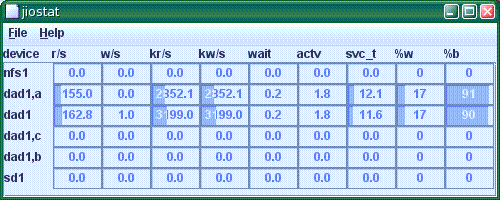
This version adds jiostat, a graphical version of iostat. This is just a basic hack at the problem - I want to be able to select and hide statistics, sort by output, and connect associated statistics (such as a disk with its partitions, or a metadevice with its components). However, the first implementation had pretty awful performance, which is why version 0.09 got skipped.

Thursday, February 09, 2006

Why do arrays have even numbers of disks?

Like it says: Why do arrays have even numbers of disks?

Most hardware disk arrays - certainly the ones that Sun sell - currently have an even number of drives in them. The StorEdge 3x00 series have 12, while the 6130 has 14.

The problem I have is that if you take away one drive to act as a hot spare, you're then left with 11 or 13. Not only is this an odd number, it's also prime.

So, what sort of sensible grouping of the drives can you come up with? I often punt and simply create a huge raid-5 volume spanning all the drives I've got left, which is simple. But there are cases when I really want to configure 2 identical sets of disks - either to mirror or to give to 2 hosts. To make this work, I have one drive left over (so I use it as a second hot spare).

Wouldn't it be neat to add an extra drive?

Roundup

Rounding up a few loose ends:

The OpenSolaris Visual Panels project has now started. This really interesting stuff, especially from my viewpoint of developing SolView and JKstat. I agree with JC Van Nieuwenhoven's comment - that managing Solaris with a GUI is a pain - and it's good to see efforts underway to fix this.

(One thing I would say, though, is that good GUIs aren't just for novices. While I might know the 16 arcane commands to configure something, would I rather have a good gui and press 1 button? If it was a good gui, yes!)

Following on from my application profiling to see if a T2000 would be a good thing, I found this article that explains a little bit more about what sorts of behaviour might throw off the statistics. Based on this, I think my machine is spending a lot of time in memcpy.

I also notice that the Ultra 45 workstation lists a 146G SAS drive as an option. I can't see this on the published price lists for the X4x00 or the T2000, but I hope it's on its way as it would help address one of the problem areas I've been having for a while.

Tuesday, February 07, 2006

Should I get a T2000?

So I'm looking at the new Sun T2000 boxes, and I tried the test program to see if my workload is suitable.

Now, this is a web server. That's all it does. And it's running coldfusion (ie JRun, as in Java), and Oracle, so first thoughts are that it should match pretty well. So I give pfp a whirl.

# /var/tmp/pfp -p 10
We observed 407247665 instructions separated
in 11.17% floating point and 88.83% others.

This workload is not recommended for UltraSPARC T1 systems.

That's not good!

OK, so that was an isolated incident. But this machine tends to stick at about the 1.5% grey area. This is typical:

# /var/tmp/pfp -p 10
We observed 1960035483 instructions separated
in 1.61% floating point and 98.39% others.

This workload is a potential fit for UltraSPARC T1 systems
and need to be tested.

Now, what I don't know is whether there's something odd about this machine, or Oracle, or Coldfusion, or the CMS sitting atop it, or the versions (oldish), or something about the fact that this is an old V880 running an old version of Solaris that pfp can't handle properly. But in any case, the T2000 doesn't look like a given.

I also tried looking at one of the machines I built myself recently, with an Apache/Tomcat/Postgres combo:

# /var/tmp/pfp 60
We observed 2132762256 instructions separated
in 0.05% floating point and 99.95% others.

This workload is recommended for UltraSPARC T1 systems.

That's what I expected. (And I get the same sort of thing on one of my Domino boxes.)

So I'm still unclear as to whether a T2000 would be a good bet for the old webserver.

Sunday, February 05, 2006

Solaris Info Viewer

Following a discussion on the sysadmin-discuss list, I've put up SolView, a utility I put together a year or so back and then forgot about.

The idea is to have a single window that gets you to the important information about a Solaris system quickly and easily. It hasn't been extensively tested, and relies on Solaris 10 at the present time. Comments etc, especially suggestions for new capabilities or information it could display, are welcome.

Friday, February 03, 2006

Suspend/Resume

After my recent confession, and looking at start up time, I tried suspend/resume to see if that could get the system going any quicker.

Now, I had earlier problems with suspend/resume taking forever, so I tried again after updating to S10U1.

And, OK, so the resume is quicker than it was. But it's still about 3 minutes - just the same as a cold boot. There has to be something wrong here - resume should be quicker, as it just has to bring things back into memory and set them running again without having to go through the thinking step of how they got there.

Thursday, February 02, 2006

System start up time

To follow on from why I use windows, I just did some (unscientific) start-up timings on my SunBlade 1500 running Solaris 10 Update 1.

Time in seconds from pressing the on button:

  1. Solaris license terms: 41s
  2. Console Login prompt: 104s
  3. Desktop Login prompt: 133s
  4. JDS start: 165s
  5. JDS ready: 190s
  6. Terminal ready to type: 199s


There's a 30 second hole in the middle where I'm typing in my username and password (and writing down the numbers) where 10 seconds would be more reasonable, so the full length of time to actual login is almost exactly 3 minutes. (And then another 20 seconds to open Mozilla.)

(I've broken the graphical startup into 2 phases, dtlogin start and JDS start, with the human typing in the middle. The whole graphical login process takes about a minute of the 3, with the general boot taking the other 2 minutes. OK, so it's possible to make the gui startup much quicker, but there's still the whole hardware phase and kernel boot to get past.)

What's the machine been doing all this time? A quick look at iostat immediately afterwards:

extended device statistics
r/s w/s kr/s kw/s wait actv wsvc_t asvc_t %w %b device
74.5 3.5 824.7 37.0 0.3 0.8 4.3 9.7 13 46 c0t0d0

Or in raw terms from kstat:

reads 10986
writes 482
nread 124590592
nwritten 5022208

So during boot I read 125M of data off the disk, in 11,000 reads. And this actually only covers about 2/3 of the boot - it isn't until about a minute into the boot that the kstats are created. If you allow for the login delay while I'm typing username and password and the few seconds it takes to actually run the above commands, and you can see that the disk is actually well over 50% busy during the boot. Based on the disk activity, boot times can't improve by better than a factor of 2 unless the disk access pattern changes (larger reads than the average 11k seen here would help).

The cpu statistics can also be obtained:

cpu_nsec_idle 102634677402
cpu_nsec_kernel 44861276123
cpu_nsec_user 25778566225

Remember that these numbers don't cover the first 1/3 of the boot. (And they don't add up, either, as I make that 170s which is more than the 140s between crtime and snaptime.) But looking at it, the processor is less than 50% busy.

I'm not sure how to look at these numbers and convert them into the sort of boot-time improvements that might be made, but taking the 50% resource utilization at face value indicates that the portion of the boot covered by the kstat collection could be sped up by a factor 2, which takes the overall cold start from 3 minutes to 2. That wouldn't be bad, would it?

Monday, January 30, 2006

Why I use Windows

I have a confession to make.

My main home computer runs Windows XP. Now, I'm a Solaris guy, so you would expect me to have banished Windows, but no, most of the times I use a computer at home it's the Windows box that gets the nod.

There are reasons for this renegade behaviour. The two main ones are Windows ability to do suspend-to-RAM and fast user switching. Essentially, if I just want to check my email quick, then either the Windows machine is on already and I just have to switch user, or I hit the power button. In both cases it's about the time it takes me to get the seat located comfortably before I'm online and working.

Solaris can't match this. If I'm working at home then the Sun box comes on, as the superior behaviour and environment are worth waiting 10 minutes for. The boot time is awful; the JDS startup time is awful; suspend resume is only on sparc and is very much hit and miss. If we're after wider adoption, then this is a huge area we have to address.

newboot 2 - nvidia failure

OK, so having had great success upgrading my home W2100z to Solaris 10 Update 1, I tried it on my work machine.

Now, I wasn't expecting this to be entirely trouble free. My work machine gets all sorts of abuse, with various test versions of anything that might be lying about - so before it started I cleaned up an old zfs beta release, deleted all the different sorts of backup software I had been trying, and tried to clean up and back out all the hacks and kludges.

In the end, none of the problems I was anticipating surfaced. But when it came back up - no graphics. Looking at the /dev/nvidia* and /dev/fb* entries, they looked very suspect.

Turns out this is a known problem with the NVIDIA drivers and the S10U1 upgrade. And it was essentially what I had surmised by looking at the device entries, so a quick deinstall, reinstall, clear up /etc/path_to_inst and a couple of reconfiguration reboots later and everything's back in business again.

Phew!

Saturday, January 28, 2006

newboot

Got my Solaris 10 1/06 DVD kit yesterday. So popped the x86 DVD into my W2100z (running Solaris 10 FCS) and let it get on with it.

Upgraded without a hitch. Everything looks good!

The boxed set includes quite a lot of stuff, so I also updated the freeware, and added the Studio 11 compilers. I'm leaving the Java Enterprise System for another time - I'm not going to risk playing with it on my main personal machine!

One interesting thing - I've got a decent monitor (a Sun 21 inch CRT) on this machine, and it had been running at 1280x1024. I hadn't really had time to investigate tweaking Xorg to get it to run at higher resolution. After upgrading, it came up on its own at 2048x1536. This was a little over the top, so I dropped it back to 1600x1200, which is the max recommended anyway, and runs at 85Hz rather than 75Hz, and makes the text a little more readable.

Everything still works, all I need now is a little more time to get back into development work.

Thursday, January 26, 2006

Buried in good stuff

The good stuff keeps on coming.

OpenSolaris now has even more communities - particularly for sysadmins and appliances - to follow. As if approachability, networking, observability, zfs, and zones weren't enough. And that's only half the communities I'm interested in!

What I really need is a time machine so I'm able to keep track of it all.

Tuesday, January 17, 2006

Enemy action?

According to Auric Goldfinger:

Once is happenstance. Twice is coincidence. Three times is enemy action.

One: panic[cpu1]/thread=fffffe80fd47aea0:
BAD TRAP: type=e (#pf Page fault) rp=fffffe8001773c70 addr=0 occurred in module "genunix" due to a NULL pointer dereference

Two: panic[cpu0]/thread=fffffe80f83a5de0:
BAD TRAP: type=e (#pf Page fault) rp=fffffe80010e8bd0 addr=0 occurred in module "unix" due to a NULL pointer dereference

Three: panic[cpu1]/thread=fffffe8000f56c80:
BAD TRAP: type=e (#pf Page fault) rp=fffffe8000f56450 addr=0 occurred in module "conskbd" due to a NULL pointer dereference

That's 3 failures on my desktop machine in just over a month. For those interested, the stack traces are:


stack pointer for thread fffffe80fd47aea0: fffffe8001773cb0
fffffe8001773d70 0xffffffff8a965940()
fffffe8001773da0 port_remove_done_event+0x4b()
fffffe8001773e10 port_associate_fd+0x2b8()
fffffe8001773ec0 portfs+0x303()
fffffe8001773ed0 portfs32+0x24()
fffffe8001773f20 sys_syscall32+0xd9()


stack pointer for thread fffffe80f83a5de0: fffffe80010e8c10
fffffe80010e8d10 tcp_close+0xff()
fffffe80010e8d50 qdetach+0x84()
fffffe80010e8dc0 strclose+0x3e4()
fffffe80010e8e00 socktpi_close+0x12b()
fffffe80010e8e30 fop_close+0x2a()
fffffe80010e8e60 closef+0x62()
fffffe80010e8ec0 closeandsetf+0x249()
fffffe80010e8ed0 close+0xb()
fffffe80010e8f20 sys_syscall32+0xd9()


stack pointer for thread fffffe8000f56c80: fffffe8000f56330
fffffe8000f56c80 5()


Huh?

Wednesday, January 11, 2006

This can't be serious...

I've often wondered why Solaris patches take so long to apply.

I'm still wondering, after updating the Java patch (118668, for the technically minded). OK, so it's a big patch, but I've got a high-spec dual Opteron W2100z so it should be done in the blink of an eye.

Or maybe not. I decided to back out the old revision (this is one of those foibles I have - I tend to apply patches regularly on test boxes, so they get every revision, so I have a habit of backing out old revisions to keep things clean). The backout took 10 minutes, adding the new version 5. That's 15 minutes on one of the fastest machines around. Ouch!

One thing I did notice is that the patch backout was writing at an average of 30Mbytes/s for most of that 10 minutes. Overall, I reckon that I had about 15Gbytes of disk writes. Why on earth?????

Clearly it's up to something very clever here.

(For comparison, simply installing that version of java - which is about 135M - generated about 200Mbytes of disk writes and took about 20 seconds. And some of that is accepting the license, unpacking and verifying the archive, and building the jars. Clearly there's some scope for improvement.)

Software Stacks

I liked the idea that Ben Rockwood came up with - SIDEkick. Essentially, a complete software stack, in this case for a php-powered postgres-backed web server, in a single file.

This is along the lines of my simplicity rant the other day. What I want is things set up ready to go.

I do this myself, for most of the projects I get involved in. For a project, I build up a software stack that contains all the components necessary, with an install script that does the work - and not only installs the stack but can also put project-specific customizations in place, and install data if required. It's largely self-documenting as well, as the install script contains all the tweaks and kludges I needed to get the thing to work.

The full stack actually has quite a bundle of components. The primary ones are:

I still use Apache 1.3.X, due to problems I've had with 2.0.X and 2.2.0 not working right. Of course, not all projects require the full set.

As an example, I've used this software stack to enable easy deployment of DSpace, in addition to basic web servers and complex soap application servers.

Which raises the valid question - why build the stack myself?

There are several reasons. Being self-contained is a pretty good reason, all on its own - having everything in a single bundle with all dependencies means you don't have to worry about how to integrate it with some other component that may or may not be installed, may or may not be the right version, and may or may not be configured compatibly. It just works. You make yourself independent of other suppliers, who may change things underneath you without your knowledge. And it fully documents and supplies your requirements so that someone else can come along later and not only understand what you did but has all the bits already at hand to reproduce it.

What I would like to see is more lightweight software stacks developed - in a modular fashion so that I can just click a link and get a single file that gives me a well-defined area of functionality. Big frameworks are all very well, but there's an awful lot of complexity due to the generality that comes with a full framework, and that gets in the way of actually doing work.

This also means that I don't really want - at all - bits of the stack bundled with the operating system. These are just a pain and get in the way. I've nothing against OS suppliers having the full software stack available, but please compartmentalize it so I can safely ignore it.

Monday, January 09, 2006

Licensing Complexity

Following on the heels of my rant about keeping software simple, is another one:

Why are licensing schemes so horrendous?

A while ago, I was looking at backup solutions. I've just started to get costings together. What a nightmare!

Really, how hard can this be? But then there are different tiers of servers, prices are different for different platforms, some of it's done by volume (how many terabytes can you afford?), tape libraries by capacity in several dozen steps. There are different base products, with no explanation of the differences.

(This sort of thing screams out for an online order form where you just tick the boxes and it puts together an order for you. How do I know whether I've actually chosen the right options from 6 densely packed pages?)