Monday, August 17, 2009

JProc - procfs from java

As if accessing kstats from Java wasn't enough, I've recently been playing with accessing process information - specifically the /proc filesystem on Solaris - from java. Thus was born JProc.

The idea, eventually, is to link this with JKstat and SolView to give a more complete view of what's happening on a Solaris system.

The obligatory screenshot:
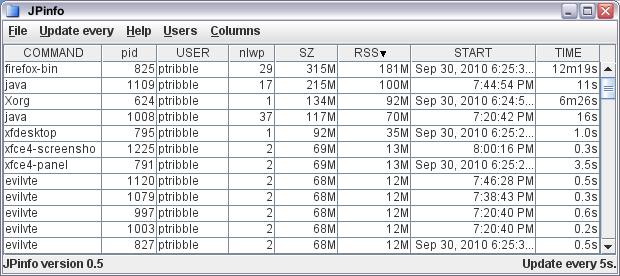


I think the correct description here is "work in progress".

Wednesday, July 22, 2009

Sane terminal behaviour with PgUp and friends

In gnome-terminal on Solaris 10, if you hit the PgUp key, it scrolls the window up. The PgDn, Home, and End keys similarly move the scrollbar.

That's the behaviour I want. It's also what you've traditionally had with xterm, dtterm, and the like.

Recently, it's become fashionable to pass PgUp and friends through to the application, so you get the application running inside the terminal emulator to do its own interpretation, and require the shift key to be pressed in order to get the terminal window itself to scroll.

I find that incredibly disruptive. I don't run anything inside a terminal that does its own scrolling (other than more, and I don't need to reach as far as the PgUp key to manipulate that). Most of the more advanced applications I run are graphical anyway.

So, how to fix? In my exploration of xfce, the Terminal application uses a newer version of vte which suffers from the above problem. So I set out to fix it, and it was relatively simple.

I used vte-0.20.5, and if you look at around line 5055 of vte.c, you'll see some code that looks like:

case GDK_KP_Page_Up:
case GDK_Page_Up:
if (modifiers & GDK_SHIFT_MASK) {
vte_terminal_scroll_pages(terminal, -1);
scrolled = TRUE;
handled = TRUE;
suppress_meta_esc = TRUE;
}
break;

simply remove the test for the shift:

case GDK_KP_Page_Up:
case GDK_Page_Up:
vte_terminal_scroll_pages(terminal, -1);
scrolled = TRUE;
handled = TRUE;
suppress_meta_esc = TRUE;
break;

for all four keys of interest, and rebuild.

My life is so much better as a result.

It's a shame that's not the default, but there are others who rely on the opposite behaviour. It would be nice if it was customizable - it's OK for me to build a separate copy for my own use on my own machine, but that's not very flexible. It would be neat if it could autodetect the terminal mode and do the right thing.

XFCE on Solaris 10

I'm getting somewhat unsatisfied with the various desktop environments available. The desktop is currently in the doldrums, presenting a dull and dreary landscape.

So, I thought I would give XFCE another look. OK, so it turns out that it is a little bit of work to get it running on Solaris 10. There's a bunch of prerequisites that you need to build first, and a couple of tweaks. So it was a bit tedious, but I got it to work fairly easily. My install notes are available to help others down the same path.

What I've got is essentially functional. I've not worked out why some of the menu and application icons don't appear, and a few of the window manager themes don't quite work (you get strange visual artifacts) but it's functional, meets my requirements (which may be different from other people) of being easy to use, has a reasonable choice of themes, isn't quite as heavyweight as some of the other desktops, and shows promise for the future.

Friday, July 10, 2009

Testing ZFS compression

One of my servers (it's a continuous build server) generates a significant amount of logfiles. About 150G so far, growing at over a gigabyte each day.

Now, logfiles tend to be compressible, so in preparation for migrating it to a new host (it's a zone, so moving from one physical host to another is trivial) I tested ZFS compression to see how well that would work.


TypeRatio
lzjb5.08x
gzip22.19x
gzip-116.37x


Now, the default lzjb gives you fair compression. That saves 80% of my storage, so that's pretty good.

Going to gzip compression the space saving is spectacular. Unfortunately the machine runs like it's stuck in treacle, so that's not exactly practical.

Which is why I tried gzip-1. You save much more space than lzjb, although not as much as the default gzip (which is gzip-6). Unfortunately, while the machine doesn't quite go as comatose as it does with the regular gzip compression, the performance impact is still noticeable.

Overall, while I wouldn't mind the extra compression, the performance impact makes it hard, so I'm going to stick with the regular lzjb.

Sunday, June 14, 2009

JKstat, meet JavaFX

One of the announcements out of CommunityOne was the availability of JavaFX for Solaris and OpenSolaris - if you're lucky enough to be running on x86, anyway.

So the first thing that occurred to me was - could I use JavaFX to make a graphical front-end to JKstat?

(And the same thought occurred to Ben Rockwood as well, who asked me how easy it would be and pushed the thought from idle fancy to a must try, especially after I glibly said - "sure, dead easy".)


So the above image is jcpustate using the JKstat core api rendered with JavaFX. Of itself, it's nothing fancy, but it's served its purpose: I've got a rudimentary understanding of JavaFX out of it; I've worked out how to integrate JKstat amd JavaFX; and this validates that the JKstat core api does its job.

You can now download JKstat 0.29. Look in the jkstatfx directory, the source code for the above example is JCpuStateFX.fx.

I had a couple of issues getting this to work. I found I had to put the jni shared library (libkstat_jni.so) directly into the right javafx lib directory - setting LD_LIBRARY_PATH didn't seem to work. The other was that JavaFX doesn't natively support either java Collections or Generics. It clearly understands them - because it tracks the types of the objects in my Collections correctly (and it doesn't understand how to cast objects back toi the right type either). I ended up having to use the toarray(T[] a) method to create a Sequence of the right type.

I have to say that this wasn't the feature I had originally planned for this version of JKstat. I've been working on an interactive chart builder so you're not limited to the fixed and limited set of charts that JKstat creates on its own, but that will have to wait a while for the next release.

Friday, May 29, 2009

Heading off to CommunityOne

Need to start packing as I'm off to CommunityOne.

It's going to be a busy week. Starting off, Sunday I'll be at the Open HA Cluster Summit, on Monday is CommunityOne, and the OGB will be out in force. If you're around, there's an OGB Town Hall at 6pm, before the OpenSolaris party.

Tuesday there's more CommunityOne, including the Deep Dives and the Crossbow BOF, then on Wednesday I'm hoping to meet up with the OSUG Bootcamp.

And, perhaps the most important thing about getting to events like this, I hope to meet as many people as possible in the few days I'm there.

Friday, May 15, 2009

Reports from the community for CommunityOne

The OGB will be at CommunityOne in a few weeks. If you would like to get involved, there's still time (just) to register - OpenSolaris will have a big presence!

On the Monday, June 1st, we're holding a Town Hall at 6pm, and we invite any and all members of the OpenSolaris community to come along, meet us, talk to us, give us feedback about OpenSolaris and how we the OGB can help in making the OpenSolaris community better.

(It's somewhat unfortunate that there's something else going on at 6pm that involves free alcohol or something like that. Hard choice, huh?)

As part of the OGB presence at CommunityOne, we're looking to display reports from communities, projects, and user groups that make up our community. What I'm thinking of here is lots of individual highlight slides we can put on display boards (so they ought to be self-contained on a single page). Bullet points, and pictures make it look better. I'll also put them all together into a single presentation (we might have that running in a permanent loop on a screen, for example) that anyone can take and use.

Longer term, I see this as a first run of a regular reporting process. The OpenSolaris community is doing great work, and we ought to all be aware of the great work that's going on and highlighting our achievements so they're more widely known.

Saturday, April 18, 2009

What can the OGB do for you?

It's a great honour to be elected to the OGB, and I want to thank everyone who took the trouble to vote.

So, what is the OGB going to do this year?

Let's start by looking at the Charter. This defines what the OGB has to do. And if you look at that, then the job of the OGB - above all else - is to construct and maintain the OpenSolaris Constitution. Much of the Charter is about the Constitution, and there's also quite a bit about the structure of the OGB itself (and a lot of that is the initial bootstrapping of the OGB when the OpenSolaris community was created and we started with the CAB).

Past that, the OGB then manages the community according to the Constitution. There are clear problems with the current Constitution, which is why a revised version was proposed. Having failed to pass, we're going to have to do something, because the current Constitution is a obstacle that's getting in the way of developing the community, but how we deal with that is another matter.

Note that the OGB is quite constrained in its operations. Both the Charter and the Constitution are reasonably specific about what we are supposed to do. In particular, it's pretty explicitly clear that the OpenSolaris we govern is not OpenSolaris the Sun distribution, nor is it OpenSolaris the codebase, it's just the OpenSolaris community.

However, I'm going to interpret the Charter slightly more broadly. At the beginning, it says to manage and direct an OpenSolaris community in its efforts to improve upon and advocate in favor of OpenSolaris. There are two phrases there that are key.

The first is manage and direct - and clearly we the OGB cannot in fact direct any member of the community to do anything. What we can do is put into place management processes that will allow the community to do its work more easily; it's up to the community to use them. One of the things we have talked about (it's come up before, but I think we want to push it again) is some level of reporting. We should expect every structural part of the community to produce regular status reports, so that we know what's going on. At the very least, that a project or community is still alive. Beyond that, these reports would promote wider awareness of what each group is doing, and would also give groups an opportunity to make bottlenecks known so that they can be acted upon. There are problems that are well known already, and we need to make sure that progress in those areas is maintained - and is more visible so that people don't think the problems are being ignored.

The second key phrase is advocate, and I would like to see the OGB more prominent as advocates and champions of OpenSolaris. On a personal note, this is difficult for a quiet reserved Englishman such as myself, but it needs doing. And at least some of the other OGB members (I'm not going to say all, because I certainly can't presume I can speak for them) feel that the OGB should be taking a more active role. If we don't, then call us to account.

Going back to the title - and given the limitations on the real power that the OGB has - what can the OGB do for you?

Friday, April 17, 2009

Backups done right?

I'm fed up with NetBackup. It vaguely works most of the time, but not all (which makes it difficult to justify it as a backup solution). And it's sucking up a lot of time - management and configuration takes a lot of work.

My experience with Legato has been great. It's incredibly easy to manage, just works, and sits there in the background without needing me to constantly mother it. It's not perfect - the latest java-based GUI is pretty horrid, and my experience of it in non-unix (ie. Windows) environments is that it's a duck out of water.

So, I'm looking around. I'll probably give Amanda a whirl. So if anyone has experience of both Amanda (or Zmanda) *and* one or both the above options, then feel free to comment - I'm particularly interested in comparisons.

Sunday, March 22, 2009

Newer != Better

We all know that just because something is new doesn't mean that it's better than what's gone before. A couple of examples I've had the misfortune to experience first-hand recently emphasize this:

Firefox 3 is dramatically inferior to Firefox 2. Not only does it feel much more sluggish, but the URL bar (in particular the drop-down menu) is terrible. Yes, the oldbar extension removes some of the maddening irritations of the look and feel, but the list of URLs presented is completely broken, to the point where it's worse than useless. I've not upgraded every machine I have, and the overall experience on the machines I have upgraded is pretty poor - so much so that I'm tempted to revert.

I've used emacs for decades. (And EDT/EVE/TPU before that.) For many years I've stayed with emacs 19.34, because it worked. Recently I've switched to emacs 22, because it's newer, maintained, and is what tends to be found on other systems. Again, the experience is staggeringly poor. Not only is it much slower but some of its features are just plain stupid. One of the more idiotic features I came across recently was that it assumes that a file named with a "zone" extension must be a DNS zone. (As a Solaris sysadmin, a zone is likely to be something else.) And if the file doesn't parse as it thinks a DNS zone file should then you are completely unable to even save the file - it's so smugly superior.

The world is full of other examples. Why do we put up with it?

Saturday, March 21, 2009

Agile SysAdmin

A while back we had a talk at LOSUG about Agile System Administration. While presenting a particular view, I think Gordon was also trying to get us systems administrators to think more about the theory underlying the work that we do.

Development has formal techniques - Agile, XP, Scrum, pair programming, test-first. And note that these are at a different layer from the actual programming skills required to write the software.

Does Systems Administration have the same sorts of practices? Does it need them? Do the concepts of Agile Development translate into Systems Administration?

Gordon has a blog discussing some of his thoughts on the subject. I encourage those of you interested in the subject to read and contribute. (The home page of the blog is just the welcome; you'll need to look at the Archives and Categories to find the actual blog entries.)

For what it's worth, I think somewhat differently, preferring flexible and lightweight (preferably zero-touch) minimalist administration over mandated standardization and heavyweight processes.

Sunday, March 08, 2009

SNMP GUI - Jangle 0.03

A little bit more work (thanks to all for comments and encouragement!) and a new version of Jangle is available.

Some highlights:
  • Prototype tree view
  • User-defined MIB location (from the File menu)
  • Some error handling
  • Work done in the background for faster startup and better responsiveness
  • The graph has the human-readable name if we can rather than the numeric OID

Enjoy!

Monday, March 02, 2009

Jangle

One of the comments I got yesterday was that my new Java SNMP browser didn't work on Ubuntu. That wasn't entirely a surprise - with such a rough first cut I was astonished that it worked at all, even for me.

But anyway, that was easy enough to fix and I've released a new version that does run on Ubuntu (verified under 8.10) and that ought to me more sane and portable generally. One thing I need to work out is where the MIB files tend to be found on different systems.

I've renamed it to Jangle. It's possible to think of this as

Java Assistant for Networked Graphs that's, Like, Easy

but I wouldn't want you to read too much into it. Really.

Download, and run ./jangle browser

(The new name has more zip, is less generic, and less likely to conflict with other tools.)

Sunday, March 01, 2009

A Java SNMP client

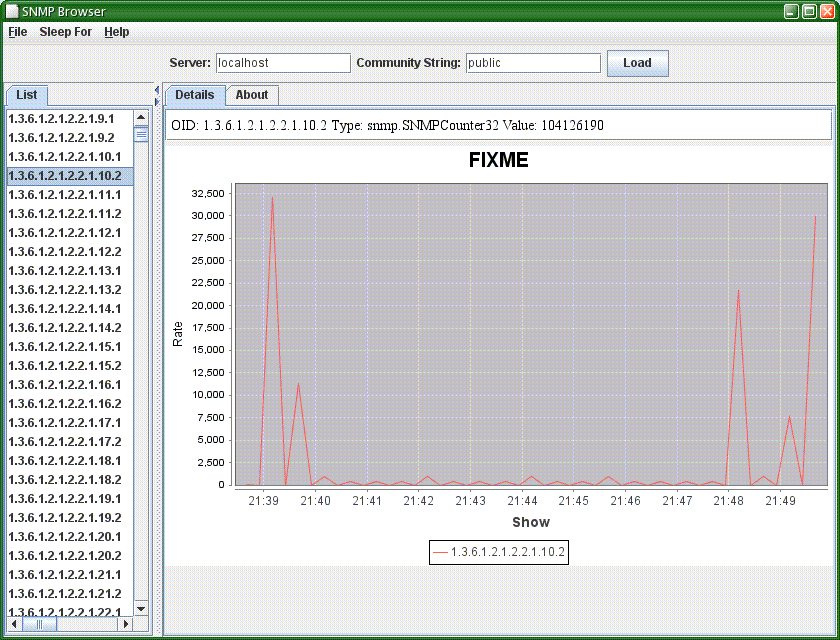
I've been looking at SNMP a bit more closely recently. One thing that has struck me is that while there are a number of java based SNMP clients, none of them seemed to be complete, and I couldn't obviously find one that could produce charts easily.

This is easy, right. So a little while later snmpgui was written.


OK, so this is version 0.01. I've been able to retrieve a list of things to monitor (that's the long list of OIDs above). Clearly that needs prettifying a bit - a tree view would be a nice next step. And I can retrieve values and produce pretty charts. That's incoming bytes on my main network interface.

It's a simple proof of concept - but it proves that something can be done pretty easily, and that it works.

SolView 0.46

I've uploaded a new version of SolView. This broadly corresponds to the version I talked about at LOSUG, with one new feature.

I've improved the Jumpstart Profile Builder by adding the ability to import an existing jumpstart profile. The idea is to use this as an initial customization of the set of installed packages that you can then modify further.

In practice, this didn't work out anything like as well as I wanted it to. One of the constraints I place upon the construction of a profile is that the package selection be self consistent: package dependencies must be satisfied. (Indeed, it was the desire to be able to construct such profiles that led to writing the profile builder in the first place.) However, most existing profiles have customizations that lead to unsatisfied package dependencies. Often, fixing up such profiles as they are imported ends up simply undoing all your customizations.

The current implementation is just a first pass, so I could improve it. For example, if it encounters a dependency error on import, it could ask you whether you want to keep the customization (and add or remove other packages as necessary) or ignore the customization. The problem is that this gets you into a horrible rats nest very quickly.

In practice, I find it easier to build a new profile based on an existing one by eye - looking at what I'm trying to add or remove and replicating that in the jumpstart profile builder.

So I'm tempted not to invest too much time on this feature. However, one thing I should be able to do relatively easily is to take the import code and use it to build a profile based on a straight list of packages. For example, this could be used to generate a jumpstart profile that would reproduce an existing installed system.

Friday, February 27, 2009

JKstat 0.27

I pushed out JKstat 0.27 a few days ago. This is just a minor update to 0.26.

I've been playing with the client-server mode a little, and while the basic code hasn't changed it's now a bit cleaner. I added a jkstat.bat and have been running the client on a Vista laptop quite successfully. I also enabled the ability to embed the client inside tomcat in addition to running the basic XML-RPC webserver.

I also fixed a regression spotted when I updated SolView. I had changed the name of the shared library in 0.25, but 0.26 had the old name again. The reason is simple forgetfulness. I develop on an x86 machine, which normally isn't a problem, but if I do any work on the native code then I need to copy across to a sparc machine to do a recompile. I did that just before uploading, and must have forgotten to copy the final version back to my development system. Doh!

Sunday, February 15, 2009

Simple Web Services

One of the things I like about XML-RPC is that is really is astonishingly easy to implement. I like to be able to understand the code I write - and that includes the things I reuse from elsewhere. And with XML-RPC, it's even better - it's normally possible to parse the XML that comes back by eye.

Contrast that with the monstrosity that SOAP has evolved into - a huge morass of complexity, massive code size, bloat everywhere, and it's really turned into a right mess. There's been nothing simple about SOAP for a long time now.

The snag with XML-RPC is that there are a couple of rather crippling limitations. In particular, you're stuck with 32-bit integers. I've had to enable vendor extensions in order to use 64-bit longs, and while that's fine for my client code, it makes the JKstat server far less useful for clients using other frameworks and languages.

So I'm stuck in a hole. I'm going to stick with XML-RPC for now, as it will be good enough to test with and is really easy to develop against. (And the way I've implemented the remote access makes it trivial to put in new or replacement access services.)

What's the way forward? I'm not at all keen on building a full web-services stack - that defeats the whole object of the exercise. There has been some discussion recently of exposing the kstat hierarchy via SNMP, but that's clunky and depends on SNMP (great if you use SNMP already, less great if you don't). I've been looking at things like JSON-RPC and RESTful web services as alternatives. The simplest approach may just be to encode everything as Strings and convert back.

Thursday, February 12, 2009

Client-server JKstat

One of the things I've wanted to add to JKstat for a while is some sort of client-server capability: the ability to run a server process on a machine and connect to it from a remote client which runs the GUI.

This separation of responsibility can offload the graphical processing associated with displaying the output off the server onto your desktop device. And that desktop device need not be running Solaris. Although I haven't tested it myself, there's no reason why you can't now run the client on - say - Windows.

So, how do you make this work? Having downloaded the latest (0.26) version of JKstat, unpack it, and on the server machine you wish to monitor:

./jkstat server -p 7367

where you can choose a port number, and on the client machine where you want the kstat browser to run

./jkstat remotebrowser -s http://server_name:7367/

so it knows where to look for the server.

The current implementation is very much an experimental proof of concept. There's no access control implemented at present, for example. And the way it operates is bound to change.

At the moment, it's using Apache XML-RPC. I like XML-RPC because it's very simple to use, pretty fast, and lightweight. There are also - in principle - implementations for other languages so you don't have to use Java.

And the Apache XML-RPC implementation can either be standalone (that's the way I'm using it right now) or embedded in a servlet container. The latter would allow you to put pretty well any access control mechanism you like in place.

I'm not particularly fixated about either XML-RPC or this specific implementation, though. This was chosen first because I've used it before and know it's so easy to implement - allowing me to concentrate on the JKstat specific part and seeing how well (or badly) client-server works at all before investing a lot of effort.

In practice, XML-RPC is a pretty good match. It implements Lists (or arrays) and Maps (or hashes) as native constructs. I don't need any more complex data structures. The weakness is that while all I need to pass in those structures are Strings and Long values, the latter requires Vendor extensions, which I've had to turn on, breaking the portability aspect.

Tuesday, January 27, 2009

Compression going really fast

The Sun coolthreads boxes are great for throughput, but not all that hot at single-threaded performance. One thing that seems to go particularly badly is compression.

Enter pbzip2

# pbzip2 foo.tar
50187.77u 156.31s 6:39.39 12605.2%

It can fill up all 128 threads and something that would otherwise take over half a day can be done in just over 6 minutes.

Friday, January 02, 2009

Zones, multiple interfaces, and routing

Some things are reasonably obvious in hindsight. This was one of them.

I've been consolidating some old applications into zones on a Solaris server.

Some of them were on physical servers, some were already in zones on other hardware. It turned out that the applications I was consolidating lived on two different subnets, and I didn't really want to go to the trouble of changing IP addresses.

No problem. The T5140 I was using has multiple interfaces, so I connected one of the unused interfaces to the second subnet and gave it an address (the server's primary interface was already in the first subnet I was using).

Then configure up the zones, remembering that you need to choose the correct network device depending on which subnet the zone is in.

And the zones didn't work. Bother. What did I forget? This:

At least one of the network interfaces used by a zone needs to have a default route associated with it.

Specifically, that second network interface needs to have a default route added to it. For the main host, it didn't matter - it will route packets over whichever interface it needs to. But if a zone is only associated with the second network interface, it can't use the default route associated with the first interface.

I add routes explicitly, so just a quick manual

route add net default 10.2.3.254

to add a default route for the second interface did the trick - you can have multiple default routes and Solaris will always use the right one.

To make this permanent, just add multiple lines to the /etc/defaultrouter file.