Saturday, May 14, 2011

JSON meets JKstat and KAR

I've been looking at JSON for a long time, wondering whether and how to best make use of it. After considerable experimentation, I'm convinced, and it's going to be an integral part of both JKstat and KAR.

So, the first thing I was looking at was the client-server code in JKstat. One of the things that's always irritated me about XML-RPC is it's obvious lack of a long data type. It doesn't seem to be bothered that the world is more than 32-bits. Sure, there are various vendor extensions (and I have to turn them on in the Apache XML-RPC implementation that I use) but the result is something that's horribly non-portable.

The other thing I've been looking at is the archive format used in KAR. I started out with simple kstat -p but that proved inadequate in that important data (metadata) was missing, so I developed a private format. This was better, but was a horrid hack.

So, enter JSON. It turns out that it makes an excellent serialization format for kstats.
  • Reusing a standard means there's less work for me to do.
  • I can use the same code for KAR and the JKstat client-server mode.
  • There are JSON bindings in almost all languages, so interoperability is easy to achieve.
  • The format is a string, so no messing about with extensions to pass longs.
  • For KAR, it's almost twice as quick to parse as my own hacked format.

As a result, the next versions of JKstat and KAR will support JSON as their archive and interchange format.

As an aside, this opens the door to wicked cool stuff.

Tuesday, May 03, 2011

SolView 0.56

Hot on the heels of an updated JKstat comes a new release of SolView.

Like with JKstat, there's a lot of tidying up and quite a bit of extra polish. Little things, like changing some of the label text to make it more meaningful, or telling you if a disk or partition is part of a ZFS pool.

There's one fairly visible change, to the start of the explorer view, which now looks very different:


This is getting closer to what I envisioned early on for this view, a much more graphically rich presentation. It's not finished, and what's shown (and how) will certainly change, but it shows the direction I would like to head in.

Monday, May 02, 2011

JKstat 0.44

It's been one day off work after another here in the UK recently. In between going to a beer festival and Newmarket races, I've found a little time to work on JKstat.

The result is a new version of JKstat available for download.

There's nothing earth shattering here, but a process of steady improvement. I've gone through the demos, removing some of the cruftier ones, enhancing some of the others, and moving some of those from SolView back to JKstat. So, the original iostat demo has gone, leaving just the table-based version; the load subcommand has been replaced by an uptime subcommand. The cpustate demo has been merged with the cpuchart demo, and has also had a vertical mode added.


OK, so it's not that impressive on my little desktop machine, but it works much better than the old layout as a display arrangement on something like a T5140 that has 128 cpus in it.

There's additional polish elsewhere. Apart from fewer typos, I've filtered out kstats from the chartbuilder that you'll never want to chart, so there are fewer kstats to munge through. The charts work a little better too: they now display the statistics in the requested order, and you can set the colors.

Another thing I've been playing with is an 'interesting' subcommand that tries to identify kstats with interesting behaviour - as in doing something out of the ordinary. This worked out a whole lot worse than I hoped. The problem, of course, is defining what constitutes normal (let alone anomalous) behaviour. The behaviour of any kstat certainly isn't normally distributed, and in fact many are very spiky as a matter of course. I may revisit this with KAR, which has historical data from which I can construct a baseline of the expected range of behaviour.

Something else I've been looking at is sparklines. I added a simple line graph to JStripChart to support this. At the moment they're not really sparklines, just little graphs, but it's a start, and expect to see more of that in SolView.

There's also a stunningly boneheaded bug fixed in KstatFilter. Filtering out things you don't want was matching far too much (it would match any of a module:instance:name specifier rather than the correct behaviour of matching all of them, so unix:0:kstat_types would throw away all unix kstats and all of instance 0, which wasn't what you wanted).

Friday, April 29, 2011

Nudging the Narwhal

As is customary with any Ubuntu release, I downloaded the recently released 11.04 and took it for a spin.

The installation started off well. I liked the fact that it got started on the install and then asked you the configuration questions, minimizing the overall install time. And it looked like the install was galloping along. Then it bogged down, and got slower and slower. Made a coffee. Drank the coffee. Install going nowhere fast. Checked the Royal wedding pictures, played a few ZX spectrum games. Install going nowhere fast. Updated a slew of other applications on my Solaris box. Install going nowhere fast. Finally, after over an hour, it finishes the install. That was gruesome.

After installing the guest additions for VirtualBox I got the new Unity interface. And it's not all that bad. It's not that good either, but I didn't get the horribly negative reaction to it that many have reported. In a lot of usage scenarios, I can see it working just fine.

So, what does Unity get you? Well, it works pretty well for simple task-based computing. If you just have a handful of applications that you use, and you only use one at a time, then it works great. It allows you to focus on the task at hand. It starts to struggle if you're multitasking or if you need to do a lot of different things because once you're outside the simple task metaphor it really struggles.

Is Unity radical? Not really. I've used dozens of desktop interfaces. So this one has panels on the left and top rather than placed elsewhere, but that's no big deal. The window controls have moved, but that's trivial. Seriously, there's nothing much new here.

The problems I have with Unity are really that it doesn't fit my normal working style (which tends to involve having huge numbers of applications open, often many windows of the same application). The launcher on the left only really scales up to a dozen applications or so; beyond that it becomes cumbersome. It folds up whatever's at the bottom of the list in the normal view, but expands things out (forcing the launcher to scroll) if you use the folded-up applications. And you can't clean things up by moving your applications across multiple virtual desktops - you get to see all the launcher items all the time, rather than just the ones relevant to the desktop you're on.

Dealing with multiple instances of the same application works really badly. There's no good way to organise 100 xterms, for instance. Double-click on the xterm launcher icon and they're sitting there in a 10x10 grid. But which one's which? Again, sorting them by virtual desktop doesn't really help. And right-click on the launcher icon gets you a menu, including quit - which quits all of them.

Another major change is the move of the application toolbar to the top of the screen. I hate this for two reasons: for one, it means you have to mouse all the way across the screen, and for two, it interacts really badly with a mouse focus policy of focus-follows-mouse. Fortunately, I tend not to use application menus very much.

None of the criticisms are necessarily aimed directly at Unity, of course. It's more that it has changed to a new usage paradigm, but all the rest of the desktop and all the applications haven't, and the mismatch shows pretty clearly. What would be really interesting to see would be what Unity would be like with applications designed around it, rather than with all the (legacy, for it) applications we have today.

Thursday, February 24, 2011

JProc 0.6

A little more tinkering, and an updated version of JProc is now available.

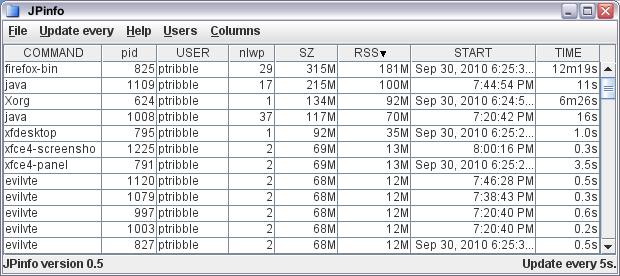
The primary addition in this release is that I've implemented access to the prusage struct, both for processes and threads. There's a new usage subcommand that shows prusage data in a table for processes. And, if you right-click in the info or usage display, you can display a breakdown of usage by thread.

Sunday, February 06, 2011

Pushing kar along

I updated KAR recently.

This follows my recent philosophy that code and bugs are the same thing, although I hope that each version squishes some bugs as well as introducing them.

Most of the bugs fixed this time were as a direct result of trying to use kar for real, generating graphs of system activity to answer question for users, developers, and management. In some cases, kar just gave up or gave the wrong data.

(A particularly insidious bug lies in the use of printf in C. You have to specify exactly the type and size of a variable. If the type you print and the actual storage type don't match, bad things can happen. Worse, different processor architectures behave in different ways. Printing a 64-bit value as 32-bit appears to work on an Opteron box, but fails miserably on a SPARC.)

One thing I'm actually doing is using kar's print subcommand to output the data, and then munging the data before feeding it into something like ploticus to do the actual plotting. The inbuilt chart support works well for predefined charts, but I often want something slightly different.

Monday, January 24, 2011

Code = bugs

I've come to the conclusion that all code is buggy, often hideously so.

This isn't necessarily an observation on other people's code. My code is perfect. Ha! Only it's not, of course.

Something like JKstat is reasonably mature and (I thought) reasonably well tested. But the latest release fixes a number of pretty basic numbskull bugs that had been sitting there for ages.

I place a lot of emphasis on code quality. I use jstyle (part of the Solaris ON build environment) to enforce a programming style. Enforcing consistency makes the code more readable, and this style is one that my eyes (and my typing fingers) are comfortable with. I use PMD to automatically check for basic errors and obvious code deficiencies. When I first started using PMD, it found lots of basic errors. What it doesn't catch are the doofus logic errors that my brain introduces.

For Java programming, I found Generics to be a great benefit. Java is a strongly typed language, but a major structural part of the language - the Collections framework - didn't impose any type safety at all. Everything was just an untyped Object. Whilst Generics adds type-safety, and the enhanced for-loop often precisely expresses your intentions (as opposed to looping over an array index), I found that adding Generics made be think about the types of object I was putting in my collections, which was one step in thinking more about the structure of the code itself.

Occasionally, I get to look at code written by others. Now, often, open source code isn't actually too bad - there's often a fixed style adopted by a community, and multiple authors can eliminate some of the more bizarre excursions into code obfuscation. But some of the code I get to see in the office truly horrifies me. Invariably without useful comments, with all the old code still in the source file but inactive, and as many different styles as we've had people work on the code (often in a language they're not entirely fluent in), just hacked in to the point where it would work with no attempt (because there's no money in this) to go back and improve maintainability of the code for the next person.

One of the problems is the languages themselves. Java is strongly typed (I like this, because it makes simple typing errors into compile failures which are obvious), but requires massive levels of boilerplate. I dislike the use of an IDE, because I want to feel comfortable with every line of code I write. So you're wedged in to a place where just feeding the IDE, or writing boilerplate code, takes far too many brain cycles away from actually implementing real functionality.

So change languages, you say! Well, I actually try and learn one new language (or a major area of a language) each year. So I wrote a monitoring application in tcl/tk once, then rewrote it as a webapp using JSP, then rewrote it to do graphics using Java2D, and then rewrote it in PHP, just so I could learn those languages. After several attempts, though, I have completely failed to acquire any significant competence in Python.

Something I have been looking at recently (after an excellent talk at the local Cambridge Java Meetup group) is Clojure. You may find this a bit of an odd choice, but hacking on lisp for emacs many years ago makes it moderately familiar, and being built on the JVM means that I may be able to leverage other skills.

Which leads to a question: what programming language (or skill) have you learnt this year?

New year, new JKstat

I've been quietly working on JKstat, and have just released another update, version 0.43.

I wasn't actually aiming to cut a release at this point, there are still a couple of things I'm working on. But I needed to get some fixes into KAR, and didn't want to push out a KAR release with an unreleased version of JKstat in it, hence a synchronization release.

Realistically, JKstat has largely stabilized. So it's more a case of fixing odd bugs (the network load demo wouldn't display anything if you resized it, and guessed the network speed wrong), adding features like stepping backwards in the browser when reading KAR data, and cleaning up the javadoc. Little features like keeping all the statistics underneath a chart, so that when you add another statistic to be graphed it shows the historical data rather than starting from the current time. Nothing earth-shattering, but (hopefully) making JKstat better.

Friday, December 03, 2010

SNMP gets slightly easier

A new version of my Java SNMP viewer Jangle is now available.

One thing I've wanted to do is automatically build relationships. There are two tabs in the Jangle display that do this automatically, showing Siblings and Cousins.

The Siblings tab shows attributes that share a common parent. Due to the way that SNMP works, this means different instances of the same thing. For example, if you're interested in ifInOctets, then this will have an entry for each interface - ifInOctets.1, ifInOctets.2, ifInOctets.3 and so on. So the Siblings display will put all these on one graph for you.

What if you're just interested in all the attributes of a particular interface? Given ifInOctets.2, you want ifOutOctets.2 and the like? That's where the Cousins tab comes in - it will show (and graph) all these related attributes for you. (Of course, while Cousins is an appropriate term in the sense that the other attributes are children of your parents siblings, it's also only a specific subset of those Cousins. It would be nice to come up with a better term.)

It's relatively trivial to build these relationships automatically - the OID tree is structured to make it possible. They also answer the questions I tend to ask most often. Building more complex relationships will likely have to be done by hand, and require domain-specific knowledge.

This was relatively easy to code up, with just a little twist. When you select a new OID to display, it starts all the graphs from scratch again. What I also wanted to be sure of was that if the new OID was a sibling or cousin of the one already being shown, then it would keep the existing sibling or cousin graph rather than reset it.

Monday, November 22, 2010

KAR at LOSUG

Last Wednesday I gave a short talk about KAR at LOSUG.

Apart from the fact that my laptop and the projector refused to get along, it went OK. That disagreement meant that the interactive show and tell (aka the demo) got skipped, but that was always designed as an extra. I hope I got people thinking - the real aim here is to try and make people think about what we do, rather than spoonfeed solutions to them (that's what marketing is for).

For the talk I released a new version of KAR, and in preparing the talk and getting some things ready I stumbled across one or two issues I thought worthy of further fixes.

Part of this is my implementation, but using JKstat to parse the KAR archives has never been exactly quick. Several minutes for a full day's data from a decent server. My original implementation of graph generation involved doing that for every graph - so generating the 100+ graphs took rather a long time.

Here follows a completely gratuitous graph: network traffic on my home machine over the course of a day.


The parser in JKstat was only partially finished, so I tidied it up a bit. It now caches parsed data, and allows consumers to step backwards as well as forwards, and rewind, and the cache is shared across multiple instances. This allows you to just parse the data once and then analyze it to your heart's content. What this means is that generating all the graphs takes only a little longer than generating the first one - making it 100 times faster.

(Which proves the point: fixing truly stupid implementations can give you huge performance gains. There is no way I can imagine getting a hundred-fold performance improvement by tweaking the parser. That's not to say I'm happy with performance now - far from it - but it's made one particular common task viable, which it wasn't before.)

So, a new release of both KAR and JKstat is now available.

The next step for KAR is to identify additional measurements that would be generally useful, and then add them to the list of graphs generated (and maybe have specific utilities for specific data).

Thursday, October 28, 2010

AfterStep, piewm, tvtwm, and friends

Following on from earlier work, I've made available some AfterStep packages for Solaris.

Then, I tried some of the twm variants. I started with ctwm and vtwm, and then moved on to tvtwm and piewm. Then I hit a problem - piewm didn't work. It was choking somewhere in the lex parser, so refusing to load any config, so no menus or anything. It's based on a older version of tvtwm and, rather than attempt to learn lex and fix that, I had a go at simply adding the pie menu support to the latest version of tvtwm (tvtwm-pl11), and that turned out to be pretty easy.

So my merged source, boringly named ptvtwm, is available from here, as are the usual Solaris packages. The packages include piewm and tvtwm derived from ptvtwm, as well as ctwm and vtwm, along with a private copy of xli so that tvtwm/piewm can load a background picture.

That's quite a lot of Window managers, so I've put together a list of package window managers.

That's essentially it for now. I'm hoping to get Xfce packaged up, but there are a fair number of prerequisites that Solaris doesn't have (or has antiquated versions of) so the packages end up being pretty huge. I'll get there, but haven't yet got a build I'm happy to let out.

Thursday, October 21, 2010

Old and New

A couple of window managers packaged up for Solaris this week.

First, some solaris packages for the pekwm window manager. This pretty much scores a bullseye when it comes to minimalism, and is still being developed.

Go back 20 years, and I've built some awm packages. Now the Ardent Window Manager wasn't the first I ever used, but I spent about 2 years working with it, and it was pretty good. Highly flexible and customizable, in the true style of the time - you open up the config file in your favourite editor and make it do whatever you want.

Now, I had to make a tiny number of code changes to get it to compile, but only a tiny number, and all pretty trivial. And it works just fine, even if it does have a bit of a retro look to it.

Thursday, October 14, 2010

Enlightenment packages for Solaris

As I mentioned earlier when talking about Window Maker, I've been hoping to find time to get some other window managers packaged up for Solaris.

OK, so Enlightenment packages are available. Just to be clear, these are e16, not some cut of the current development branch. (I'm having a look at the EFL beta, trying to get it to work on Solaris.)

As with wmaker, these packages should install fine on Solaris 10 (some reasonably current update, anyway) and OpenSolaris/OpenIndiana. They should appear as session options on the login screen, and they should basically work. But this isn't something I use extensively, and there are almost certainly rough edges.

The packages include imlib2, e16, libast, Eterm, and themes. They all go together, so there's just the one package. This all installs directly into /usr, which is fine as there aren't any conflicts with anything that ships with Solaris.

While I like playing with shiny toys such as enlightenment, I never really got on with it - the behaviour was always slightly interesting, and I found the themes overly fussy, And speaking of themes, a whole bunch of themes for e16 are available, and a lot of those are quite polished.

Tuesday, October 12, 2010

Remote Monitoring, APIs, and JMX

Recently I went along to the Cambridge Java Group. Enjoyable evening - would be great to get more people along, so if there's anybody else in Cambridge interested in Java and related technologies then do come along!

I talked about JKstat briefly, and I hope that some people found it interesting. One of the comments was along the lines of "hey, you could expose this with JMX and monitor it remotely". I had looked at JMX before, and had largely ignored it because I couldn't see an easy way to use the technology. So I tried again, putting together a bean interface and implementation, and a simple server.

I pointed jconsole at it, and it works. I can see the data I exposed there in jconsole. So, that proves that my code works. But is that it? After all, jconsole can do some quite sophisticated monitoring of a JVM, and give pretty graphs. But there seems to be a fair amount of domain-specific knowledge that has gone into that, which is hard-coded into the client. And I really don't want to write (yet another) client interface - the whole point is to leverage what is claimed to be considerable investment in JMX tooling.

This investment must be kept locked safely away. I've had a look around, and really can't see much in the way of fully functional general-purpose JMX clients. (Here's a list.)

Of course, I've been here before. I ended up writing my own SNMP client because I couldn't find anything else that did what I wanted. I really don't want to do the same for JMX.

So, a question: what do people use for monitoring that uses JMX? How valuable is it?

Of course, you wouldn't actually set up a JMX server and client specifically for accessing JKstat. That would be silly. After all, JKstat comes with a fully functional client-server mode that exposes all the data you need in a reasonably efficient manner. The ideal case for using JMX would be when you had an existing system already being monitored with JMX, at which point you could simply add JKstat support to gain access to extra data without adding additional protocols or tools.

I've also been looking at other client-server technologies. One that I'll probably do (partly because it shares some framework with JMX, partly because I know how to do it anyway) is RMI. But that, like JMX, is fairly specific to Java. It would be nice to have something that was capable of communicating with, say, python (or pretty much any scripting language). You would have thought that because I had used XML-RPC then I would be able to access it from anything else using XML-RPC, but that's not the case. I needed to use extensions to get sensible type support (like the fact that much of the data is stored as a long not an int), and those aren't commonly deployed. I was, therefore, intrigued by Theo's rant which summed up my thoughts exactly, and saved me the trouble of investigating JSON, as it's clearly not up to the task either.

So many half-baked answers. Go on, somebody - tell me what I'm missing!

Saturday, October 02, 2010

Window Maker

I've always experimented with different X11 window managers and desktops. There was a time when there was actually significant choice and variety, and a lot of energy to go with it.

I simply never got on with either SunView or OpenWindows, much preferring awm or tvtwm. And while CDE had some useful utilities, the desktop itself drove me to distraction. I appreciate the strengths of KDE, but can't get on with it either. I currently use either the Solaris JDS build of GNOME or a home-built version of XFCE as my primary desktop.

I spend a lot of my time living inside VNC sessions, and there I run Window Maker. I've always liked Window Maker - fast, lightweight, and there were oodles of themes available. (A theme here is a desktop background and a colour scheme for menus and window decorations.) Unfortunately availability of themes is now limited.

I've made available my own Window Maker Packages for Solaris. These include the software and integration with either dtlogin or gdm, and will work on either Solaris 10 or OpenSolaris/OpenIndiana.

Included in those packages are a couple of simple themes I've put together based on OpenSolaris and OpenIndiana, which you can also get directly from the above link if you already have Window Maker running.

I also run, at times, many of the other older styles of window managers, from the basic twm derivatives up to enlightenment and AfterStep. Hopefully I'll be able to find some time to get those properly packaged up as well.

Thursday, September 30, 2010

SolView 0.54

Actually, this was supposed to be about version 0.53 of SolView, but 0.54 has the fixed JProc which is quite handy.

Apart from that bugfix, SolView now sports a number of useful refinements.

The localprofile subcommand generates a jumpstart profile that will (approximately) match the current system. So on my desktop:

# ./solview localprofile
cluster SUNWCXall
cluster SUNWCapache delete
cluster SUNWCapch2 delete
cluster SUNWCappserver delete
cluster SUNWCbreg delete
cluster SUNWCfsmgt delete
cluster SUNWCiq delete
cluster SUNWCmcdk delete
cluster SUNWCmip delete
cluster SUNWCnet delete
cluster SUNWCpcmc delete
cluster SUNWCpgadmin3 delete
cluster SUNWCpmgr delete
cluster SUNWCpostgr delete
cluster SUNWCpostgr-82 delete
cluster SUNWCpostgr-82-dev delete
cluster SUNWCpostgr-83 delete
cluster SUNWCpostgr-83-dev delete
cluster SUNWCpostgr-dev delete
cluster SUNWCrm delete
cluster SUNWCservicetags delete
cluster SUNWCsip delete
cluster SUNWCsmap delete
cluster SUNWCsmc delete
cluster SUNWCsppp delete
cluster SUNWCswup delete
cluster SUNWCtcat delete
cluster SUNWCwbem delete
cluster SUNWCwsdk delete
cluster SUNWCxmft delete
cluster SUNWCzebra delete
package SK98sol delete
package SKfp delete
package SUNWast delete
package SUNWcnsr delete
package SUNWcnsu delete
package SUNWfac delete
package SUNWfwdc delete
package SUNWfwdcu delete
package SUNWipplr delete
package SUNWipplu delete
package SUNWjato delete
package SUNWjatodmo delete
package SUNWjatodoc delete
package SUNWjsnmp delete
package SUNWluzone delete
package SUNWlvma delete
package SUNWlvmg delete
package SUNWmcon delete
package SUNWmcos delete
package SUNWmcosx delete
package SUNWmctag delete
package SUNWosdem delete
package SUNWpdas delete
package SUNWrmwbr delete
package SUNWrmwbu delete
package SUNWsra delete
package SUNWsrh delete
package SUNWtnamd delete
package SUNWtnamr delete
package SUNWtnetd delete
package SUNWtnetr delete
package SUNWwbpro delete
package SUNWwebminr delete
package SUNWwebminu delete
package SUNWxorg-compatlinks delete
package SUNWxwslb delete
package SUNWzfsgr delete
package SUNWzfsgu delete

Actually, there's a little bit missing from the above, which is what another new subcommand - missingpackages - will show, namely the list of packages that should be installed to meet dependency requirements but aren't:

# ./solview missingpackages
missing package SUNW5xmft needed by [SUNW5xfnt, SUNWjxplt, SUNWhkfnt]
missing package SUNWcxmft needed by [SUNWcxfnt, SUNWcscgu, SUNWjxplt]
missing package SUNWfsmgtr needed by [SUNWdmgtr, SUNWdmgtu]
missing package SUNWfsmgtu needed by [SUNWdmgtr, SUNWdmgtu]
missing package SUNWjxmft needed by [SUNWjxcft, SUNWjedt, SUNWjxplt]
missing package SUNWkxmft needed by [SUNWkuxft, SUNWjxplt]
missing package SUNWluzone needed by [SUNWzoneu]
missing package SUNWlvma needed by [SUNWlvmr, SUNWmddr]
missing package SUNWpostgr-82-client needed by [SUNWpostgr-upgrade]
missing package SUNWpostgr-82-libs needed by [SUNWpmdbdpg, SUNWpostgr-upgrade]
missing package SUNWpostgr-82-server needed by [SUNWpostgr-upgrade]
missing package SUNWwbcor needed by [SUNWdmgtu]
missing package SUNWwbcou needed by [SUNWdhcsu, SUNWdmgtu]
missing package SUNWwbpro needed by [SUNWdmgtu]
missing package SUNWzlibr needed by [openofficeorg-ure]

Now, some of those are install errors on my part (I ought to have killed all the postgres packages), but some are just due to wrong dependency data.

Continuing a bit of a theme, disks, networks interfaces, processors, packages, and clusters are sorted.

In the jumpstart profile builder there's quite a lot more polish. Version 0.52 added automatic recursive removal of packages, but the new version fixes a number of minor display issues - the checkboxes update instantly, clusters properly reflect their status if all their constituent packages are added or removed, and the profile appears automatically when you go to the profile display tab. And if you're fed up, you can start over without exiting. All in all it's now much easier to use.

JProc 0.5

I've just released version 0.5 of JProc, which allows you to access Solaris data from java applications.

I was hoping for a few more features, but encountered a fairly nasty bug, and it was more than worth fixing that straight away.

Basically, you get the data from /proc by opening files in the /proc filesystem and reading data from them. I was doing the open(), but there was a distinct lack of close() associated with each one. A massive file descriptor leak ensued.


The one neat feature that made it was the ability to select which columns are visible in the process viewer. This involved a little fiddling with the Model underlying the JTable. Essentially, all I had to do was add an array of visible columns, each element of which maps to a real column. So I can have only some of the columns visible, and could re-order them if that's desired. The only tricky bit I had trouble with is that I have custom renderers for some of the columns (so that times and sizes are shown in human-friendly terms), and fiddling with the columns completely lost the custom renderers, forcing me to have to re-apply the renderers any time I change the structure.

I've hidden a few of the less commonly used columns by default, which helps by making the viewer less cluttered. There's still room for improvement, especially in the area of aggregation and filtering - areas where top and prstat are so-so.

Monday, September 06, 2010

KAR 0.4

The latest release of KAR, the Kstat Activity Reporter, is now available.

This version adds a couple of extra features:

The graphs subcommand will generate a bunch of useful png graphs for a given input file. Currently, I generate basic graphs for cpu utilization (user/kernel/idle for the whole system and for each cpu), I/O, and network statistics.

I've also added a simple browser, which looks for kar output files and lets you load them into either the kstat browser or chart builder from JKstat.

Oh, and in line with some of the other work I've been doing recently, most of the output is sorted correctly.

Sunday, September 05, 2010

JKstat 0.41

Updated versions of JKstat are coming out more frequently than I would like at the moment. I think I'm done and move on to something else and find I need to add some new feature.

Having just finished 0.40, which implemented Comparable to make sorting easier, I went through more of the code - including the demos included, and those in SolView - to look at how they sorted (or, in some cases, failed to sort where they should have) their output. This led me to make a slight change to the jkstat api, which cleaned up a little of the code.

The data stored by a Kstat is a simple key-value hash.The original implementation exposed this internal data structure - you simply got access to the internal Java Map. This always felt slightly ugly, exposing internal implementation details. So that's been changed. There's a new Kstat.statistics() method, which simply returns a Set of the statistic names. This is really what clients want, rather than getting the hash and getting its keys, which is what they did before. Furthermore, in almost every case you want the list of statistic names to be sorted, so rather than everyone getting the list and sorting it themselves, it's backed by a TreeSet and is already sorted. The original getMap() method is gone. Removed. That's why we're not yet at version 1.

This version also includes a couple of samples using JStripChart, as shown in an earlier blog entry

Wednesday, September 01, 2010

Simple Java strip charts

I've been looking for a very simple Java strip chart for a while, and haven't found one. So in the end I decided to put together something myself, the end result being JStripChart.

(There's already something else out there called jstripchart. Just to confuse you, it's a python implementation.)

Using JKstat to knock something together I came up with this:

Of course, you partly miss the point which is that this thing is merrily scrolling away.

I expect to be able to use this fairly extensively in both JKstat and SolView, but it's certainly not tied to those in any way - it's designed to be trivially simple to use in any context.

The API really is very simple. Just create a chart:

JStripChart jsc = new JStripChart();

which you can add to your application in the normal way as it's just a JPanel, and then

jsc.add(some_data);

will add the value some_data to the right of the chart and move everything else along. That's it. (To get it to continuously update, create a Timer loop.)