The scripts and configuration files that I used to build Tribblix are now available on github.
There are currently two components available. There are some more bits and pieces that I'm still working on. (Specifically, the live image manifests and method scripts, and the overlay mechanism.)
First, the ips2svr4 repo contains the scripts used to create the SVR4 packages. The initial Tribblix prerelease was based on an OpenIndiana 151a7 install, I simply converted all the packages wholesale. One of the problems I had was that an installed system has had lots of configuration applied, so I needed to nullify many of the changes made to system files. There's also an equivalent script that can make SVR4 packages from an IPS on-disk repo; I've tested that I can make packages from an Illumos build, but haven't yet tried to build a system from them. (At least I know the OI binaries work on the system I'm testing.)
Next, the tribblix-build repo contains the scripts used to install the packages to a staging area, fix up that install, create the zlib files, build the boot archive, and create the iso, along with the live_install script that's used to install to hard disk.
The scripts are ugly. Mostly, I was doing the steps by hand and simply saved the commands into the scripts so I didn't have to type it next time. That they can be improved is undoubted. I hope I've taken most of the profane language in the comments I put in as I found out what worked and what didn't along the way.
The second problem anybody else is going to have with the scripts is that they have myself embedded in them. When I'm doing the construction, I'm always working from my own home directory, so it's currently hard-coded, as are all the other locations. That will get fixed, but it's more fun building a better distro than making the scripts suitable for a beauty contest.
Monday, October 29, 2012

Friday, October 26, 2012
Those strange zlib files
If you look at an OpenIndiana live CD, you'll see a couple of strangely named files - solaris.zlib and solarismisc.zlib. What are these, how can you access their contents, and how can you build your own?
These are actually archives of parts of the filesystem. In the case of solaris.zlib, it's /usr; for solarismisc.zlib it's /etc, /var, and /opt.
These are regular iso images, compressed with lofiadm. So you can use lofiadm against the file to create a lofi device, and mount that up as you would anything else. During the live boot, solaris.zlib gets mounted up at /usr. (There have to be some minimal bits of /usr in the boot archive; that's another story.)
Building these archives is very easy. Just go to where the directory you want to archive is and use mkisofs, like so:
mkisofs -o solaris.zlib -quiet -N \
-l -R -U -allow-multidot \
-no-iso-translate -cache-inodes \
-d -D -V "compress" usr
Then you can ask lofiadm to compress the archive
lofiadm -C gzip solaris.zlib
The compression options are gzip, gzip-9, and lzma. On the content I'm using, I found that basic gzip gives me 3-4x compression, and lzma a bit more at 4-5x. However, using lzma takes an order of magnitude longer to compress, and you get maybe half the read performance. There's a trade-off of additional space saving against the performance hit, which is clearly something you need to consider.
For Tribblix, I use the same trick, although I'm planning to get rid of the extra solarismisc.zlib. And I'm hoping that being lean will mean that I don't need the extra lzma compression, so I can stay fast.
These are actually archives of parts of the filesystem. In the case of solaris.zlib, it's /usr; for solarismisc.zlib it's /etc, /var, and /opt.
These are regular iso images, compressed with lofiadm. So you can use lofiadm against the file to create a lofi device, and mount that up as you would anything else. During the live boot, solaris.zlib gets mounted up at /usr. (There have to be some minimal bits of /usr in the boot archive; that's another story.)
Building these archives is very easy. Just go to where the directory you want to archive is and use mkisofs, like so:
mkisofs -o solaris.zlib -quiet -N \
-l -R -U -allow-multidot \
-no-iso-translate -cache-inodes \
-d -D -V "compress" usr
Then you can ask lofiadm to compress the archive
lofiadm -C gzip solaris.zlib
The compression options are gzip, gzip-9, and lzma. On the content I'm using, I found that basic gzip gives me 3-4x compression, and lzma a bit more at 4-5x. However, using lzma takes an order of magnitude longer to compress, and you get maybe half the read performance. There's a trade-off of additional space saving against the performance hit, which is clearly something you need to consider.
For Tribblix, I use the same trick, although I'm planning to get rid of the extra solarismisc.zlib. And I'm hoping that being lean will mean that I don't need the extra lzma compression, so I can stay fast.
Wednesday, October 24, 2012
Building Tribblix
I've recently been working on putting together a distribution based on OpenSolaris, OpenIndiana, and Illumos.
Called Tribblix, it was quite challenging to put together. I'll cover the individual pieces in more detail as time goes on, and put the code up so anybody else can do the same. But here's the rough overview of the process.
First, I've created SVR4 packages - I can do this either from an installed system, or from an on-disk repo. The IPS manifests contain all the information required to construct a package in other formats, not only what files are in the package, but also the scripting metadata that can be used to generate the SVR4 installation scripts. The most complex piece is actually generating the somewhat arcane and meaningless SVR4 package name from the equally arcane and meaningless IPS package name, making sure it fits into the 32 character limit imposed by the SVR4 tools. This has to be repeatable, as I use the same transformation in dependencies.
(An aside on dependencies: there are significant areas of brokenness in the IPS package dependencies on OpenIndiana, not to mention problems with how files are split into packages. There's significant refactoring required to restore sanity.)
Then I simply install the required packages for a minimal system into a build area. Of course, it took a little experimentation to work out what packages are necessary. There's an extra package for the OpenSolaris live CD that goes on as well.
There's then some fiddling with the installed image, setting up an initial SMF repository, SMF profiles, and grub. Something in need of more attention is the construction of the boot archive. I've got it to work, but it's not perfect.
The zlib archives you find on the live cd are then put together (these are lofi compressed iso images), plus an extra archive containing extra packages, and then mkisofs creates the iso.
The installer is very simple. I need to work on automating disk partitioning, as it's currently left to the user to configure the disk by hand. Then a ZFS pool is created and mounted up. The booted image is fairly minimalist, so that is simply copied across wholesale. It's unlikely that you would want less on the installed system than you would on the initial boot. I delete the live cd package, and then optionally add sets of additional packages.
Then grub configuration, setting up SMF for a real boot (which has different SMF profiles), creating the real boot archive (which currently takes an order of magnitude longer than it should), and finally setting up the live filesystems so they end up in the right place.
That's pretty much it. Descriptions of each step will be forthcoming in future blog posts, together with the code on github.
Called Tribblix, it was quite challenging to put together. I'll cover the individual pieces in more detail as time goes on, and put the code up so anybody else can do the same. But here's the rough overview of the process.
First, I've created SVR4 packages - I can do this either from an installed system, or from an on-disk repo. The IPS manifests contain all the information required to construct a package in other formats, not only what files are in the package, but also the scripting metadata that can be used to generate the SVR4 installation scripts. The most complex piece is actually generating the somewhat arcane and meaningless SVR4 package name from the equally arcane and meaningless IPS package name, making sure it fits into the 32 character limit imposed by the SVR4 tools. This has to be repeatable, as I use the same transformation in dependencies.
(An aside on dependencies: there are significant areas of brokenness in the IPS package dependencies on OpenIndiana, not to mention problems with how files are split into packages. There's significant refactoring required to restore sanity.)
Then I simply install the required packages for a minimal system into a build area. Of course, it took a little experimentation to work out what packages are necessary. There's an extra package for the OpenSolaris live CD that goes on as well.
There's then some fiddling with the installed image, setting up an initial SMF repository, SMF profiles, and grub. Something in need of more attention is the construction of the boot archive. I've got it to work, but it's not perfect.
The zlib archives you find on the live cd are then put together (these are lofi compressed iso images), plus an extra archive containing extra packages, and then mkisofs creates the iso.
The installer is very simple. I need to work on automating disk partitioning, as it's currently left to the user to configure the disk by hand. Then a ZFS pool is created and mounted up. The booted image is fairly minimalist, so that is simply copied across wholesale. It's unlikely that you would want less on the installed system than you would on the initial boot. I delete the live cd package, and then optionally add sets of additional packages.
Then grub configuration, setting up SMF for a real boot (which has different SMF profiles), creating the real boot archive (which currently takes an order of magnitude longer than it should), and finally setting up the live filesystems so they end up in the right place.
That's pretty much it. Descriptions of each step will be forthcoming in future blog posts, together with the code on github.
Tuesday, September 25, 2012
Mangling the contents file for fun and profit
I was recently using Live Upgrade to update a Solaris 10 system, when it went and chucked the following error at me and refused to go any further:
WARNING: Directory </usr/openv> zone <global> lies on a filesystem shared between BEs, remapping path to </usr/openv-S10U10>.
WARNING: Device <storage/backup> is shared between BEs, remapping to <storage/backup-S10U10>.
Mounting ABE <S10U10>.
ERROR: error retrieving mountpoint source for dataset <storage/backup-S10U10>
ERROR: failed to mount file system <storage/backup-S10U10> on </.alt.tmp.b-yPg.mnt/usr/openv-S10U10>
What I have is Netbackup installed in /usr/openv, and this is a separate filesystem (in fact, it's on a completely separate pool on completely separate drives).
The underlying problem here is that Solaris thinks there's part of the OS installed in /usr/openv, so it gets included in the scope of the upgrade. I've seen this in other cases where someone has stuck Netbackup off to the side, and it drags way too much stuff into scope.
On backup clients, the simplest thing to do is remove the client and reinstall it when you're done. You might get a free upgrade of the backup client along the way.
In this case I was working on the master backup server and didn't want to touch the installation at all.
One advantage of SVR4 packaging is that the package "database" is just a bunch of text files. If anything gets messed up you can open them up in your favourite editor and fix things up. (In one case, I remember simply copying /var/sadm off a similar system and nothing noticed the difference.)
The list of what files are installed is the contents file (found at /var/sadm/install/contents). The Live Upgrade process looks at this file to work out where software is installed. So all I had to do here was
grep /usr/openv contents > contents.openv
to save the entries for later, and
grep -v /usr/openv contents > contents.new
mv contents.new contents
to create a contents file without any references to /usr/openv.
After this, Live Upgrade worked a treat and didn't try and stick its nose where it wasn't wanted.
Then, after the upgrade, I just had to merge the saved contents.openv I saved above into the new contents file. There's a bit of a trick here - the contents file is sorted on filename, so you can't just cat them together. I opened up the new contents file, went to the right place, inserted the saved entries, and was good to go.
WARNING: Directory </usr/openv> zone <global> lies on a filesystem shared between BEs, remapping path to </usr/openv-S10U10>.
WARNING: Device <storage/backup> is shared between BEs, remapping to <storage/backup-S10U10>.
Mounting ABE <S10U10>.
ERROR: error retrieving mountpoint source for dataset <storage/backup-S10U10>
ERROR: failed to mount file system <storage/backup-S10U10> on </.alt.tmp.b-yPg.mnt/usr/openv-S10U10>
What I have is Netbackup installed in /usr/openv, and this is a separate filesystem (in fact, it's on a completely separate pool on completely separate drives).
The underlying problem here is that Solaris thinks there's part of the OS installed in /usr/openv, so it gets included in the scope of the upgrade. I've seen this in other cases where someone has stuck Netbackup off to the side, and it drags way too much stuff into scope.
On backup clients, the simplest thing to do is remove the client and reinstall it when you're done. You might get a free upgrade of the backup client along the way.
In this case I was working on the master backup server and didn't want to touch the installation at all.
One advantage of SVR4 packaging is that the package "database" is just a bunch of text files. If anything gets messed up you can open them up in your favourite editor and fix things up. (In one case, I remember simply copying /var/sadm off a similar system and nothing noticed the difference.)
The list of what files are installed is the contents file (found at /var/sadm/install/contents). The Live Upgrade process looks at this file to work out where software is installed. So all I had to do here was
grep /usr/openv contents > contents.openv
to save the entries for later, and
grep -v /usr/openv contents > contents.new
mv contents.new contents
to create a contents file without any references to /usr/openv.
After this, Live Upgrade worked a treat and didn't try and stick its nose where it wasn't wanted.
Then, after the upgrade, I just had to merge the saved contents.openv I saved above into the new contents file. There's a bit of a trick here - the contents file is sorted on filename, so you can't just cat them together. I opened up the new contents file, went to the right place, inserted the saved entries, and was good to go.
Recursive zfs send and receive
I normally keep my ZFS filesystem hierarchy simple, so that the filesystem boundary is the boundary of administrative activity. So migrating a filesystem from one place to another is usually as simple as:
zfs snapshot tank/a@copy
zfs send tank/a@copy | zfs recv cistern/a
However, if you have child filesystems, and clones in particular, that you want to move, then it's slightly more involved. Suppose you have the following
tank/a/myfiles
tank/a/myfiles@clone
tank/a/myfiles-clone
where myfiles-clone is a clone of the @clone snapshot. I often create these temporarily if someone wants a copy of some data in a slightly different layout. In today's case, it had taken some time to shuffle the files around in the clone and I didn't want to have to do that all over again.
So, ZFS has recursive send and receive. The first thing I learnt is that myfiles-clone isn't really a descendant of myfiles - think of it as more of a sibling. So in this case you start from tank/a and send everything under that. First create a recursive snapshot:
zfs snapshot -r tank/a@copy
Then to send the whole lot
zfs send -R tank/a@copy
I was rather naive and thought that
zfs send -R tank/a@copy | zfs recv cistern/a
would do what I wanted - simply drop everything into cistern/a, and was somewhat surprised that this doesn't work. Particularly as ZFS almost always just works and does what you expect.
What went wrong? What I think happens here is that the recursive copy effectively does:
zfs send tank/a@copy | zfs recv cistern/a
zfs send tank/a/myfiles@copy | zfs recv cistern/a
zfs send tank/a/myfiles-clone@copy | zfs recv cistern/a
and attempts to put all the child filesystems in the same place, which fails rather badly. (You can see the hierarchy that would be created on the receiving side by using 'zfs recv -vn'.)
The way to solve this is to use the -e or -d options of zfs recv, like so:
zfs send -R tank/a@copy | zfs recv -d cistern/a
or
zfs send -R tank/a@copy | zfs recv -e cistern/a
In both cases it uses the name of the source dataset to construct the name at the destination, so it will lay it out properly.
The difference (read the man page) is that -e simply uses the last part of the source name at the destination. In this example, this was fine, but if you start off with a hierarchy it will get flattened (and you could potentially have naming collisions). With -d, it will just strip off the beginning (in this case, tank), so that the structure of the hierarchy is preserved, although you may end up with extra levels at the destination. If it's not quite right, though, zfs rename can sort it all out.
zfs snapshot tank/a@copy
zfs send tank/a@copy | zfs recv cistern/a
However, if you have child filesystems, and clones in particular, that you want to move, then it's slightly more involved. Suppose you have the following
tank/a/myfiles
tank/a/myfiles@clone
tank/a/myfiles-clone
where myfiles-clone is a clone of the @clone snapshot. I often create these temporarily if someone wants a copy of some data in a slightly different layout. In today's case, it had taken some time to shuffle the files around in the clone and I didn't want to have to do that all over again.
So, ZFS has recursive send and receive. The first thing I learnt is that myfiles-clone isn't really a descendant of myfiles - think of it as more of a sibling. So in this case you start from tank/a and send everything under that. First create a recursive snapshot:
zfs snapshot -r tank/a@copy
Then to send the whole lot
zfs send -R tank/a@copy
I was rather naive and thought that
zfs send -R tank/a@copy | zfs recv cistern/a
would do what I wanted - simply drop everything into cistern/a, and was somewhat surprised that this doesn't work. Particularly as ZFS almost always just works and does what you expect.
What went wrong? What I think happens here is that the recursive copy effectively does:
zfs send tank/a@copy | zfs recv cistern/a
zfs send tank/a/myfiles@copy | zfs recv cistern/a
zfs send tank/a/myfiles-clone@copy | zfs recv cistern/a
and attempts to put all the child filesystems in the same place, which fails rather badly. (You can see the hierarchy that would be created on the receiving side by using 'zfs recv -vn'.)
The way to solve this is to use the -e or -d options of zfs recv, like so:
zfs send -R tank/a@copy | zfs recv -d cistern/a
or
zfs send -R tank/a@copy | zfs recv -e cistern/a
In both cases it uses the name of the source dataset to construct the name at the destination, so it will lay it out properly.
The difference (read the man page) is that -e simply uses the last part of the source name at the destination. In this example, this was fine, but if you start off with a hierarchy it will get flattened (and you could potentially have naming collisions). With -d, it will just strip off the beginning (in this case, tank), so that the structure of the hierarchy is preserved, although you may end up with extra levels at the destination. If it's not quite right, though, zfs rename can sort it all out.
Monday, September 10, 2012
iTribble
Just over a month or two ago, I wasn't an Apple customer. Sure, my daughter had an iPad (which I had used for a little development), but I didn't own or use any Apple devices myself.
Then my company mobile phone gave up the ghost. I had a Galaxy SII, and was assuming that I would get an SIII when the renewal came due. However, my old phone simply died a few days before the SIII became available in the UK, and I got an iPhone instead as it was actually available there and then.
The iPhone is OK, I guess. I'm not really a heavy smartphone user, it's handy to have some of the features but I wouldn't say that they're really crucial to me. My own personal phone is many years old now, and is one of those increasingly rare device that's actually useful for making phone calls. Generally, though, I wouldn't say that the iPhone is dramatically better than the Galaxy SII I had before; it's a bit more polished, but that's about all.
When it comes to spending my own cash, I then got myself a new iPad. The one with the retina display. I had been meaning to for a while, but was often too busy.
I had used several iPads before, and they've always just felt right. The touch, weight, balance, quality, all combine to generate an excellent experience. I wanted something around the home with reasonable battery life, instant on, and something that doesn't need a magnifying glass or too precise finger location. And the iPad delivers.
The main thing I use it for, a lot, is Sky Go. Generally in catchup mode, rather than live. (It's one of those odd things. Of all the programming that's available, a small fraction is what I want to watch. Invariably there's a multiway conflict, followed by hours or days of total wasteland.)
Generally, I find the Sky Go player to work extremely well. Better than iPlayer, anyway (whether that's the player or the delivery mechanism, though, I'm not quite sure). But then I notice that the latest release of the iPlayer app can download content to the iPad for viewing later, which may come in extremely useful.
I got a little iPod shuffle along with it. It's just great. I had an mp3 player from a brand that I had never heard of, and it wasn't reliable, nor did it have reasonable battery life. The whole thing put me off. But I wanted a little distraction at the gym, so the shuffle was perfect - you don't want to look at it or fiddle with the controls, ever, beyond on and off, and I wanted the smallest and lightest model available. I find myself using it so much now that I could actually do with a larger capacity model to get more tracks in the mix.
The latest toy is a new MacBook Pro. A new company laptop was due, I'm known to be a unix guy, so got offered a choice. My only constraint was that the resolution be adequate. (Seriously, 1366x768 is so 1990s.) So the retina display was called for again.
Frankly, I love it. So the keyboard is different, the trackpad is different, the user interface is different. But I quickly became accustomed to it, especially when things actually work. Like the iPad, though, the user experience is dramatically superior. And that old Windows thing from a mainstream supplier I had before is utter garbage in comparison.
Unfortunately I'm having a bit of trouble persuading the company to go for the dual thunderbolt 27-inch display setup.
So, largely by accident, and certainly without deliberate planning, most of my devices happen to have an Apple logo on.
Then my company mobile phone gave up the ghost. I had a Galaxy SII, and was assuming that I would get an SIII when the renewal came due. However, my old phone simply died a few days before the SIII became available in the UK, and I got an iPhone instead as it was actually available there and then.
The iPhone is OK, I guess. I'm not really a heavy smartphone user, it's handy to have some of the features but I wouldn't say that they're really crucial to me. My own personal phone is many years old now, and is one of those increasingly rare device that's actually useful for making phone calls. Generally, though, I wouldn't say that the iPhone is dramatically better than the Galaxy SII I had before; it's a bit more polished, but that's about all.
When it comes to spending my own cash, I then got myself a new iPad. The one with the retina display. I had been meaning to for a while, but was often too busy.
I had used several iPads before, and they've always just felt right. The touch, weight, balance, quality, all combine to generate an excellent experience. I wanted something around the home with reasonable battery life, instant on, and something that doesn't need a magnifying glass or too precise finger location. And the iPad delivers.
The main thing I use it for, a lot, is Sky Go. Generally in catchup mode, rather than live. (It's one of those odd things. Of all the programming that's available, a small fraction is what I want to watch. Invariably there's a multiway conflict, followed by hours or days of total wasteland.)
Generally, I find the Sky Go player to work extremely well. Better than iPlayer, anyway (whether that's the player or the delivery mechanism, though, I'm not quite sure). But then I notice that the latest release of the iPlayer app can download content to the iPad for viewing later, which may come in extremely useful.
I got a little iPod shuffle along with it. It's just great. I had an mp3 player from a brand that I had never heard of, and it wasn't reliable, nor did it have reasonable battery life. The whole thing put me off. But I wanted a little distraction at the gym, so the shuffle was perfect - you don't want to look at it or fiddle with the controls, ever, beyond on and off, and I wanted the smallest and lightest model available. I find myself using it so much now that I could actually do with a larger capacity model to get more tracks in the mix.
The latest toy is a new MacBook Pro. A new company laptop was due, I'm known to be a unix guy, so got offered a choice. My only constraint was that the resolution be adequate. (Seriously, 1366x768 is so 1990s.) So the retina display was called for again.
Frankly, I love it. So the keyboard is different, the trackpad is different, the user interface is different. But I quickly became accustomed to it, especially when things actually work. Like the iPad, though, the user experience is dramatically superior. And that old Windows thing from a mainstream supplier I had before is utter garbage in comparison.
Unfortunately I'm having a bit of trouble persuading the company to go for the dual thunderbolt 27-inch display setup.
So, largely by accident, and certainly without deliberate planning, most of my devices happen to have an Apple logo on.
Sunday, September 02, 2012
Cargo Cult IT
In a Cargo Cult, practitioners slavishly imitate the superficial behaviours of a more advanced culture in the hope that they will receive the benefits of that more advanced culture.
I'm seeing signs that Cargo Cult behaviour is becoming prevalent in IT. Some examples that come to mind are agile, cloud, and devops.
This isn't to say that these technologies are inherently flawed. Rather, just as in the true Cargo Cults, adherents completely miss the point and hope to reap the benefits of a technology by blindly applying its superficial manifestations in formulaic fashion.
Let's be absolutely clear - many advanced organizations are using agile, cloud, devops, and other technologies to great effect. The problem comes when more primitive societies merely emulate the formalism without any clear understanding of the reasons behind it - or even an acceptance that there are underlying reasons.
Slavishly imitating the behavioural patterns of a more successful organization is unlikely to lead to a successful outcome. Rather, understanding your own organization's problems and then understanding how other organizations have attacked theirs, and why they have adopted the solutions they have, will allow progress.
Of course, there are other cults that are simply false. I'm tempted to drop ITIL and ISO9000 straight into that bucket.
I'm seeing signs that Cargo Cult behaviour is becoming prevalent in IT. Some examples that come to mind are agile, cloud, and devops.
This isn't to say that these technologies are inherently flawed. Rather, just as in the true Cargo Cults, adherents completely miss the point and hope to reap the benefits of a technology by blindly applying its superficial manifestations in formulaic fashion.
Let's be absolutely clear - many advanced organizations are using agile, cloud, devops, and other technologies to great effect. The problem comes when more primitive societies merely emulate the formalism without any clear understanding of the reasons behind it - or even an acceptance that there are underlying reasons.
Slavishly imitating the behavioural patterns of a more successful organization is unlikely to lead to a successful outcome. Rather, understanding your own organization's problems and then understanding how other organizations have attacked theirs, and why they have adopted the solutions they have, will allow progress.
Of course, there are other cults that are simply false. I'm tempted to drop ITIL and ISO9000 straight into that bucket.
Monday, June 04, 2012
JKstat in Javascript
I've just released version 0.70 of JKstat, which brings in a couple of new features that I've had sitting off to the side for a while.
The simplest is an implementation of a RESTful server using Jersey. This is just a handful of annotated classes and an updated build script to create a war file that can be dropped into tomcat. On its own, this isn't terribly interesting - the JKstat client can use the XML-RPC interface just fine, and that's easier to implement.
However, there are a number of client interfaces that are much easier to get working if you're using RESTful interfaces. One is the java applet version of the JKstat browser; another is anything using javascript on the client.
Which leads me to the other new feature here. Spurred on by Mike Harsch's mpstat demo, I've put together a very simple browser based client for JKstat, using javascript.

It's just a prototype, really. But it has the basic interface features you would need. On the left the kstats are arranged in a hierarchy, thanks to jsTree. In the main panel is a continuously updating table of the statistics and their values and rates, and above is a graph of the data implemented using Flot.
The simplest is an implementation of a RESTful server using Jersey. This is just a handful of annotated classes and an updated build script to create a war file that can be dropped into tomcat. On its own, this isn't terribly interesting - the JKstat client can use the XML-RPC interface just fine, and that's easier to implement.
However, there are a number of client interfaces that are much easier to get working if you're using RESTful interfaces. One is the java applet version of the JKstat browser; another is anything using javascript on the client.
Which leads me to the other new feature here. Spurred on by Mike Harsch's mpstat demo, I've put together a very simple browser based client for JKstat, using javascript.
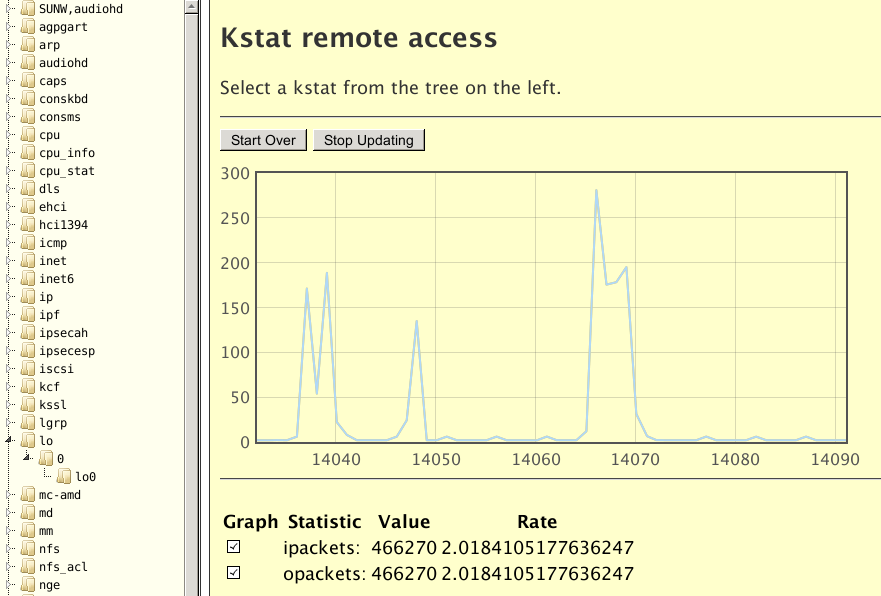
It's just a prototype, really. But it has the basic interface features you would need. On the left the kstats are arranged in a hierarchy, thanks to jsTree. In the main panel is a continuously updating table of the statistics and their values and rates, and above is a graph of the data implemented using Flot.
Sunday, May 27, 2012
Lessons learnt from serving Queen Victoria's Journals
Towards the end of last year I was asked about how easy it would be to launch a very public website. Most of what the company does is relatively highly specialised, low traffic, high value, for a very narrow and targeted audience.
We were essentially unfamiliar with sites that were wide open and potentially interesting to the whole world (or a large fraction thereof). And we knew that there would be widespread media coverage. So there were real concerns that whatever we built would buckle, turning into a PR disaster. (Everyone's heard of the census launch, I expect.)
Almost 6 months later, we launched Queen Victoria's Journals. And yes, it ended up both nationally and locally on the BBC, in the UK newspapers including The Guardian, The Independent and the Daily Mail, and overseas in Canada and India.
After a huge amount of work, the launch went without a hitch. Traffic levels were right where we expected, and the system handled the traffic exactly as predicted. What's also clear is that if we hadn't done all the preparation work, it would most likely have been a disaster.
We're using pretty standard components - Java, Apache, Tomcat, Solr - and as I've explained previously, we maintain our own software stack. This is all hosted on Solaris Zones, built our way - so we can trivially build a bunch more, clone and restore them.
There's no real tuning involved in the standard components. They'll cope just fine, provided you don't do anything spectacularly stupid with the applications or data that you're serving. I built an isolated test setup, cloned regularly from a development build, so that I could run capacity tests without my work being affected by or impacting on regular development.
The site doesn't have that many pages, so I started by simply testing each one - using wget or ab (apache bench). I needed a whole bunch of servers to send the requests from - easy, just build a bunch more zones. And this showed that we could serve hundreds of pages a second from each tomcat, apart from one page which was returning a page every few seconds. The problem page - it's the Illustrations page linked to from the main toolbar - was being created dynamically via multiple queries to the search back-end which were being rendered each time. The content never changes (until we update the product, at any rate) so this is really a static page. Replacing it with something static not only fixed that problem, but dramatically reduced the memory footprint of tomcat, as we were holding search references open in the user session and generating huge numbers of temporary objects each time it was rendered.
The server capacity and performance issues solved, we went back to looking at network utilization. That's harder to solve from an infrastructure point of view - while I can trivially deploy a whole bunch more zones in a minute or so, it takes months to get additional fibre put in the ground. And our initial estimates, which were based on the bandwidth characteristics of some our existing sites, indicated we could well get close to saturating our network.
The truth is, though, that most sites are pretty inefficient, and ours started out as no exception. We got massive wins from compressing html with mod_gzip, we started to minify our javascript, and were able to dramatically decrease the file size of most of the images. (Sane jpeg quality settings are good; not including a 3k colour profile with a 10 byte png icon also helps.) Not only did this decrease our bandwidth requirements by a factor of 5 or more, it also improves responsiveness of the site because users have to download far less.
Most of the testing for bandwidth was really simple - construct a sample test, run it, and count the bytes transferred by looking at the apache logs. Simply replaying the session allows you to see what effect a change has, and you can easily see which requests are most important to address.
We also took the precaution of having some of the site hosted elsewhere, thanks to our good friends at EveryCity. They're using a Solaris derivative so everything's incredibly simple and familiar, making setup a breeze.
We learnt a lot from this exercise, but one of the primary lessons is that building sites that work well isn't hard, it just requires you not to do things that are phenomenally stupid (taking several seconds to dynamically generate a static page) or obviously inefficient (jpeg thumbnails that are hundreds of kilobytes each), that javascript minifies very well, and html (especially the hideously inefficient html I was looking at) compresses down really well.
Test. Identify worst offender. Fix. Repeat. Every time you go round the loop improves your chances of success.
We were essentially unfamiliar with sites that were wide open and potentially interesting to the whole world (or a large fraction thereof). And we knew that there would be widespread media coverage. So there were real concerns that whatever we built would buckle, turning into a PR disaster. (Everyone's heard of the census launch, I expect.)
Almost 6 months later, we launched Queen Victoria's Journals. And yes, it ended up both nationally and locally on the BBC, in the UK newspapers including The Guardian, The Independent and the Daily Mail, and overseas in Canada and India.
After a huge amount of work, the launch went without a hitch. Traffic levels were right where we expected, and the system handled the traffic exactly as predicted. What's also clear is that if we hadn't done all the preparation work, it would most likely have been a disaster.
We're using pretty standard components - Java, Apache, Tomcat, Solr - and as I've explained previously, we maintain our own software stack. This is all hosted on Solaris Zones, built our way - so we can trivially build a bunch more, clone and restore them.
There's no real tuning involved in the standard components. They'll cope just fine, provided you don't do anything spectacularly stupid with the applications or data that you're serving. I built an isolated test setup, cloned regularly from a development build, so that I could run capacity tests without my work being affected by or impacting on regular development.
The site doesn't have that many pages, so I started by simply testing each one - using wget or ab (apache bench). I needed a whole bunch of servers to send the requests from - easy, just build a bunch more zones. And this showed that we could serve hundreds of pages a second from each tomcat, apart from one page which was returning a page every few seconds. The problem page - it's the Illustrations page linked to from the main toolbar - was being created dynamically via multiple queries to the search back-end which were being rendered each time. The content never changes (until we update the product, at any rate) so this is really a static page. Replacing it with something static not only fixed that problem, but dramatically reduced the memory footprint of tomcat, as we were holding search references open in the user session and generating huge numbers of temporary objects each time it was rendered.
The server capacity and performance issues solved, we went back to looking at network utilization. That's harder to solve from an infrastructure point of view - while I can trivially deploy a whole bunch more zones in a minute or so, it takes months to get additional fibre put in the ground. And our initial estimates, which were based on the bandwidth characteristics of some our existing sites, indicated we could well get close to saturating our network.
The truth is, though, that most sites are pretty inefficient, and ours started out as no exception. We got massive wins from compressing html with mod_gzip, we started to minify our javascript, and were able to dramatically decrease the file size of most of the images. (Sane jpeg quality settings are good; not including a 3k colour profile with a 10 byte png icon also helps.) Not only did this decrease our bandwidth requirements by a factor of 5 or more, it also improves responsiveness of the site because users have to download far less.
Most of the testing for bandwidth was really simple - construct a sample test, run it, and count the bytes transferred by looking at the apache logs. Simply replaying the session allows you to see what effect a change has, and you can easily see which requests are most important to address.
We also took the precaution of having some of the site hosted elsewhere, thanks to our good friends at EveryCity. They're using a Solaris derivative so everything's incredibly simple and familiar, making setup a breeze.
We learnt a lot from this exercise, but one of the primary lessons is that building sites that work well isn't hard, it just requires you not to do things that are phenomenally stupid (taking several seconds to dynamically generate a static page) or obviously inefficient (jpeg thumbnails that are hundreds of kilobytes each), that javascript minifies very well, and html (especially the hideously inefficient html I was looking at) compresses down really well.
Test. Identify worst offender. Fix. Repeat. Every time you go round the loop improves your chances of success.
Wednesday, May 23, 2012
Simple Zone Architecture
I use Solaris zones extensively - the assumption is that everything a user or application sees is a zone, everything is run in zones by default.
(System-level infrastructure doesn't, but that's basically NFS and nameservers. Everything else, just build another zone.)
After a lot of experience building and deploying zones, I've settled on what is basically a standard build. For new builds, that is; legacy replacement is a whole different ballgame.
First, start with a sparse-root zone. Apart from being efficient, this makes the OS read-only. Which basically means that there's no mystery meat, the zone is guaranteed to tbe the same as the host, and all zones are identical. Users in the zone can't change the system at all; which means that the OS administrator (me) can reliably assume that the OS is disposable.
Second, define one place for applications to be. It doesn't really matter what that is. Not being likely to conflict with anything else out there is good. Something in /opt is probably a good idea. We used to have this vary, so that different types of application used different names. But now we insist on /opt/company_name and every system looks the same. (That's the theory - some applications get really fussy and insist on being installed in one specific place, but that's actually fairly rare.)
This one location is a separate zfs filesystem loopback mounted from the global zone. Note that it's just mounted, not delegated - all storage management is done in the global zone.
Then, install everything you need in that one place. And we manage our own stack so that we don't have unnecessary dependencies on what comes with the OS, making the OS installation even more disposable.
We actually have a standard layout we use: install the components at the top-level, such as /opt/company_name/apache, which is root-owned and read-only, and then use /opt/company_name/project_name/apache as the server root. Similar trick works for most applications; languages and interpreters go at the top-level and users can't write to them. This is yet another layer of separation, allowing me to upgrade or replace an application or interpreter safely (and roll it back safely as well).
This means that if we want to back up a system, all we need is /opt/company_name and /var/svc/manifest/site to pick up the SMF manifests (and the SSH keys in /etc/ssh if we want to capture the system identity). That's back up. Restore is just unpacking the archive thus created, including the ssh keys; cloning a system you just unpack a backup of the system you want to reproduce. I have a handful of base backups so I can create a server of a given type from a bare zone in a matter of seconds.
(Because the golden location is its own zfs filesystem, you can use zfs send and receive to do the copy. For normal applications it's probably not worth it; for databases it's pretty valuable. A limitation here is that you can't go to an older zfs version.)
It's so simple there's just a couple of scripts - one to build a zone from a template, another to install the application stack (or restore a backup) that you want, with no need for any fancy automation.
(System-level infrastructure doesn't, but that's basically NFS and nameservers. Everything else, just build another zone.)
After a lot of experience building and deploying zones, I've settled on what is basically a standard build. For new builds, that is; legacy replacement is a whole different ballgame.
First, start with a sparse-root zone. Apart from being efficient, this makes the OS read-only. Which basically means that there's no mystery meat, the zone is guaranteed to tbe the same as the host, and all zones are identical. Users in the zone can't change the system at all; which means that the OS administrator (me) can reliably assume that the OS is disposable.
Second, define one place for applications to be. It doesn't really matter what that is. Not being likely to conflict with anything else out there is good. Something in /opt is probably a good idea. We used to have this vary, so that different types of application used different names. But now we insist on /opt/company_name and every system looks the same. (That's the theory - some applications get really fussy and insist on being installed in one specific place, but that's actually fairly rare.)
This one location is a separate zfs filesystem loopback mounted from the global zone. Note that it's just mounted, not delegated - all storage management is done in the global zone.
Then, install everything you need in that one place. And we manage our own stack so that we don't have unnecessary dependencies on what comes with the OS, making the OS installation even more disposable.
We actually have a standard layout we use: install the components at the top-level, such as /opt/company_name/apache, which is root-owned and read-only, and then use /opt/company_name/project_name/apache as the server root. Similar trick works for most applications; languages and interpreters go at the top-level and users can't write to them. This is yet another layer of separation, allowing me to upgrade or replace an application or interpreter safely (and roll it back safely as well).
This means that if we want to back up a system, all we need is /opt/company_name and /var/svc/manifest/site to pick up the SMF manifests (and the SSH keys in /etc/ssh if we want to capture the system identity). That's back up. Restore is just unpacking the archive thus created, including the ssh keys; cloning a system you just unpack a backup of the system you want to reproduce. I have a handful of base backups so I can create a server of a given type from a bare zone in a matter of seconds.
(Because the golden location is its own zfs filesystem, you can use zfs send and receive to do the copy. For normal applications it's probably not worth it; for databases it's pretty valuable. A limitation here is that you can't go to an older zfs version.)
It's so simple there's just a couple of scripts - one to build a zone from a template, another to install the application stack (or restore a backup) that you want, with no need for any fancy automation.
Sunday, May 20, 2012
Vendor Stack vs build your own
Operating System distributions are getting ever more bloated, including more and more packages. While this reduces the need for the end user to build their own software, does it actually eliminate the need for systems administrators to manage the software on their systems?
I would argue that in many cases having software you rely on as part of the operating system is actually a hindrance rather than a help.
For example, much of my work involves building web servers. These include Java, Apache, Tomcat, MySQL and the like. And, when we deploy systems, we explicitly use our own private copies of each component in the stack.
This is a deliberate choice. And there are several reasons behind it.
For one, it ensures that we have exactly the build time options and, (in the case of apache) the modules we need. Often we require slightly different choices than the defaults.
Keeping everything separate insulates us from vendor changes - we're completely unaffected by a vendor applying a harmful patch, or from "upgrading" to a newer version of the components.
A corollary to this is that we can patch and update the OS on our servers with much more freedom, as we don't have to worry about the effect on our application stack at all. It goes the other way - we can update the components in our stack without having to touch the OS.
It also means that we can move applications between systems with different patch levels, able to go to both newer and older systems easily - and indeed, between different operating systems and chip architectures.
As we use Solaris zones extensively, this also allows us to have different zones with the components at different revision levels.
With all this, we simply don't need a vendor to supply the various components of the stack. If the OS needs them for something else then fine, we just don't want to get involved. In some cases (databases are the prime example) we go to some effort to make sure they don't get installed at all, because some poor user using the wrong version is likely to get hurt.
All this makes me wonder why operating system vendors bother with maintaining central copies of software that are no use to us. Indeed, many application stacks on unix systems come with their own private copies of the components they need, for exactly the reasons I outlined above. (I've lost count of the number of times something from Sun installed it's own private copy of Java.)
(While the above considers one particular aspect of servers, it's equally true of desktops. Perhaps even more so, as many operating system releases are primarily defined by how incompatible their user interface is to previous releases.)
I would argue that in many cases having software you rely on as part of the operating system is actually a hindrance rather than a help.
For example, much of my work involves building web servers. These include Java, Apache, Tomcat, MySQL and the like. And, when we deploy systems, we explicitly use our own private copies of each component in the stack.
This is a deliberate choice. And there are several reasons behind it.
For one, it ensures that we have exactly the build time options and, (in the case of apache) the modules we need. Often we require slightly different choices than the defaults.
Keeping everything separate insulates us from vendor changes - we're completely unaffected by a vendor applying a harmful patch, or from "upgrading" to a newer version of the components.
A corollary to this is that we can patch and update the OS on our servers with much more freedom, as we don't have to worry about the effect on our application stack at all. It goes the other way - we can update the components in our stack without having to touch the OS.
It also means that we can move applications between systems with different patch levels, able to go to both newer and older systems easily - and indeed, between different operating systems and chip architectures.
As we use Solaris zones extensively, this also allows us to have different zones with the components at different revision levels.
With all this, we simply don't need a vendor to supply the various components of the stack. If the OS needs them for something else then fine, we just don't want to get involved. In some cases (databases are the prime example) we go to some effort to make sure they don't get installed at all, because some poor user using the wrong version is likely to get hurt.
All this makes me wonder why operating system vendors bother with maintaining central copies of software that are no use to us. Indeed, many application stacks on unix systems come with their own private copies of the components they need, for exactly the reasons I outlined above. (I've lost count of the number of times something from Sun installed it's own private copy of Java.)
(While the above considers one particular aspect of servers, it's equally true of desktops. Perhaps even more so, as many operating system releases are primarily defined by how incompatible their user interface is to previous releases.)
Saturday, March 17, 2012
Does anybody still use Java applets?
It's been an awful long time since I thought about Java applets.
A while ago I updated a Java jigsaw application, Sphaero 2, and it was just a regular desktop application. Recently I got asked if it was possible to use it in a web page - as an applet.
This turned out to be incredibly easy. In parallel with the main application (which is a JFrame), implement the same code as part of a JApplet. Took me a few minutes to do (and a bit longer to clean it up and refactor it), so if you go to the Sphaero 2 page there are now a number of sample images that will launch a Java applet if you've got Java support in your browser.
Encouraged by this, I added applet support to JKstat. The idea is to set up a JKstat server, and if you point a web browser directly at the server then you get a page containing the JKstat applet, which can then connect back to the server it was downloaded from (the applet security model says that you can connect back to where you came from, so that's OK) to gather statistics.
This proved to be a little harder. It looks like this only works (in the case of an unsigned applet) for the REST variant of the client-server protocol. If I try it with XML-RPC then it looks like it wants to get DTDs for validation, and gets security exceptions trying to get them. So the standalone JKstat server doesn't work as is.
But that's not too bad, because I've got several options for serving the data using the REST protocol. From my sample play server, to node-kstat, or I've been testing a RESTful server based on Jersey.
It's been a useful learning exercise, and I actually find the results to be quite useful. Maybe applets will become fashionable again?
A while ago I updated a Java jigsaw application, Sphaero 2, and it was just a regular desktop application. Recently I got asked if it was possible to use it in a web page - as an applet.
This turned out to be incredibly easy. In parallel with the main application (which is a JFrame), implement the same code as part of a JApplet. Took me a few minutes to do (and a bit longer to clean it up and refactor it), so if you go to the Sphaero 2 page there are now a number of sample images that will launch a Java applet if you've got Java support in your browser.
Encouraged by this, I added applet support to JKstat. The idea is to set up a JKstat server, and if you point a web browser directly at the server then you get a page containing the JKstat applet, which can then connect back to the server it was downloaded from (the applet security model says that you can connect back to where you came from, so that's OK) to gather statistics.
This proved to be a little harder. It looks like this only works (in the case of an unsigned applet) for the REST variant of the client-server protocol. If I try it with XML-RPC then it looks like it wants to get DTDs for validation, and gets security exceptions trying to get them. So the standalone JKstat server doesn't work as is.
But that's not too bad, because I've got several options for serving the data using the REST protocol. From my sample play server, to node-kstat, or I've been testing a RESTful server based on Jersey.
It's been a useful learning exercise, and I actually find the results to be quite useful. Maybe applets will become fashionable again?
Monday, December 12, 2011
JKstat at Play!
The Play framework seems to be quite popular around Cambridge.
For those not familiar with it, it's a java application framework built for REST. And, like Ruby on Rails, it emphasizes convention over configuration.
Rather than creating yet another boring blogging example I decided to use JKstat as an example, and see how involved building a RESTful JKstat server was using the Play framework.
Creating a project is easy:
The one thing I'm not keen on is the way it manages dependencies for you to get you jar files. You can either mess about with yaml files, or drop the jar file into the lib directory of the project. Full details of the complex way are in the play directory of the JKstat source.
The next step is to decide how to route requests. The JKstat client only has a few requests, in a fairly fixed form. So I can write the routes file explicitly by hand:
All this means is that if a client requests /jkstat/list, then the list() method in the JKplay class gets called.
Slightly more complex, something of the form /jkstat/get/module/instance/name will invoke a call to get(module, instance, name).
Putting this in a routes file in the application's conf directory is all that's needed to set up the routing. The other thing you need to do is write the JKplay class and put the java source in the application's app/controllers directory. The class just contains public static void methods with the correct signatures. For example:
JKstat knows how to generate JSON output, and the renderJSON()call tells Play that this is JSON data (which just means it won't do anything with it, like format a template, which is the normal mode of operation).
And that's basically it. All I then had to do was run the project (with LD_LIBRARY_PATH set to find my jni library) and it was all set. The JKstat client was able to communicate with it just fine.
For those not familiar with it, it's a java application framework built for REST. And, like Ruby on Rails, it emphasizes convention over configuration.
Rather than creating yet another boring blogging example I decided to use JKstat as an example, and see how involved building a RESTful JKstat server was using the Play framework.
Creating a project is easy:
play new jkstat
The one thing I'm not keen on is the way it manages dependencies for you to get you jar files. You can either mess about with yaml files, or drop the jar file into the lib directory of the project. Full details of the complex way are in the play directory of the JKstat source.
The next step is to decide how to route requests. The JKstat client only has a few requests, in a fairly fixed form. So I can write the routes file explicitly by hand:
# JKstat queries get sent to JKplay
GET /jkstat/getkcid    JKplay.getkcid
GET /jkstat/list    JKplay.list
GET /jkstat/get/{module}/{instance}/{name} JKplay.get
All this means is that if a client requests /jkstat/list, then the list() method in the JKplay class gets called.
Slightly more complex, something of the form /jkstat/get/module/instance/name will invoke a call to get(module, instance, name).
Putting this in a routes file in the application's conf directory is all that's needed to set up the routing. The other thing you need to do is write the JKplay class and put the java source in the application's app/controllers directory. The class just contains public static void methods with the correct signatures. For example:
    public static void list() {
 KstatSet kss = new KstatSet(jkstat);
 renderJSON(kss.toJSON());
    }
JKstat knows how to generate JSON output, and the renderJSON()call tells Play that this is JSON data (which just means it won't do anything with it, like format a template, which is the normal mode of operation).
And that's basically it. All I then had to do was run the project (with LD_LIBRARY_PATH set to find my jni library) and it was all set. The JKstat client was able to communicate with it just fine.
Sunday, December 11, 2011
Editing cells in a JTable
For the recently released update to Jangle I wanted to do a couple of things for the cousin and sibling tabs.
First, I wanted to have the list of OIDs and associated data to be slightly better formatted and to update along with the charts. This wasn't too difficult - the chart knows what the data is, so I got it to extend AbstractTableModel and could then simply use JTable to display it, just calling fireTableDataChanged at the end of the loop that updates the data.
(As an aside, I'm irritated that the API doesn't include fireTableColumnsChanged. You can do the whole table, or a cell, or by row, but not by column.)
 The second thing I wanted to do was to allow the user to select the list of items to be shown in the chart. The picture above shows the table with the data, and how I wanted it to look. (And is exactly how I managed to implement it.)
Now, the table is already showing the list of available data, so I just added a third column to handle whether it's displayed in the chart or not. I simply implemented getColumnClass and returned Boolean.class for the third column, and the JTable automatically shows it as a checkbox. (With the value of the checkbox simply toggled from the underlying model.)
The next step was to be able to edit that field - tick or untick the checkbox - and get it to update the chart. The first step is easy enough - just get isCellEditable to return true for the third column.
I then actually got stuck, because the documentation simply isn't clear as to how to connect that all back up. I was looking for all sorts of listeners or event handlers, and couldn't find anything. Searching found a number of threads where someone else clearly didn't understand this either, with responses that were rude, patronising, or unhelpful - from people who regarded the answer as obvious.
Anyway, the important thing is that it really is easy and obvious once you've worked it out. Making the cell editable automatically creates a cell editor, and all the plumbing is created for you. All you have to do is implement setValueAt which gets called when you do your edit. So my implementation simply adds or removes the relevant field from the chart. (And because that's what's supplying the model, the value displayed in the checkbox automatically tracks it.)
That's the sort of basic thing that ought to be covered in documentation but isn't; this blog entry is there for the next time I forget how to do it.
First, I wanted to have the list of OIDs and associated data to be slightly better formatted and to update along with the charts. This wasn't too difficult - the chart knows what the data is, so I got it to extend AbstractTableModel and could then simply use JTable to display it, just calling fireTableDataChanged at the end of the loop that updates the data.
(As an aside, I'm irritated that the API doesn't include fireTableColumnsChanged. You can do the whole table, or a cell, or by row, but not by column.)
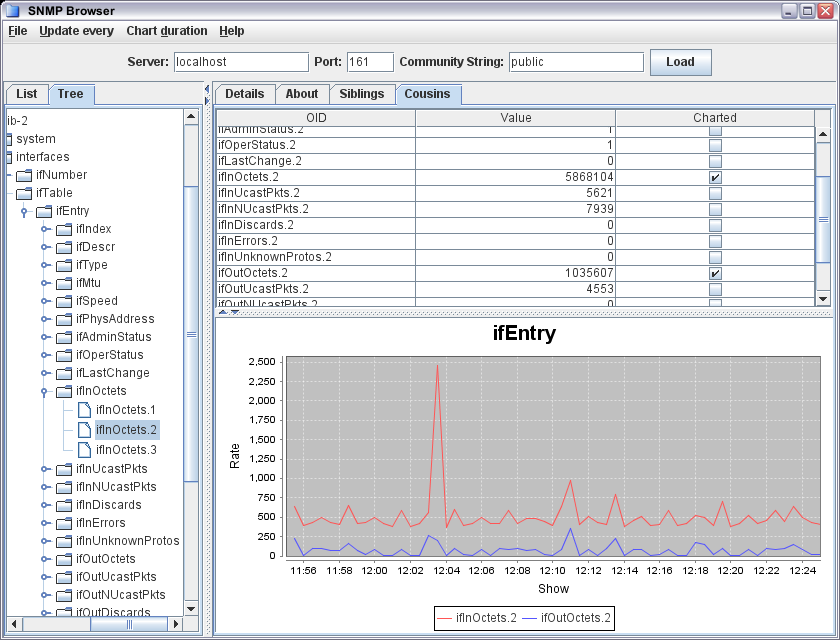
Now, the table is already showing the list of available data, so I just added a third column to handle whether it's displayed in the chart or not. I simply implemented getColumnClass and returned Boolean.class for the third column, and the JTable automatically shows it as a checkbox. (With the value of the checkbox simply toggled from the underlying model.)
The next step was to be able to edit that field - tick or untick the checkbox - and get it to update the chart. The first step is easy enough - just get isCellEditable to return true for the third column.
I then actually got stuck, because the documentation simply isn't clear as to how to connect that all back up. I was looking for all sorts of listeners or event handlers, and couldn't find anything. Searching found a number of threads where someone else clearly didn't understand this either, with responses that were rude, patronising, or unhelpful - from people who regarded the answer as obvious.
Anyway, the important thing is that it really is easy and obvious once you've worked it out. Making the cell editable automatically creates a cell editor, and all the plumbing is created for you. All you have to do is implement setValueAt which gets called when you do your edit. So my implementation simply adds or removes the relevant field from the chart. (And because that's what's supplying the model, the value displayed in the checkbox automatically tracks it.)
That's the sort of basic thing that ought to be covered in documentation but isn't; this blog entry is there for the next time I forget how to do it.
Saturday, December 03, 2011
Building current gcc on Solaris 10
While Solaris 10 comes with gcc, it's quite an old version. For some modern code, you need to use a newer version - this is the case in my Node.js for Solaris builds, for example.
Actually building a current gcc on Solaris 10 turns out to be reasonably straightforward but, as in most things, there's a twist. So the follwoing is the procedure I've used successfully to get 4.6.X built.
You first need to download the release tarball from http://gcc.gnu.org/, and unpack it:
There are 3 prerequisites: gmp (4.3.2), mpfr (2.4.2), and mpc (0.8.1). However, you should use the specific version mentioned, which may not be the current versions. Conveniently, there's a copy of the right versions on ftp://gcc.gnu.org/pub/gcc/infrastructure/. Go into the gcc source, unpack them, and rename them to remove the version numbers.
You have to build from outside the tree. If you followed the above, you'll be in the parent to gcc-4.6.2. Create a build directory and change into it:
mkdir build
cd build
Then you're ready to configure and build:
env PATH=/usr/bin:$PATH gmake install
There are three things to note here.
First is that I'm installing it into a location that is specific to this particular version of gcc. You don't have to, but I maintain large numbers of different versions of all sorts of applications, so they always live in their own space. You can put symlinks into a common location if necessary.
The second is one of the key tricks: I just build c, c++, and fortran. They're the only languages I actually need, and the build dies spectacularly with other languages enabled.
The third is that I force /usr/bin to the front of the PATH. Not ucb, and not xpg4 either.
You'll have to wait a while (and then some), but hopefully when that's all finished you'll have a modern compiler installed that will make building modern software such as Node.js much easier.
Actually building a current gcc on Solaris 10 turns out to be reasonably straightforward but, as in most things, there's a twist. So the follwoing is the procedure I've used successfully to get 4.6.X built.
You first need to download the release tarball from http://gcc.gnu.org/, and unpack it:
bzcat /path/to/gcc-4.6.2.tar.bz2 | gtar xf -
There are 3 prerequisites: gmp (4.3.2), mpfr (2.4.2), and mpc (0.8.1). However, you should use the specific version mentioned, which may not be the current versions. Conveniently, there's a copy of the right versions on ftp://gcc.gnu.org/pub/gcc/infrastructure/. Go into the gcc source, unpack them, and rename them to remove the version numbers.
cd gcc-4.6.2
bzcat /path/to/gmp-4.3.2.tar.bz2 | gtar xf -
mv gmp-4.3.2 gmp
mv gmp-4.3.2 gmp
zcat /path/to/mpfr-2.4.2.tar.bz2 | gtar xf -
mv mpfr-2.4.2 mpfr
gzcat /path/to/mpc-0.8.1.tar.gz | gtar xf -
mv mpc-0.8.1 mpc
mv mpfr-2.4.2 mpfr
gzcat /path/to/mpc-0.8.1.tar.gz | gtar xf -
mv mpc-0.8.1 mpc
cd ..
You have to build from outside the tree. If you followed the above, you'll be in the parent to gcc-4.6.2. Create a build directory and change into it:
cd build
Then you're ready to configure and build:
env PATH=/usr/bin:$PATH ../gcc-4.6.2/configure \
--prefix=/usr/local/versions/gcc-4.6.2 \
--enable-languages=c,c++,fortran
env PATH=/usr/bin:$PATH gmake -j 4env PATH=/usr/bin:$PATH gmake install
There are three things to note here.
First is that I'm installing it into a location that is specific to this particular version of gcc. You don't have to, but I maintain large numbers of different versions of all sorts of applications, so they always live in their own space. You can put symlinks into a common location if necessary.
The second is one of the key tricks: I just build c, c++, and fortran. They're the only languages I actually need, and the build dies spectacularly with other languages enabled.
The third is that I force /usr/bin to the front of the PATH. Not ucb, and not xpg4 either.
You'll have to wait a while (and then some), but hopefully when that's all finished you'll have a modern compiler installed that will make building modern software such as Node.js much easier.
Monday, November 07, 2011
Zooming into images
I spend rather a lot of my time working with images. Scanning and digitizing is one thing we do on a fairly large scale.
To allow customers to see image detail at high resolution, we use Zoomify extensively. We generate the images in advance, using ZoomifyImage. OK, so we end up with huge numbers of files to store, but this is the 21st century and we can cope with it.
There are other options available that do similar things, of course. Just to mention a few: Deep Zoom, OpenZoom, and OpenLayers. One snag with some of these zooming capabilities is that they require browser plugins (Flash or Silverlight). Not only does this hurt users who don't have the plugin installed, but some platforms (OK, let's call out the iPad here) don't have any prospect of Flash or Silverlight.
However, modern systems do have HTML5 capable browsers, and HTML5 is really powerful.
A quick search finds CanvasZoom, which is a pretty good start. Given a set of Deep Zoom tiles it just works. I tried it on an iPad and it sort of works, not really doing touch properly. So I forked it on github (with ImageLoader for compatibility) and played with adding touch support.
It turns out the adding touch handling is pretty trivial. There's just the touchstart, touchend and touchmove events to handle. You want to call event.preventDefault() so as to stop the normal platform handling of moves in particular. The only tricky bit was working out that while you can get the coordinates for touchstart and touchmove from event.targetTouches[0], for touchend you have to look back at event.changedTouches[0]. So, poke the image and it zooms, poke and move and you can pan the image.
One thing I mean to do is to look at whether I can point it at a set of Zoomify tiles. I've already got lots of those, and just having one set of image tiles saves both processing time and storage. If not, I'll have to generate a whole load more images - I'm using deepjzoom which seems to do a pretty good job.
To allow customers to see image detail at high resolution, we use Zoomify extensively. We generate the images in advance, using ZoomifyImage. OK, so we end up with huge numbers of files to store, but this is the 21st century and we can cope with it.
There are other options available that do similar things, of course. Just to mention a few: Deep Zoom, OpenZoom, and OpenLayers. One snag with some of these zooming capabilities is that they require browser plugins (Flash or Silverlight). Not only does this hurt users who don't have the plugin installed, but some platforms (OK, let's call out the iPad here) don't have any prospect of Flash or Silverlight.
However, modern systems do have HTML5 capable browsers, and HTML5 is really powerful.
A quick search finds CanvasZoom, which is a pretty good start. Given a set of Deep Zoom tiles it just works. I tried it on an iPad and it sort of works, not really doing touch properly. So I forked it on github (with ImageLoader for compatibility) and played with adding touch support.
It turns out the adding touch handling is pretty trivial. There's just the touchstart, touchend and touchmove events to handle. You want to call event.preventDefault() so as to stop the normal platform handling of moves in particular. The only tricky bit was working out that while you can get the coordinates for touchstart and touchmove from event.targetTouches[0], for touchend you have to look back at event.changedTouches[0]. So, poke the image and it zooms, poke and move and you can pan the image.
One thing I mean to do is to look at whether I can point it at a set of Zoomify tiles. I've already got lots of those, and just having one set of image tiles saves both processing time and storage. If not, I'll have to generate a whole load more images - I'm using deepjzoom which seems to do a pretty good job.
Friday, October 14, 2011
Optimizing mysql with DTrace
I've got a mysql server that's a bit busy, and I idly wondered why. Now, this is mysql 4, so it's a bit old and doesn't have a lot of built-in diagnostics.
(In case you're wondering, we have an awful lot of legacy client code that issues queries using a join syntax that isn't supported by later versions of mysql, so simply upgrading mysql isn't an option.)
This is running on Solaris, and a quick look with iostat indicates that the server isn't doing any physical I/O. That's good. A quick look with fsstat indicates that we're seeing quite a lot of read activity - all out of memory, as nothing goes to disk. (We're using zfs, which makes it trivially easy to split the storage up to give mysql its own file system, so we can monitor just the mysql traffic using fsstat.)
As an aside, when reading MyISAM tables the server relies on the OS to buffer table data in RAM, so you actually see the reads of tables as reads of the underlying files, which gets caught in fsstat and makes the following trivial.
But, which tables are actually being read? You might guess, by looking at the queries ("show full processlist" is your friend), but that simply tells you which tables are being accessed, not how much data is being read from each one.
Given that we're on Solaris, it's trivial to use DTrace to simply count both the read operations and the bytes read, per file. The following one-liners from the DTrace Book are all we need. First, to count reads per file:
dtrace -n 'syscall::read:entry /execname == "mysqld"/ { @[fds[arg0].fi_pathname] = count(); }'
and bytes per file:
dtrace -n 'fsinfo:::read /execname == "mysqld"/ { @[args[0]->fi_pathname] = sum(arg1); }'
With DTrace, aggregation is built in so there's no need to post-process the data.
The latter is what's interesting here. So running that quickly and looking at the last 3 lines which are the most heavily read files:
/mysql/data/foobar/subscriptions_table.MYD 42585701
/mysql/data/foobar/concurrent_accesses.MYD 83717726
/mysql/data/foobar/databases_table.MYD 177066629
That last table accounts for well over a third of the total bytes read. A quick look indicates that it's a very small table (39kbytes whereas other tables are quite a bit larger).
A quick look in mysql using DESCRIBE TABLE showed that this table had no indexed columns, so the problem is that every query is doing a full table scan. I added a quick index on the most likely looking column and the bytes read drops down to almost nothing, with a little speedup and corresponding reduction of load on the server.
I've used this exact technique quite a few times now - fsstat showing huge reads, a DTrace one-liner to identify the errant table. Many times, users and developers set up a simple mysql instance, and it's reasonably quick to start with so they don't bother with thinking about an index. Later (possibly years later) data and usage grows and performance drops as a result. And often they're just doing a very simple SELECT.
It's not always that simple. The other two most heavily read tables are also interesting. One of them is quite large, gets a lot of accesses, and ends up being quite sparse. Running OPTIMIZE TABLE to compact out the gaps due to deleted rows helped a lot there. The other one is actually the one used by the funky join query that's blocking the mysql version upgrade. No index I create makes any difference, and I suspect that biting the bullet and rewriting the query (or restructuring the tables somewhat more sanely) is what's going to be necessary to make any improvements.
(In case you're wondering, we have an awful lot of legacy client code that issues queries using a join syntax that isn't supported by later versions of mysql, so simply upgrading mysql isn't an option.)
This is running on Solaris, and a quick look with iostat indicates that the server isn't doing any physical I/O. That's good. A quick look with fsstat indicates that we're seeing quite a lot of read activity - all out of memory, as nothing goes to disk. (We're using zfs, which makes it trivially easy to split the storage up to give mysql its own file system, so we can monitor just the mysql traffic using fsstat.)
As an aside, when reading MyISAM tables the server relies on the OS to buffer table data in RAM, so you actually see the reads of tables as reads of the underlying files, which gets caught in fsstat and makes the following trivial.
But, which tables are actually being read? You might guess, by looking at the queries ("show full processlist" is your friend), but that simply tells you which tables are being accessed, not how much data is being read from each one.
Given that we're on Solaris, it's trivial to use DTrace to simply count both the read operations and the bytes read, per file. The following one-liners from the DTrace Book are all we need. First, to count reads per file:
dtrace -n 'syscall::read:entry /execname == "mysqld"/ { @[fds[arg0].fi_pathname] = count(); }'
and bytes per file:
dtrace -n 'fsinfo:::read /execname == "mysqld"/ { @[args[0]->fi_pathname] = sum(arg1); }'
With DTrace, aggregation is built in so there's no need to post-process the data.
The latter is what's interesting here. So running that quickly and looking at the last 3 lines which are the most heavily read files:
/mysql/data/foobar/subscriptions_table.MYD 42585701
/mysql/data/foobar/concurrent_accesses.MYD 83717726
/mysql/data/foobar/databases_table.MYD 177066629
That last table accounts for well over a third of the total bytes read. A quick look indicates that it's a very small table (39kbytes whereas other tables are quite a bit larger).
A quick look in mysql using DESCRIBE TABLE showed that this table had no indexed columns, so the problem is that every query is doing a full table scan. I added a quick index on the most likely looking column and the bytes read drops down to almost nothing, with a little speedup and corresponding reduction of load on the server.
I've used this exact technique quite a few times now - fsstat showing huge reads, a DTrace one-liner to identify the errant table. Many times, users and developers set up a simple mysql instance, and it's reasonably quick to start with so they don't bother with thinking about an index. Later (possibly years later) data and usage grows and performance drops as a result. And often they're just doing a very simple SELECT.
It's not always that simple. The other two most heavily read tables are also interesting. One of them is quite large, gets a lot of accesses, and ends up being quite sparse. Running OPTIMIZE TABLE to compact out the gaps due to deleted rows helped a lot there. The other one is actually the one used by the funky join query that's blocking the mysql version upgrade. No index I create makes any difference, and I suspect that biting the bullet and rewriting the query (or restructuring the tables somewhat more sanely) is what's going to be necessary to make any improvements.
Saturday, October 08, 2011
JKstat 0.60, handling kstat chain updates correctly
I've just updated JKstat, now up to version 0.60.
The key change this time, and the reason for a jump in version number (the previous was 0.53) is that I've changed the way that updates to the kstat chain are handled.
Now, libkstat has a kstat_chain_update() function, which you call to synchronize your idea of what kstats exist with the current view held by the kernel. And you can look at the return value to see if anything has changed.
This only works if you're running in a single thread, of course. If you have multiple threads, then it's possible that only one will detect a change. Even worse if you have a server with multiple clients. So, the only reliable way for any consumer to detect whether the chain has been updated is to retrieve the current kstat chain ID and compare it with the one it holds.
This has largely been hidden because I've usually used the KstatSet class to track updates, and it does the right thing. It checks the kstat ID and doesn't blindly trust the return code from kstat_chain_update(). (And it handles subsets of kstats and will only notify its consumers of any relevant changes.)
So what I've finally done is eliminate the notion of calling kstat_chain_update(), which should have been done long ago. The native code still calls this internally, to make sure it's correctly synchronized with the kernel, but all consumers need to track the kstat chain ID themselves.
This change actually helps client-server operation, as it means we only need one call to see if anything has changed rather than the two that were needed before.
The key change this time, and the reason for a jump in version number (the previous was 0.53) is that I've changed the way that updates to the kstat chain are handled.
Now, libkstat has a kstat_chain_update() function, which you call to synchronize your idea of what kstats exist with the current view held by the kernel. And you can look at the return value to see if anything has changed.
This only works if you're running in a single thread, of course. If you have multiple threads, then it's possible that only one will detect a change. Even worse if you have a server with multiple clients. So, the only reliable way for any consumer to detect whether the chain has been updated is to retrieve the current kstat chain ID and compare it with the one it holds.
This has largely been hidden because I've usually used the KstatSet class to track updates, and it does the right thing. It checks the kstat ID and doesn't blindly trust the return code from kstat_chain_update(). (And it handles subsets of kstats and will only notify its consumers of any relevant changes.)
So what I've finally done is eliminate the notion of calling kstat_chain_update(), which should have been done long ago. The native code still calls this internally, to make sure it's correctly synchronized with the kernel, but all consumers need to track the kstat chain ID themselves.
This change actually helps client-server operation, as it means we only need one call to see if anything has changed rather than the two that were needed before.
Friday, September 30, 2011
Limiting CPU usage in a zone
By default, a Solaris zone has access to all the resources of the host it's running on. Normally, I've found this works fine - most applications I put in zones aren't all that resource hungry.
But if you do want to place some limits on a zone, then the zone configuration offers a couple of options.
First, you can simply allocate some CPUs to the zone:
Or, you can cap the cpu utilization of the zone:
I normally put all the configuration commands for a zone into a file, and use
In terms of stopping a zone monopolizing a machine, the two are fairly similar. Depending on the need, I've used both.
When using dedicated-cpu, it's not just a limit but a guarantee. Those cpus aren't available to other zones. Sometimes that's exactly what you want, but it does mean that those cpus will be idle if the zone they're allocated to doesn't use them.
Also, with dedicated-cpu, the zone thinks it's only got the specified number of cpus (just run psrinfo to see). Sometimes this is necessary for licensing, but there was one case where I needed this for something else: consolidating some really old systems running a version of the old Netscape Enterprise Server, and it would crash at startup. I worked out that this was because it collected performance statistics on all the cpus, and someone had decided that hard coding the array size at 100 (or something) would cover all future possibilities. That was, until I ran it one a T5140 with 128 cpus and it segfaulted. Just giving the zone 4 cpus allowed it to run just fine.
I use capped-cpu when I just want to stop a zone wiping out the machine. For example, I have a machine that runs application servers and a data build process. The data build process runs only rarely, but launches many parallel processes. When it had its own hardware that was fine: the machine would have occasional overload spikes but was otherwise OK. When shared with other workloads, we didn't want to change the process, but have the build zone capped at 30 or 40 cpus (on a 64-way system) so there's plety of cpu left over for other workloads.
One advantage of stopping runaways with capped-cpu is that you can limit each zone to, say, 80% of the system, and you can do that for all zones. It looks like you're overcommitting, but that's not really the case - uncapped is the same as a cap of all the cpus, so you're lower than that. This means that any one zone can't take the system out, but each zone still has most of the machine if it needs it (and the system has the available capacity).
The capability to limit memory also exists. I haven't yet had a case where that's been necessary, so have no practical experience to share.
But if you do want to place some limits on a zone, then the zone configuration offers a couple of options.
First, you can simply allocate some CPUs to the zone:
add dedicated-cpu
set ncpus=4
end
Or, you can cap the cpu utilization of the zone:
add capped-cpu
set ncpus=4
end
I normally put all the configuration commands for a zone into a file, and use
zonecfg -f to build the zone; if modifying a zone then I create a fragment like the above and load that the same way.In terms of stopping a zone monopolizing a machine, the two are fairly similar. Depending on the need, I've used both.
When using dedicated-cpu, it's not just a limit but a guarantee. Those cpus aren't available to other zones. Sometimes that's exactly what you want, but it does mean that those cpus will be idle if the zone they're allocated to doesn't use them.
Also, with dedicated-cpu, the zone thinks it's only got the specified number of cpus (just run psrinfo to see). Sometimes this is necessary for licensing, but there was one case where I needed this for something else: consolidating some really old systems running a version of the old Netscape Enterprise Server, and it would crash at startup. I worked out that this was because it collected performance statistics on all the cpus, and someone had decided that hard coding the array size at 100 (or something) would cover all future possibilities. That was, until I ran it one a T5140 with 128 cpus and it segfaulted. Just giving the zone 4 cpus allowed it to run just fine.
I use capped-cpu when I just want to stop a zone wiping out the machine. For example, I have a machine that runs application servers and a data build process. The data build process runs only rarely, but launches many parallel processes. When it had its own hardware that was fine: the machine would have occasional overload spikes but was otherwise OK. When shared with other workloads, we didn't want to change the process, but have the build zone capped at 30 or 40 cpus (on a 64-way system) so there's plety of cpu left over for other workloads.
One advantage of stopping runaways with capped-cpu is that you can limit each zone to, say, 80% of the system, and you can do that for all zones. It looks like you're overcommitting, but that's not really the case - uncapped is the same as a cap of all the cpus, so you're lower than that. This means that any one zone can't take the system out, but each zone still has most of the machine if it needs it (and the system has the available capacity).
The capability to limit memory also exists. I haven't yet had a case where that's been necessary, so have no practical experience to share.
Monday, August 08, 2011
Thoughts on ZFS dedup
Following on from some thoughts on ZFS compression, and nudged by one of the comments, what about ZFS dedup?
There's also a somewhat less opinionated article that you should definitely read.
So, my summary: unlike compression, dedup should be avoided unless you have a specific niche use.
Even for a modest storage system, say something in the 25TB range, then you should be aiming for half a terabyte of RAM (or L2ARC). Read the article above. And the point isn't just the cost of an SSD or a memory DIMM, it's the cost of a system that can take enough SSD devices or has enough memory capacity. And then think about a decent size storage system that may scale to 10 times that size. Eventually, the time may come, but my point is that while the typical system you might use today already has cpu power going spare to do compression for you, you're looking at serious engineering to get the capability to do dedup.
We can also see when turning on dedup might make sense. A typical (server) system may have 48G of memory so, scaled from the above, something in the range of 2.5TB of unique data might be a reasonable target. Frankly, that's pretty small, and you actually need to get a pretty high dedup ratio to make the savings worthwhile.
I've actually tested dedup on some data where I expected to get a reasonable benefit: backup images. The idea here is that you're saving similar data multiple times (either multiple backups of the same host, or backups of like data from lots of different hosts). I got a disappointing saving - of order 7% or so. Given the amount of memory we would have needed to put into a box to have 100TB of storage, this simply wasn't going to fly. By comparison, I see 25-50% compression on the same data, and you get that essentially for free. And that's part of the argument behind having compression on all the time, and avoiding dedup entirely.
I have another opinion here as well, which is that using dedup to identify identical data after the fact is the wrong place to do it, and indicates a failure in data management. If you know you have duplicate data (and you pretty much have to know you've got duplicate data to make the decision to enable dedup in the first place) then you ought to have management in place to avoid creating multiple copies of it: snapshots, clones, single-instance storage, or the like. Not generating duplicate data in the first place is a lot cheaper than creating all the multiple copies and then deduplicating them afterwards.
Don't get me wrong: deduplication has its place. But it's very much a niche product and certainly not something that you can just enable by default.
There's also a somewhat less opinionated article that you should definitely read.
So, my summary: unlike compression, dedup should be avoided unless you have a specific niche use.
Even for a modest storage system, say something in the 25TB range, then you should be aiming for half a terabyte of RAM (or L2ARC). Read the article above. And the point isn't just the cost of an SSD or a memory DIMM, it's the cost of a system that can take enough SSD devices or has enough memory capacity. And then think about a decent size storage system that may scale to 10 times that size. Eventually, the time may come, but my point is that while the typical system you might use today already has cpu power going spare to do compression for you, you're looking at serious engineering to get the capability to do dedup.
We can also see when turning on dedup might make sense. A typical (server) system may have 48G of memory so, scaled from the above, something in the range of 2.5TB of unique data might be a reasonable target. Frankly, that's pretty small, and you actually need to get a pretty high dedup ratio to make the savings worthwhile.
I've actually tested dedup on some data where I expected to get a reasonable benefit: backup images. The idea here is that you're saving similar data multiple times (either multiple backups of the same host, or backups of like data from lots of different hosts). I got a disappointing saving - of order 7% or so. Given the amount of memory we would have needed to put into a box to have 100TB of storage, this simply wasn't going to fly. By comparison, I see 25-50% compression on the same data, and you get that essentially for free. And that's part of the argument behind having compression on all the time, and avoiding dedup entirely.
I have another opinion here as well, which is that using dedup to identify identical data after the fact is the wrong place to do it, and indicates a failure in data management. If you know you have duplicate data (and you pretty much have to know you've got duplicate data to make the decision to enable dedup in the first place) then you ought to have management in place to avoid creating multiple copies of it: snapshots, clones, single-instance storage, or the like. Not generating duplicate data in the first place is a lot cheaper than creating all the multiple copies and then deduplicating them afterwards.
Don't get me wrong: deduplication has its place. But it's very much a niche product and certainly not something that you can just enable by default.
Sunday, August 07, 2011
Thoughts on ZFS compression
Apart from the sort of features that I now take for granted in a filesystem (data integrity, easy management, extreme scalability, unlimited snapshots), ZFS also has built in compression.
I've already noted how this can be used to compress backup catalogs. One important thing here is that it's completely transparent, which isn't true of any scheme that goes around compressing the files themselves.
Recently, I've (finally) started to enable compression more widely, as a matter of course. Certainly on new systems there's no excuse, at the default level of compression at any rate.
There was a caveat there: at the default compression level. The point here being that the default level of compression can get you decent gains and is essentially free: you gain space and reduce I/O for a negligible CPU cost. The more aggressive compression schemes can compress your data more, but having tried them it's clear that there's a significant performance hit: in some cases when I tried it the machine can freeze completely for a few seconds, which is clearly noticeable to users. Newer more powerful machines shouldn't have that problem, and there have been improvements in Solaris as well that keep the rest of the system more responsive. I still feel, though, that enabling more aggressive compression than the default is something that should only be done selectively when you've actually compared the costs and benefits.
So, I'm enabling compression on every filesystem containing regular data from now on.
The exception, still, is large image filesystems. Images in TIFF and JPEG format are already compressed so the benefit is pretty negligible. And the old thumpers we still use extensively have relatively little CPU power (both compared to more modern systems, and for the amount of data and I/O these systems do). Compression here is enabled more selectively.
Given the continuing growth in cpu power - even our entry-level systems are 24-way now - I'm expecting it won't be long before we get to the point where enabling more aggressive compression all the time is going to be a no-brainer.
I've already noted how this can be used to compress backup catalogs. One important thing here is that it's completely transparent, which isn't true of any scheme that goes around compressing the files themselves.
Recently, I've (finally) started to enable compression more widely, as a matter of course. Certainly on new systems there's no excuse, at the default level of compression at any rate.
There was a caveat there: at the default compression level. The point here being that the default level of compression can get you decent gains and is essentially free: you gain space and reduce I/O for a negligible CPU cost. The more aggressive compression schemes can compress your data more, but having tried them it's clear that there's a significant performance hit: in some cases when I tried it the machine can freeze completely for a few seconds, which is clearly noticeable to users. Newer more powerful machines shouldn't have that problem, and there have been improvements in Solaris as well that keep the rest of the system more responsive. I still feel, though, that enabling more aggressive compression than the default is something that should only be done selectively when you've actually compared the costs and benefits.
So, I'm enabling compression on every filesystem containing regular data from now on.
The exception, still, is large image filesystems. Images in TIFF and JPEG format are already compressed so the benefit is pretty negligible. And the old thumpers we still use extensively have relatively little CPU power (both compared to more modern systems, and for the amount of data and I/O these systems do). Compression here is enabled more selectively.
Given the continuing growth in cpu power - even our entry-level systems are 24-way now - I'm expecting it won't be long before we get to the point where enabling more aggressive compression all the time is going to be a no-brainer.
Thursday, July 28, 2011
A bigger hammer than svcadm
One advantage of the service management facility (SMF) in Solaris is that you can treat services as single units: you can use
Sometimes, though, that's not enough. If your system is under real stress (think swapping itself to death with thousands of rogue processes) then you can find that
So, what to to? It's actually quite easy, once you know what you're looking for.
The first step is to get details of the service using
(Why use -9 rather than a friendlier signal? In this case, it was because I just wanted the processes to die. Asking then nicely involves swapping them back in, which would take forever.)
svcadm to control all the processes associated with a service in one command. This makes dealing with problems a lot easier than trying to grope through ps output trying to kill the right processes.Sometimes, though, that's not enough. If your system is under real stress (think swapping itself to death with thousands of rogue processes) then you can find that
svcadm disable or svcadm restart simply don't take.So, what to to? It's actually quite easy, once you know what you're looking for.
The first step is to get details of the service using
svcs with the -v switch. For example:(you'll notice a presentation bug here). The important thing is the number in the CTID column. This is the contract ID. You can then use
# svcs -v server:rogue
STATE          NSTATE        STIME    CTID   FMRI
online         -             10:06:05 7226124svc:/network/server:rogue
pkill with the -c switch to send a signal to every process in that process contract, which defines the boundaries of the service. So:and they will all go. And then, of course SMF will neatly restart your service automatically for you.
pkill -9 -c 7226124
(Why use -9 rather than a friendlier signal? In this case, it was because I just wanted the processes to die. Asking then nicely involves swapping them back in, which would take forever.)
Tuesday, July 26, 2011
The Oracle Hardware Management Pack
I've recently acquired some new servers - some SPARC T3-1s and some x86 based X4170M2s.
One of the interesting things about these is that the internal drives are multipathed by default - so you get device names like c0t6006016021B02C00F22A3EED6CADE011d0s2 rather than the more traditional c0t0d0s2.
This makes building a jumpstart profile a bit more tedious than normal, because you need to have a separate disk configuration section for every box - because the device names are different on each box.
However, there's another minor problem. How do you easily map from the WWN-based device names to physical positions in the chassis? You really need this so you're sure you're swapping the right drive. And while a SPARC system really doesn't mind which disk it's booting from, for an x86 system it helps if you install the OS on the first disk in the BIOS boot order.
The answer is to install the Oracle Hardware Management Pack. (Why this isn't even on the preinstalled image I can't explain.) This seems to work on most current and recent Sun server models.
Now, actually getting the Hardware Management Pack isn't entirely trivial. So prepare to do battle with the monstrosity called My Oracle Support.
So, you're logged in to My Oracle Support. Click the Patches & Updates tab. In the Patch Search area, click the link marked 'Product or Family (Advanced)'. Then scroll down the dropdown list and select the item that says 'Oracle Hardware Management Pack'. Then choose some of the most recent releases (highest version numbers - note that different hardware platforms match different version numbers of the software) and select your desired platform (essentially, SPARC or X86 or both) from the dropdown to the right of where it says 'Platform is'. Then hit the Search button.
Assuming the flash gizmo hasn't crashed out on you (again) you should get a list of patches. No, I have no idea why they're called patches when they're not. You can then click on the one you want and download it.
What you get is a zip file, so you can unzip that, cd into it and then into the SOFTWARE directory inside it, and then run the install.bin file you find there. (You may have to chmod the install.bin file to make it executable.) I just accept all the defaults and let it get on with it.
On a preinstalled system it may claim it's already installed. It probably isn't - just 'pkgrm ipmitool' first. And if you're using your own jumpstart profile, make sure the SUNWCsma cluster is installed. It may be necessary to wait a while and then 'svcadm restart sma' to get things to take the first time.
So, once it's installed, what can you do?
The first thing is that there's a Storage tab in the ILOM web interface. Go there once you've got the hardware management pack installed and you should be able to see the controllers and disks enumerated.
On the system itself, the
will give a verbose listing of the disks on controller c0. (And. just to remind you, the c0 in c0t6006016021B02C00F22A3EED6CADE011d0s2 doesn't refer to physical controller 0.)
The hardware management pack is really useful - if you're running current generation Sun T-series or X-series hardware, you ought to get it and use it.
One of the interesting things about these is that the internal drives are multipathed by default - so you get device names like c0t6006016021B02C00F22A3EED6CADE011d0s2 rather than the more traditional c0t0d0s2.
This makes building a jumpstart profile a bit more tedious than normal, because you need to have a separate disk configuration section for every box - because the device names are different on each box.
However, there's another minor problem. How do you easily map from the WWN-based device names to physical positions in the chassis? You really need this so you're sure you're swapping the right drive. And while a SPARC system really doesn't mind which disk it's booting from, for an x86 system it helps if you install the OS on the first disk in the BIOS boot order.
The answer is to install the Oracle Hardware Management Pack. (Why this isn't even on the preinstalled image I can't explain.) This seems to work on most current and recent Sun server models.
Now, actually getting the Hardware Management Pack isn't entirely trivial. So prepare to do battle with the monstrosity called My Oracle Support.
So, you're logged in to My Oracle Support. Click the Patches & Updates tab. In the Patch Search area, click the link marked 'Product or Family (Advanced)'. Then scroll down the dropdown list and select the item that says 'Oracle Hardware Management Pack'. Then choose some of the most recent releases (highest version numbers - note that different hardware platforms match different version numbers of the software) and select your desired platform (essentially, SPARC or X86 or both) from the dropdown to the right of where it says 'Platform is'. Then hit the Search button.
Assuming the flash gizmo hasn't crashed out on you (again) you should get a list of patches. No, I have no idea why they're called patches when they're not. You can then click on the one you want and download it.
What you get is a zip file, so you can unzip that, cd into it and then into the SOFTWARE directory inside it, and then run the install.bin file you find there. (You may have to chmod the install.bin file to make it executable.) I just accept all the defaults and let it get on with it.
On a preinstalled system it may claim it's already installed. It probably isn't - just 'pkgrm ipmitool' first. And if you're using your own jumpstart profile, make sure the SUNWCsma cluster is installed. It may be necessary to wait a while and then 'svcadm restart sma' to get things to take the first time.
So, once it's installed, what can you do?
The first thing is that there's a Storage tab in the ILOM web interface. Go there once you've got the hardware management pack installed and you should be able to see the controllers and disks enumerated.
On the system itself, the
raidconfig command is very useful. Something likewill give you a device summary, and
raidconfig list all
raidconfig list disk -c c0 -v
will give a verbose listing of the disks on controller c0. (And. just to remind you, the c0 in c0t6006016021B02C00F22A3EED6CADE011d0s2 doesn't refer to physical controller 0.)
The hardware management pack is really useful - if you're running current generation Sun T-series or X-series hardware, you ought to get it and use it.
Friday, July 08, 2011
CPU visualization
Over the years, simple tools like cpustate have allowed you to get a quick visualization of cpu utilization on Solaris. It's sufficiently simple and useful that emulating it was one of the first demos I put together using JKstat.
Its presentation starts to suffer as core and thread counts continue to rise. So recently I added vertical bars as an option. This allows a more compact representation, and also works better given that most screens are wider that they are tall.
Still, even that doesn't work very well on a 128-way machine. And, by treating all cpus equally, you can't see how the load is distributed in terms of the processor topology.
However, as of the new release of SolView there's now a 'vertical' option for the enhanced cpustate demo included there.

So, what's here? This is a 2-chip system (actually an X4170M2), each chip has 6 cores, each of which has 2 threads. The chips are stacked above each other, and within each chip is a smaller display for each core, and within each core are its threads. All grouped together to show how the threads and cores are related, and each core and chip having an aggregate display.

Above is a T5140 - 2 chips, each with 8 cores each with 8 threads.
I find it interesting to watch these for a while, and you can see how work is scheduled. What you normally see is an even spread across the cores. Normally, if there's an idle core you see a process sent there rather than running on a thread on a busy core and competing for shared resources. (Not always: you can see on the first graph that there's one idle core and another core with both threads busy, which is unusual.) The scheduler is clearly aware of the processor topology and generally distributes the work pretty well to make best use of the available cores.
Its presentation starts to suffer as core and thread counts continue to rise. So recently I added vertical bars as an option. This allows a more compact representation, and also works better given that most screens are wider that they are tall.
Still, even that doesn't work very well on a 128-way machine. And, by treating all cpus equally, you can't see how the load is distributed in terms of the processor topology.
However, as of the new release of SolView there's now a 'vertical' option for the enhanced cpustate demo included there.

So, what's here? This is a 2-chip system (actually an X4170M2), each chip has 6 cores, each of which has 2 threads. The chips are stacked above each other, and within each chip is a smaller display for each core, and within each core are its threads. All grouped together to show how the threads and cores are related, and each core and chip having an aggregate display.

Above is a T5140 - 2 chips, each with 8 cores each with 8 threads.
I find it interesting to watch these for a while, and you can see how work is scheduled. What you normally see is an even spread across the cores. Normally, if there's an idle core you see a process sent there rather than running on a thread on a busy core and competing for shared resources. (Not always: you can see on the first graph that there's one idle core and another core with both threads busy, which is unusual.) The scheduler is clearly aware of the processor topology and generally distributes the work pretty well to make best use of the available cores.
Thursday, June 30, 2011
Updated Node
As a result of a new version of Node being released, I've updated my Solaris 10 (x86) package, available here.
This updates Node to 0.4.9 and the bundled cURL to 7.21.7.
Building this was exactly the same as in my earlier posts. I've updated the patch, although the observant will notice that it's the same patch with the path updated; there's no functional change in the patch.
This updates Node to 0.4.9 and the bundled cURL to 7.21.7.
Building this was exactly the same as in my earlier posts. I've updated the patch, although the observant will notice that it's the same patch with the path updated; there's no functional change in the patch.
Tuesday, June 28, 2011
Node serving zipfiles
One problem I've been looking at recently is how to serve - efficiently - directories containing large numbers of tiny files to http clients. At the moment, we just create the files, put them on a filesystem, and let apache go figure it out.
The data is grouped, though, so that each directory is an easily identifiable and self-contained chunk of data. And, if a client accesses one file, chances are that they're going to access many of the other neighbouring files as well.
We're a tiny tiny fraction of the way into the project, and we're already up to 250 million files. Anyone who's suffered with traditional backup knows that you can't realistically back this data up, and we don't even try.
What I do, though, is generate a zip file of each directory. One file instead of 1000, many orders of magnitude less in your backup catalog (thinking about this sort of data, generating a backup index or catalog can be a killer), and you can stream large files instead of doing random I/O to tiny little files. We save the zip archives, not the original files.
So then, I've been thinking, why not serve content out of the zip files directly? We cut the number of files on the filesystem dramatically, improve performance, and make it much more manageable. And the access pattern is in our favour as well - once a client hits a file, they'll probably access many more files in the same zip archive, so we could prefetch the whole archive for even more efficiency.
A quick search turned up this article. It's not exactly what I wanted to do, but it's pretty close. So I was able to put together a very simple node script using the express framework that serves content out of a zip file.
So, a quick explanation:
See how easy it is to generate something pretty sophisticated using Node? And even I can look at the above and understand what it's doing.
Now, the above isn't terribly complete.
For one thing, I ought to work out the correct content type for each request. This isn't hard but adds quite a lot of lines of code.
The other thing that I want to do is to have the application handle multiple zip files. So you get express to split up the request into a zipfile name and the name of a file within the zip archive. And then keep a cache of recently used zipfiles.
Which leaves a little work for version 2.
The data is grouped, though, so that each directory is an easily identifiable and self-contained chunk of data. And, if a client accesses one file, chances are that they're going to access many of the other neighbouring files as well.
We're a tiny tiny fraction of the way into the project, and we're already up to 250 million files. Anyone who's suffered with traditional backup knows that you can't realistically back this data up, and we don't even try.
What I do, though, is generate a zip file of each directory. One file instead of 1000, many orders of magnitude less in your backup catalog (thinking about this sort of data, generating a backup index or catalog can be a killer), and you can stream large files instead of doing random I/O to tiny little files. We save the zip archives, not the original files.
So then, I've been thinking, why not serve content out of the zip files directly? We cut the number of files on the filesystem dramatically, improve performance, and make it much more manageable. And the access pattern is in our favour as well - once a client hits a file, they'll probably access many more files in the same zip archive, so we could prefetch the whole archive for even more efficiency.
A quick search turned up this article. It's not exactly what I wanted to do, but it's pretty close. So I was able to put together a very simple node script using the express framework that serves content out of a zip file.
// requires express and zipfile
// npm install express
// npm install zipfile
//

function isDir(pathname) {
 if (!pathname) {
  return false;
 } else {
  return pathname.slice(-1) == '/';
 }
}

var zipfile = require('zipfile').ZipFile;
var myzip = new zipfile('/home/peter/test.zip');

// hash of filenames and content
var ziptree = {};
for (var i = 0; i < myzip.names.length ; i++) {
 if (!isDir(myzip.names[i])) {
  ziptree[myzip.names[i]] = myzip.readFileSync(myzip.names[i])
 }
}

var app = require('express').createServer();

app.get('/zip/*', function(req, res){
    if(ziptree[req.params[0]]) {
 res.send(ziptree[req.params[0]], {'Content-Type': 'text/plain'});
    } else {
 res.send(404);
    }
});

app.listen(3000);
console.log("zip server listening on port %d", app.address().port);
So, a quick explanation:
- I open up a zipfile and, for each entry in it that isn't a directory, shove it into a hash with the name as the key and the data as the value.
- I use express to route any request under /zip/, the filename is everything after the /zip/, and I just grab that path from the hash and return the data.
See how easy it is to generate something pretty sophisticated using Node? And even I can look at the above and understand what it's doing.
Now, the above isn't terribly complete.
For one thing, I ought to work out the correct content type for each request. This isn't hard but adds quite a lot of lines of code.
The other thing that I want to do is to have the application handle multiple zip files. So you get express to split up the request into a zipfile name and the name of a file within the zip archive. And then keep a cache of recently used zipfiles.
Which leaves a little work for version 2.
Saturday, June 18, 2011
Node and kstat goodness
Now I've got got node.js built on Solaris (see blog entry 1 and blog entry 2) I've been playing with using it as a server.
So the next thing I did was to augment node-kstat from Bryan Cantrill's original. There's the odd minor fix, I've essentially completed the list of kstats supported (including most of the raw kstats), and added methods that give the support needed by JKstat, and there's an example jkstat.js script that can run as a server under node that the JKstat client can connect to.
A collection of my Node stuff is available here, including a Solaris 10 package for those of you unable to build it yourselves.
Of course, in order to use the node-kstat server I've had to add RESTful http client support to JKstat, which has now been updated with the 0.51 release.
JKstat also loses the JavaFX demos. It doesn't appear to me that JavaFX is going to be terribly interesting for a while. The 2.0 beta isn't available for Solaris at all (1.x wasn't available for SPARC anyway), and appears to be essentially incompatible anyway.
So the next thing I did was to augment node-kstat from Bryan Cantrill's original. There's the odd minor fix, I've essentially completed the list of kstats supported (including most of the raw kstats), and added methods that give the support needed by JKstat, and there's an example jkstat.js script that can run as a server under node that the JKstat client can connect to.
A collection of my Node stuff is available here, including a Solaris 10 package for those of you unable to build it yourselves.
Of course, in order to use the node-kstat server I've had to add RESTful http client support to JKstat, which has now been updated with the 0.51 release.
JKstat also loses the JavaFX demos. It doesn't appear to me that JavaFX is going to be terribly interesting for a while. The 2.0 beta isn't available for Solaris at all (1.x wasn't available for SPARC anyway), and appears to be essentially incompatible anyway.
Friday, June 17, 2011
Cache batteries on Sun 25xx arrays
I have a number of the old Sun 2530 disk arrays, and a batch that we bought 3 years ago have started to come up with the fault LED lit.
These arrays have cache batteries, and the batteries need replacing sometimes to ensure they're operating correctly. Originally, this was a simple 3 year timer. After 3 years, a timer expires and it generates a fault to let you know it's time to put in new batteries.
Current Oracle policy is different: rather than relying on a dumb timer and replacing batteries as a precaution, the systems are actually capable of monitoring the health of the batteries (they have built in SMART technology). As a result, they will only send out new batteries if there's actual evidence of a fault.
This is actually good, as it means we don't have to take unnecessary downtime to replace the batteries. (And it eliminates the risk of the battery replacement procedure accidentally causing more problems.)
Now, the management software version we have (6.xx) doesn't report the SMART status (but will report if a real failure occurs). So you can't see predictive failure, but if CAM just says "near expiration" then it's just the precautionary timer.
So, the solution is to check and reset the timer.
Go to CAM. (The exact location of the relevant menu item may vary depending on which version of CAM you've got, so you may have to go looking.)
Expand the Storage Systems tree
Select the array you want to fix
Click on service advisor
In the new window that pops up, verify that it's actually picked up the correct array. The name should be at the top of the expanded tree in the left-hand panel.
Under Array Troubleshooting and recovery, expand the Resetting the Controller Battery Age item.
Click on each battery in turn and follow the instructions.
This also applies to the 6x80 arrays as well, as I understand it, but I don't have any of those.
If you search for "2500 battery" on My Oracle Support, you'll find all this documented.
These arrays have cache batteries, and the batteries need replacing sometimes to ensure they're operating correctly. Originally, this was a simple 3 year timer. After 3 years, a timer expires and it generates a fault to let you know it's time to put in new batteries.
Current Oracle policy is different: rather than relying on a dumb timer and replacing batteries as a precaution, the systems are actually capable of monitoring the health of the batteries (they have built in SMART technology). As a result, they will only send out new batteries if there's actual evidence of a fault.
This is actually good, as it means we don't have to take unnecessary downtime to replace the batteries. (And it eliminates the risk of the battery replacement procedure accidentally causing more problems.)
Now, the management software version we have (6.xx) doesn't report the SMART status (but will report if a real failure occurs). So you can't see predictive failure, but if CAM just says "near expiration" then it's just the precautionary timer.
So, the solution is to check and reset the timer.
Go to CAM. (The exact location of the relevant menu item may vary depending on which version of CAM you've got, so you may have to go looking.)
Expand the Storage Systems tree
Select the array you want to fix
Click on service advisor
In the new window that pops up, verify that it's actually picked up the correct array. The name should be at the top of the expanded tree in the left-hand panel.
Under Array Troubleshooting and recovery, expand the Resetting the Controller Battery Age item.
Click on each battery in turn and follow the instructions.
This also applies to the 6x80 arrays as well, as I understand it, but I don't have any of those.
If you search for "2500 battery" on My Oracle Support, you'll find all this documented.
Wednesday, June 08, 2011
Node.js on Solaris, part 2
Here's a followup and slight correction to my notes on building node.js on Solaris 10.
If you read carefully, you'll notice that I specified --without-ssl to the configure command. This makes it build, as it looks like there's a dependency on a newer openssl than is shipped with Solaris 10. While this is good enough for some purposes, it turns out the the expresss module wants ssl (it's required, even if you don't use https, although all you have to do is delete the references).
So, a better way is to build a current openssl first and then get node to link against that. So for the openssl build:
Then you can unpack and patch node as before, then configure with
If you read carefully, you'll notice that I specified --without-ssl to the configure command. This makes it build, as it looks like there's a dependency on a newer openssl than is shipped with Solaris 10. While this is good enough for some purposes, it turns out the the expresss module wants ssl (it's required, even if you don't use https, although all you have to do is delete the references).
So, a better way is to build a current openssl first and then get node to link against that. So for the openssl build:
I'm using the Studio compilers here, as I normally do with things like openssl that provide libraries that might be used by other tools, although gcc should work fine. The important parts here are that it matches the architecture of your other components (so 32-bit, ie x86) and you build shared libraries.
gzcat openssl-1.0.0d.tar.gz | gtar xf -
cd openssl-1.0.0d
env CC=cc CXX=CC ./Configure --prefix=/opt/Node solaris-x86-cc shared
gmake -j 8
gmake install
Then you can unpack and patch node as before, then configure with
env LDFLAGS=-R/opt/Node/lib CFLAGS=-std=gnu99 ./configure --prefix=/opt/Node --openssl-includes=/opt/Node/include --openssl-lib=/opt/Node/lib
Sunday, June 05, 2011
Building node.js on Solaris 10
Constantly on the search for new tools and technologies to play with, I wanted to actually try out Node.js on my own machine.
I'm running Solaris 10 (x86), and it didn't quite work out first time. But it was pretty trivial to fix. A couple of tweaks to the configure invocation and a simple patch to make things like
So, to build Node on Solaris 10 x86:
First download node-0.4.8 and my node patch. (Yes, the patch to V8 is ugly, and it's likely to be specific to the V8 version and the Solaris rev and gcc version. And don't expect Node or V8 to work on sparc at all.)
Unpack node and apply the patch:
Then configure and build:
Replacing /opt/Node with wherever you want to install it. (Somewhere you have permission to write to, obviously.)
You then want to install npm. You will need to have curl for this, although I recommend downloading the install.sh and running it by hand, like so:
This way, it uses the correct version of tar and uses a compatible shell. (It actually invokes curl in the script, so you still need curl installed. That's not hard, or you can find one on the Companion CD.)
To actually use npm you need to continue with the tweaks. For example:
I'm running Solaris 10 (x86), and it didn't quite work out first time. But it was pretty trivial to fix. A couple of tweaks to the configure invocation and a simple patch to make things like
isnan and signbit work with a vanilla Solaris 10 install.So, to build Node on Solaris 10 x86:
First download node-0.4.8 and my node patch. (Yes, the patch to V8 is ugly, and it's likely to be specific to the V8 version and the Solaris rev and gcc version. And don't expect Node or V8 to work on sparc at all.)
Unpack node and apply the patch:
gzcat node-v0.4.8.tar.gz | gtar xf -
gpatch -p0 -i node-v0.4.8.soldiff
Then configure and build:
env CFLAGS=-std=gnu99 ./configure --prefix=/opt/Node --without-ssl
gmake -j 8
gmake install
Replacing /opt/Node with wherever you want to install it. (Somewhere you have permission to write to, obviously.)
You then want to install npm. You will need to have curl for this, although I recommend downloading the install.sh and running it by hand, like so:
env PATH=/opt/Node/bin:$PATH TAR=gtar bash install.sh
This way, it uses the correct version of tar and uses a compatible shell. (It actually invokes curl in the script, so you still need curl installed. That's not hard, or you can find one on the Companion CD.)
To actually use npm you need to continue with the tweaks. For example:
or, if you want it to install express into the Node tree rather than "." you'll need something like:
env PATH=/opt/Node/bin:$PATH TAR=gtar npm install express
env PATH=/opt/Node/bin:$PATH TAR=gtar npm install -g express
Tuesday, May 31, 2011
The trouble with tabs (in Firefox 4)
I use my web browser a lot. And I mean, a lot. (It's not that I necessarily want to, but the browser seems to have killed off a lot of proper applications, and the world is a poorer place for that.)
I've actually switched to Firefox 4. (OK, on Solaris you don't actually have all that much choice.) But normally it takes me very much longer to update to a newly released version of Firefox. Why the move this time? Primarily performance - I've found that some sites (and I suspect Twitter here) can make the whole browser feel sluggish. Certainly since I switched to version 4 the annoying lags I used to have are gone.
There are a few changes in Firefox 4 that really can't be described as anything but negative. That's my opinion, of course, but I'm a heavy user and it has really irked me that for the last couple of decades we've matched advances in computing with compensating steps backward.
The first thing that didn't actually bother me initially but soon got spectacularly irritating was the new "Tabs on Top" feature. (Ahem, misfeature.) What this really means is that the tabs for a page are separated from the page they apply to by a couple of tool bars (in my case, the Bookmarks toolbar and the Navigation toolbar). This makes the user suffer thrice: the interface appears to put the toolbars into the tabs, causing confusion; separation on screen causes a mental disconnect between the page and its tab; and you have to move the mouse further to get to the tabs, making them harder to use. Fortunately you can turn this off pretty easily by right-clicking (on the home button for example) and unchecking the option.
Far worse (because it can't just be turned off) is the switch to tab feature. So you want to open a site, you start typing its address and it appears in the dropdown list. Only if you've already got it open, you don't get to open it, you get to switch to tab - so the browser just goes to the already existing tab. Now, listen people: if I wanted to go to the tab I had already had open, guess what? I would have clicked on the tab! The fact that I'm entering it again means that I absolutely want a new copy. This behaviour is especially annoying when the tab is in another window on another virtual desktop, because it then brings that up (moving the Firefox window to a different virtual desktop in the process). Fortunately there's an add-on to disable this particular misfeature.
Browsing in tabs was a spectacularly useful advance, adding extra scalability to the browsing experience. Firefox 4 attempts to make them less usable; fortunately I've been able to sidestep that (for now).
I've actually switched to Firefox 4. (OK, on Solaris you don't actually have all that much choice.) But normally it takes me very much longer to update to a newly released version of Firefox. Why the move this time? Primarily performance - I've found that some sites (and I suspect Twitter here) can make the whole browser feel sluggish. Certainly since I switched to version 4 the annoying lags I used to have are gone.
There are a few changes in Firefox 4 that really can't be described as anything but negative. That's my opinion, of course, but I'm a heavy user and it has really irked me that for the last couple of decades we've matched advances in computing with compensating steps backward.
The first thing that didn't actually bother me initially but soon got spectacularly irritating was the new "Tabs on Top" feature. (Ahem, misfeature.) What this really means is that the tabs for a page are separated from the page they apply to by a couple of tool bars (in my case, the Bookmarks toolbar and the Navigation toolbar). This makes the user suffer thrice: the interface appears to put the toolbars into the tabs, causing confusion; separation on screen causes a mental disconnect between the page and its tab; and you have to move the mouse further to get to the tabs, making them harder to use. Fortunately you can turn this off pretty easily by right-clicking (on the home button for example) and unchecking the option.
Far worse (because it can't just be turned off) is the switch to tab feature. So you want to open a site, you start typing its address and it appears in the dropdown list. Only if you've already got it open, you don't get to open it, you get to switch to tab - so the browser just goes to the already existing tab. Now, listen people: if I wanted to go to the tab I had already had open, guess what? I would have clicked on the tab! The fact that I'm entering it again means that I absolutely want a new copy. This behaviour is especially annoying when the tab is in another window on another virtual desktop, because it then brings that up (moving the Firefox window to a different virtual desktop in the process). Fortunately there's an add-on to disable this particular misfeature.
Browsing in tabs was a spectacularly useful advance, adding extra scalability to the browsing experience. Firefox 4 attempts to make them less usable; fortunately I've been able to sidestep that (for now).
Saturday, May 28, 2011
JKstat and KAR - JSON migration
There are a couple of new updates for JKstat and KAR.
For JKstat, version 0.45 brings in JSON support, and 0.50 solidifies it.
For KAR, version 0.6.5 likewise introduces JSON support, and 0.7 makes JSON the only supported data format, superseding KAR's private data format.
The only point of 0.6.5 is that it can both read and write in both the old KAR format and the new JSON format. So I needed that in order to be able to convert old KAR archives.
I've covered some of the advantages of JSON previously. While those were just early thoughts, subsequent tests confirm the advantages of using JSON for both the client-server communication and the KAR archive format. So these releases represent both a transition and a clean break (which is why there are two new versions of each).
Now I've got JSON format data available, I'm learning javascript so as to write a browser-based client. Stay tuned.
For JKstat, version 0.45 brings in JSON support, and 0.50 solidifies it.
For KAR, version 0.6.5 likewise introduces JSON support, and 0.7 makes JSON the only supported data format, superseding KAR's private data format.
The only point of 0.6.5 is that it can both read and write in both the old KAR format and the new JSON format. So I needed that in order to be able to convert old KAR archives.
I've covered some of the advantages of JSON previously. While those were just early thoughts, subsequent tests confirm the advantages of using JSON for both the client-server communication and the KAR archive format. So these releases represent both a transition and a clean break (which is why there are two new versions of each).
Now I've got JSON format data available, I'm learning javascript so as to write a browser-based client. Stay tuned.
Sunday, May 15, 2011
About time to modernize Java
It's about time to modernize Java.
I'm not talking fancy things like closures or functional programming. I'm talking some of the basic interfaces in commonly used classes.
Exhibit A are the constructors for
Exhibit B are classes that still return
I could go on, but I think you get the point - many of Java's own classes simply haven't been modernized to bring them in line with improvements elsewhere. And I get really irritated having to continue to write crufty old-fashioned code to deal with those deficiencies.
I'm not talking fancy things like closures or functional programming. I'm talking some of the basic interfaces in commonly used classes.
Exhibit A are the constructors for
JTree and JList. These take a Hashtable and a Vector. How long have we had Collections built into Java? So why don't JTree and JList use Map and List?Exhibit B are classes that still return
Enumeration. For example, to get the contents of a ZipFile you get an Enumeration and have to work your way through it by hand. Now Java has the enhanced for-loop, there ought to be methods for returning a Collection directly.I could go on, but I think you get the point - many of Java's own classes simply haven't been modernized to bring them in line with improvements elsewhere. And I get really irritated having to continue to write crufty old-fashioned code to deal with those deficiencies.
Saturday, May 14, 2011
JSON meets JKstat and KAR
I've been looking at JSON for a long time, wondering whether and how to best make use of it. After considerable experimentation, I'm convinced, and it's going to be an integral part of both JKstat and KAR.
So, the first thing I was looking at was the client-server code in JKstat. One of the things that's always irritated me about XML-RPC is it's obvious lack of a long data type. It doesn't seem to be bothered that the world is more than 32-bits. Sure, there are various vendor extensions (and I have to turn them on in the Apache XML-RPC implementation that I use) but the result is something that's horribly non-portable.
The other thing I've been looking at is the archive format used in KAR. I started out with simple
So, enter JSON. It turns out that it makes an excellent serialization format for kstats.
As a result, the next versions of JKstat and KAR will support JSON as their archive and interchange format.
As an aside, this opens the door to wicked cool stuff.
So, the first thing I was looking at was the client-server code in JKstat. One of the things that's always irritated me about XML-RPC is it's obvious lack of a long data type. It doesn't seem to be bothered that the world is more than 32-bits. Sure, there are various vendor extensions (and I have to turn them on in the Apache XML-RPC implementation that I use) but the result is something that's horribly non-portable.
The other thing I've been looking at is the archive format used in KAR. I started out with simple
kstat -p but that proved inadequate in that important data (metadata) was missing, so I developed a private format. This was better, but was a horrid hack.So, enter JSON. It turns out that it makes an excellent serialization format for kstats.
- Reusing a standard means there's less work for me to do.
- I can use the same code for KAR and the JKstat client-server mode.
- There are JSON bindings in almost all languages, so interoperability is easy to achieve.
- The format is a string, so no messing about with extensions to pass longs.
- For KAR, it's almost twice as quick to parse as my own hacked format.
As a result, the next versions of JKstat and KAR will support JSON as their archive and interchange format.
As an aside, this opens the door to wicked cool stuff.
Tuesday, May 03, 2011
SolView 0.56
Hot on the heels of an updated JKstat comes a new release of SolView.
Like with JKstat, there's a lot of tidying up and quite a bit of extra polish. Little things, like changing some of the label text to make it more meaningful, or telling you if a disk or partition is part of a ZFS pool.
There's one fairly visible change, to the start of the explorer view, which now looks very different:

This is getting closer to what I envisioned early on for this view, a much more graphically rich presentation. It's not finished, and what's shown (and how) will certainly change, but it shows the direction I would like to head in.
Like with JKstat, there's a lot of tidying up and quite a bit of extra polish. Little things, like changing some of the label text to make it more meaningful, or telling you if a disk or partition is part of a ZFS pool.
There's one fairly visible change, to the start of the explorer view, which now looks very different:

This is getting closer to what I envisioned early on for this view, a much more graphically rich presentation. It's not finished, and what's shown (and how) will certainly change, but it shows the direction I would like to head in.
Monday, May 02, 2011
JKstat 0.44
It's been one day off work after another here in the UK recently. In between going to a beer festival and Newmarket races, I've found a little time to work on JKstat.
The result is a new version of JKstat available for download.
There's nothing earth shattering here, but a process of steady improvement. I've gone through the demos, removing some of the cruftier ones, enhancing some of the others, and moving some of those from SolView back to JKstat. So, the original iostat demo has gone, leaving just the table-based version; the load subcommand has been replaced by an uptime subcommand. The cpustate demo has been merged with the cpuchart demo, and has also had a vertical mode added.
 OK, so it's not that impressive on my little desktop machine, but it works much better than the old layout as a display arrangement on something like a T5140 that has 128 cpus in it.
There's additional polish elsewhere. Apart from fewer typos, I've filtered out kstats from the chartbuilder that you'll never want to chart, so there are fewer kstats to munge through. The charts work a little better too: they now display the statistics in the requested order, and you can set the colors.
Another thing I've been playing with is an 'interesting' subcommand that tries to identify kstats with interesting behaviour - as in doing something out of the ordinary. This worked out a whole lot worse than I hoped. The problem, of course, is defining what constitutes normal (let alone anomalous) behaviour. The behaviour of any kstat certainly isn't normally distributed, and in fact many are very spiky as a matter of course. I may revisit this with KAR, which has historical data from which I can construct a baseline of the expected range of behaviour.
Something else I've been looking at is sparklines. I added a simple line graph to JStripChart to support this. At the moment they're not really sparklines, just little graphs, but it's a start, and expect to see more of that in SolView.
There's also a stunningly boneheaded bug fixed in KstatFilter. Filtering out things you don't want was matching far too much (it would match any of a module:instance:name specifier rather than the correct behaviour of matching all of them, so unix:0:kstat_types would throw away all unix kstats and all of instance 0, which wasn't what you wanted).
The result is a new version of JKstat available for download.
There's nothing earth shattering here, but a process of steady improvement. I've gone through the demos, removing some of the cruftier ones, enhancing some of the others, and moving some of those from SolView back to JKstat. So, the original iostat demo has gone, leaving just the table-based version; the load subcommand has been replaced by an uptime subcommand. The cpustate demo has been merged with the cpuchart demo, and has also had a vertical mode added.
 OK, so it's not that impressive on my little desktop machine, but it works much better than the old layout as a display arrangement on something like a T5140 that has 128 cpus in it.
There's additional polish elsewhere. Apart from fewer typos, I've filtered out kstats from the chartbuilder that you'll never want to chart, so there are fewer kstats to munge through. The charts work a little better too: they now display the statistics in the requested order, and you can set the colors.
Another thing I've been playing with is an 'interesting' subcommand that tries to identify kstats with interesting behaviour - as in doing something out of the ordinary. This worked out a whole lot worse than I hoped. The problem, of course, is defining what constitutes normal (let alone anomalous) behaviour. The behaviour of any kstat certainly isn't normally distributed, and in fact many are very spiky as a matter of course. I may revisit this with KAR, which has historical data from which I can construct a baseline of the expected range of behaviour.
Something else I've been looking at is sparklines. I added a simple line graph to JStripChart to support this. At the moment they're not really sparklines, just little graphs, but it's a start, and expect to see more of that in SolView.
There's also a stunningly boneheaded bug fixed in KstatFilter. Filtering out things you don't want was matching far too much (it would match any of a module:instance:name specifier rather than the correct behaviour of matching all of them, so unix:0:kstat_types would throw away all unix kstats and all of instance 0, which wasn't what you wanted).
Subscribe to:
Posts (Atom)